


Hướng dẫn nâng cấp cụm đồng hồ kỹ thuật số VW Passat B8
.ikg-passat-b8-en,
.ikg-passat-b8-en *,
.ikg-passat-b8-en *::before,
.ikg-passat-b8-en *::after {
box-sizing: border-box;
}
.ikg-passat-b8-en {
–ikg-text: #111827;
–ikg-muted: #4b5563;
–ikg-soft: #6b7280;
–ikg-dark: #0f172a;
–ikg-line: #e5e7eb;
–ikg-line-strong: #d1d5db;
–ikg-purple: #7c3aed;
–ikg-purple-dark: #4c1d95;
–ikg-purple-soft: #f5f3ff;
–ikg-blue-soft: #eff6ff;
–ikg-green-soft: #ecfdf5;
–ikg-orange-soft: #fff7ed;
–ikg-red-soft: #fef2f2;
–ikg-card: #ffffff;
–ikg-radius-lg: 22px;
–ikg-radius-md: 16px;
–ikg-radius-sm: 12px;
width: 100%;
max-width: 100%;
margin: 0;
padding: 0;
overflow-x: hidden;
color: var(–ikg-text);
background: transparent;
font-family: -apple-system, BlinkMacSystemFont, “Segoe UI”, Roboto, Arial, sans-serif;
font-size: 16px;
line-height: 1.76;
}
.ikg-passat-b8-en a {
color: var(–ikg-purple);
text-decoration: none;
border-bottom: 1px solid rgba(124, 58, 237, .24);
transition: color .2s ease, border-color .2s ease;
}
.ikg-passat-b8-en a:hover {
color: var(–ikg-purple-dark);
border-bottom-color: rgba(76, 29, 149, .55);
}
.ikg-passat-b8-en p {
margin: 0 0 15px;
color: var(–ikg-text);
}
.ikg-passat-b8-en strong {
color: var(–ikg-dark);
font-weight: 620;
}
.ikg-passat-b8-en ul,
.ikg-passat-b8-en ol {
margin: 0 0 18px;
padding-left: px;
}
.ikg-passat-b8-en li {
margin: 0 0 8px;
padding-left: 4px;
}
.ikg-passat-b8-wrap {
width: 100%;
max-width: 100%;
margin: 0;
padding: 0;
background: transparent;
}
.ikg-passat-b8-hero {
width: 100%;
margin: 0 0 26px;
padding: px 28px 30px;
border: 1px solid var(–ikg-line);
border-radius: var(–ikg-radius-lg);
background:
radial-gradient(circle at top right, rgba(124, 58, 237, .10), transparent 34%),
linear-gradient(180deg, #ffffff 0%, #fbfdff 100%);
}
.ikg-passat-b8-eyebrow {
display: inline-flex;
align-items: center;
gap: 8px;
margin: 0 0 14px;
padding: 6px 12px;
border: 1px solid var(–ikg-line);
border-radius: 999px;
background: #ffffff;
color: var(–ikg-soft);
font-size: 12px;
font-weight: 700;
letter-spacing: .08em;
text-transform: uppercase;
}
.ikg-passat-b8-title {
margin: 0 0 12px;
color: var(–ikg-dark);
font-size: 32px;
line-height: 1.24;
letter-spacing: -0.02em;
font-weight: 760;
}
.ikg-passat-b8-lead {
max-width: 940px;
margin: 0;
color: var(–ikg-muted);
font-size: 18px;
line-height: 1.78;
}
.ikg-passat-b8-quick {
margin: 22px 0 0;
padding: 18px 18px 16px;
border: 1px solid rgba(124, 58, 237, .22);
border-radius: var(–ikg-radius-md);
background: linear-gradient(180deg, #ffffff 0%, var(–ikg-purple-soft) 100%);
}
.ikg-passat-b8-quick strong {
display: block;
margin: 0 0 7px;
color: var(–ikg-dark);
font-size: 15px;
}
.ikg-passat-b8-quick p {
margin: 0;
color: var(–ikg-muted);
font-size: 15.5px;
}
.ikg-passat-b8-section {
width: 100%;
margin: 0 0 26px;
padding: 26px 28px;
border: 1px solid var(–ikg-line);
border-radius: var(–ikg-radius-lg);
background: #ffffff;
}
.ikg-passat-b8-section.is-soft {
background: linear-gradient(180deg, #ffffff 0%, #fbfdff 100%);
}
.ikg-passat-b8-en h2 {
margin: 0 0 14px;
color: var(–ikg-dark);
font-size: 26px;
line-height: 1.32;
letter-spacing: -0.02em;
font-weight: 740;
}
.ikg-passat-b8-en h3 {
margin: 24px 0 10px;
color: var(–ikg-dark);
font-size: 18px;
line-height: 1.45;
font-weight: 720;
}
.ikg-passat-b8-en h4 {
margin: 20px 0 8px;
color: var(–ikg-dark);
font-size: 16px;
line-height: 1.45;
font-weight: 720;
}
.ikg-passat-b8-note {
margin: 18px 0;
padding: 15px 16px;
border-left: 4px solid var(–ikg-purple);
border-radius: 0 var(–ikg-radius-sm) var(–ikg-radius-sm) 0;
background: var(–ikg-purple-soft);
}
.ikg-passat-b8-note p {
margin: 0;
color: var(–ikg-muted);
font-size: 15px;
}
.ikg-passat-b8-warning {
margin: 18px 0;
padding: 15px 16px;
border-left: 4px solid #f59e0b;
border-radius: 0 var(–ikg-radius-sm) var(–ikg-radius-sm) 0;
background: var(–ikg-orange-soft);
}
.ikg-passat-b8-warning p {
margin: 0;
color: #78350f;
font-size: 15px;
}
.ikg-passat-b8-alert {
margin: 18px 0;
padding: 15px 16px;
border-left: 4px solid #ef4444;
border-radius: 0 var(–ikg-radius-sm) var(–ikg-radius-sm) 0;
background: var(–ikg-red-soft);
}
.ikg-passat-b8-alert p {
margin: 0;
color: #7f1d1d;
font-size: 15px;
}
.ikg-passat-b8-figure {
width: 100%;
margin: 22px auto 24px;
text-align: center;
}
.ikg-passat-b8-img {
display: block;
width: 100%;
max-width: 460px;
height: auto;
margin: 0 auto;
border-radius: 14px;
box-shadow: 0 10px 24px rgba(15, 23, 42, .12);
}
.ikg-passat-b8-figure figcaption {
margin-top: 10px;
color: var(–ikg-soft);
font-size: 13px;
line-height: 1.5;
}
.ikg-passat-b8-gallery {
display: grid;
grid-template-columns: repeat(2, minmax(0, 1fr));
gap: 16px;
margin: 20px 0 22px;
}
.ikg-passat-b8-table-wrap {
width: 100%;
margin: 22px 0;
overflow-x: auto;
border: 1px solid var(–ikg-line);
border-radius: var(–ikg-radius-md);
background: #ffffff;
}
.ikg-passat-b8-table {
width: 100%;
min-width: 760px;
border-collapse: collapse;
text-align: left;
font-size: 15px;
}
.ikg-passat-b8-table th,
.ikg-passat-b8-table td {
padding: 14px 16px;
border-bottom: 1px solid var(–ikg-line);
vertical-align: top;
}
.ikg-passat-b8-table th {
background: #f8fafc;
color: var(–ikg-dark);
font-weight: 720;
}
.ikg-passat-b8-table tr:last-child td {
border-bottom: none;
}
.ikg-passat-b8-check-grid {
display: grid;
grid-template-columns: repeat(2, minmax(0, 1fr));
gap: 14px;
margin: 18px 0 4px;
}
.ikg-passat-b8-card {
padding: 18px 18px 16px;
border: 1px solid var(–ikg-line);
border-radius: var(–ikg-radius-md);
background: #ffffff;
}
.ikg-passat-b8-card h3 {
margin: 0 0 8px;
font-size: 17px;
}
.ikg-passat-b8-card p {
margin: 0;
color: var(–ikg-muted);
font-size: 15px;
}
.ikg-passat-b8-video {
width: 100%;
margin: 22px 0;
padding: 18px;
border: 1px solid var(–ikg-line);
border-radius: var(–ikg-radius-md);
background: #fbfdff;
}
.ikg-passat-b8-video p {
margin: 0 0 12px;
color: var(–ikg-dark);
font-weight: 720;
}
.ikg-passat-b8-video video {
display: block;
width: 100%;
max-width: 860px;
height: auto;
margin: 0 auto;
border-radius: 14px;
background: #0f172a;
}
.ikg-passat-b8-cta {
margin: 24px 0 0;
padding: 24px;
border: 1px solid rgba(124, 58, 237, .28);
border-radius: var(–ikg-radius-lg);
background:
radial-gradient(circle at top right, rgba(124, 58, 237, .10), transparent 32%),
linear-gradient(180deg, #ffffff 0%, #faf5ff 100%);
text-align: left;
}
.ikg-passat-b8-cta h3 {
margin: 0 0 8px;
font-size: 20px;
}
.ikg-passat-b8-cta p {
margin: 0 0 14px;
color: var(–ikg-muted);
font-size: 15.5px;
}
.ikg-passat-b8-btn-row {
display: flex;
flex-wrap: wrap;
gap: 10px;
margin-top: 14px;
}
.ikg-passat-b8-btn {
display: inline-flex;
align-items: center;
justify-content: center;
min-height: 42px;
padding: 11px 18px;
border-radius: 999px;
background: var(–ikg-purple);
color: #ffffff !important;
font-weight: 700;
font-size: 14.5px;
border-bottom: none !important;
text-decoration: none !important;
}
.ikg-passat-b8-btn:hover {
background: var(–ikg-purple-dark);
color: #ffffff !important;
}
.ikg-passat-b8-btn.secondary {
background: #ffffff;
color: var(–ikg-purple-dark) !important;
border: 1px solid rgba(124, 58, 237, .32);
}
.ikg-passat-b8-btn.secondary:hover {
background: var(–ikg-purple-soft);
color: var(–ikg-purple-dark) !important;
}
.ikg-passat-b8-scoreboard {
margin: 24px 0 0;
padding: 22px;
border: 1px solid rgba(124, 58, 237, .28);
border-radius: var(–ikg-radius-lg);
background:
radial-gradient(circle at top right, rgba(124, 58, 237, .10), transparent 30%),
linear-gradient(180deg, #ffffff 0%, #fbfdff 100%);
}
.ikg-passat-b8-score-head {
display: grid;
grid-template-columns: 1.05fr .95fr;
gap: 18px;
align-items: start;
margin: 0 0 18px;
padding-bottom: 16px;
border-bottom: 1px solid var(–ikg-line);
}
.ikg-passat-b8-score-kicker {
display: inline-flex;
align-items: center;
margin: 0 0 8px;
padding: 5px 10px;
border: 1px solid rgba(124, 58, 237, .22);
border-radius: 999px;
background: var(–ikg-purple-soft);
color: var(–ikg-purple-dark);
font-size: 12px;
font-weight: 800;
letter-spacing: .06em;
text-transform: uppercase;
}
.ikg-passat-b8-score-head h3 {
margin: 0 0 8px;
color: var(–ikg-dark);
font-size: 22px;
line-height: 1.32;
letter-spacing: -0.02em;
font-weight: 760;
}
.ikg-passat-b8-score-head p {
margin: 0;
color: var(–ikg-muted);
font-size: 14.5px;
line-height: 1.65;
}
.ikg-passat-b8-score-summary {
display: grid;
grid-template-columns: repeat(3, minmax(0, 1fr));
gap: 10px;
}
.ikg-passat-b8-score-mini {
padding: 12px;
border: 1px solid var(–ikg-line);
border-radius: var(–ikg-radius-md);
background: #ffffff;
}
.ikg-passat-b8-score-mini span {
display: block;
margin: 0 0 5px;
color: var(–ikg-soft);
font-size: 11px;
font-weight: 800;
letter-spacing: .06em;
text-transform: uppercase;
}
.ikg-passat-b8-score-mini strong {
display: block;
color: var(–ikg-dark);
font-size: 18px;
line-height: 1.15;
font-weight: 800;
}
.ikg-passat-b8-score-mini em {
display: block;
margin-top: 5px;
color: var(–ikg-muted);
font-size: 12px;
line-height: 1.45;
font-style: normal;
}
.ikg-passat-b8-score-grid {
display: grid;
grid-template-columns: repeat(3, minmax(0, 1fr));
gap: 14px;
margin: 0 0 16px;
}
.ikg-passat-b8-score-card {
display: flex;
flex-direction: column;
min-height: 100%;
padding: 17px;
border: 1px solid var(–ikg-line);
border-radius: var(–ikg-radius-md);
background: #ffffff;
}
.ikg-passat-b8-score-title {
display: flex;
align-items: flex-start;
justify-content: space-between;
gap: 10px;
margin: 0 0 10px;
}
.ikg-passat-b8-score-title h4 {
margin: 0;
color: var(–ikg-dark);
font-size: 16px;
line-height: 1.35;
font-weight: 760;
}
.ikg-passat-b8-score-badge {
flex: 0 0 auto;
padding: 5px 8px;
border-radius: 999px;
background: var(–ikg-purple-soft);
color: var(–ikg-purple-dark);
font-size: 12px;
font-weight: 800;
line-height: 1;
white-space: nowrap;
}
.ikg-passat-b8-score-number {
margin: 0 0 8px;
color: var(–ikg-dark);
font-size: 30px;
line-height: 1;
font-weight: 800;
letter-spacing: -0.03em;
}
.ikg-passat-b8-score-level {
margin: 0 0 12px;
color: var(–ikg-muted);
font-size: 14px;
line-height: 1.55;
}
.ikg-passat-b8-score-bar {
width: 100%;
height: 8px;
margin: 0 0 12px;
overflow: hidden;
border-radius: 999px;
background: #eef2ff;
}
.ikg-passat-b8-score-bar span {
display: block;
height: 100%;
border-radius: 999px;
background: linear-gradient(90deg, var(–ikg-purple) 0%, #a855f7 100%);
}
.ikg-passat-b8-score-list {
margin: 0 0 13px !important;
padding-left: 18px !important;
color: var(–ikg-muted);
font-size: 13.5px;
line-height: 1.58;
}
.ikg-passat-b8-score-list li {
margin-bottom: 6px;
}
.ikg-passat-b8-score-box {
margin-top: auto;
padding: 11px;
border: 1px solid var(–ikg-line);
border-radius: var(–ikg-radius-sm);
background: #f8fafc;
}
.ikg-passat-b8-score-box strong {
display: block;
margin: 0 0 5px;
color: var(–ikg-dark);
font-size: 13px;
line-height: 1.35;
}
.ikg-passat-b8-score-box p {
margin: 0;
color: var(–ikg-muted);
font-size: 13px;
line-height: 1.55;
}
.ikg-passat-b8-score-table {
width: 100%;
margin: 0 0 15px;
border: 1px solid var(–ikg-line);
border-radius: var(–ikg-radius-md);
overflow: hidden;
background: #ffffff;
}
.ikg-passat-b8-score-row {
display: grid;
grid-template-columns: 150px 1fr 1fr;
border-bottom: 1px solid var(–ikg-line);
}
.ikg-passat-b8-score-row:last-child {
border-bottom: none;
}
.ikg-passat-b8-score-row div {
padding: 12px 14px;
color: var(–ikg-muted);
font-size: 13.5px;
line-height: 1.55;
border-right: 1px solid var(–ikg-line);
}
.ikg-passat-b8-score-row div:last-child {
border-right: none;
}
.ikg-passat-b8-score-row strong {
color: var(–ikg-dark);
font-size: 13.5px;
}
.ikg-passat-b8-score-row.is-head div {
background: #f8fafc;
color: var(–ikg-dark);
font-weight: 760;
}
.ikg-passat-b8-score-links {
display: flex;
flex-wrap: wrap;
gap: 8px;
margin: 0;
padding-top: 15px;
border-top: 1px solid var(–ikg-line);
}
.ikg-passat-b8-score-links a {
display: inline-flex;
align-items: center;
min-height: 34px;
padding: 7px 11px;
border: 1px solid rgba(124, 58, 237, .22);
border-radius: 999px;
background: var(–ikg-purple-soft);
color: var(–ikg-purple-dark);
font-size: 13px;
font-weight: 720;
line-height: 1.25;
border-bottom: 1px solid rgba(124, 58, 237, .22);
}
.ikg-passat-b8-link-grid {
display: grid;
grid-template-columns: repeat(3, minmax(0, 1fr));
gap: 14px;
margin: 18px 0 0;
}
.ikg-passat-b8-link-card {
display: block;
min-height: 100%;
padding: 16px;
border: 1px solid var(–ikg-line);
border-radius: var(–ikg-radius-md);
background: #ffffff;
color: var(–ikg-text);
text-decoration: none !important;
border-bottom: 1px solid var(–ikg-line) !important;
}
.ikg-passat-b8-link-card strong {
display: block;
margin: 0 0 6px;
color: var(–ikg-dark);
font-size: 15.5px;
line-height: 1.4;
}
.ikg-passat-b8-link-card span {
display: block;
color: var(–ikg-muted);
font-size: 14px;
line-height: 1.55;
}
.ikg-passat-b8-link-card:hover {
border-color: rgba(124, 58, 237, .38) !important;
background: var(–ikg-purple-soft);
}
.ikg-passat-b8-faq {
display: grid;
grid-template-columns: 1fr;
gap: 12px;
margin-top: 14px;
}
.ikg-passat-b8-faq-item {
border: 1px solid var(–ikg-line);
border-radius: var(–ikg-radius-md);
background: #ffffff;
overflow: hidden;
}
.ikg-passat-b8-faq-question {
width: 100%;
display: flex;
align-items: center;
justify-content: space-between;
gap: 14px;
padding: 16px 18px;
border: 0;
background: #ffffff;
color: var(–ikg-dark);
text-align: left;
font: inherit;
font-size: 16px;
font-weight: 720;
cursor: pointer;
}
.ikg-passat-b8-faq-question::after {
content: “+”;
flex: 0 0 auto;
width: 24px;
height: 24px;
border-radius: 999px;
background: var(–ikg-purple-soft);
color: var(–ikg-purple-dark);
display: inline-flex;
align-items: center;
justify-content: center;
font-weight: 800;
line-height: 1;
}
.ikg-passat-b8-faq-item.is-open .ikg-passat-b8-faq-question::after {
content: “–”;
}
.ikg-passat-b8-faq-answer {
display: none;
padding: 0 18px 16px;
color: var(–ikg-muted);
font-size: 15px;
}
.ikg-passat-b8-faq-item.is-open .ikg-passat-b8-faq-answer {
display: block;
}
.ikg-passat-b8-faq-answer p {
margin: 0;
color: var(–ikg-muted);
}
@media (max-width: 767px) {
.ikg-passat-b8-en {
font-size: 15px;
line-height: 1.72;
}
.ikg-passat-b8-hero,
.ikg-passat-b8-section {
padding: 22px 16px;
border-radius: 18px;
}
.ikg-passat-b8-title {
font-size: 25px;
}
.ikg-passat-b8-lead {
font-size: 16px;
}
.ikg-passat-b8-en h2 {
font-size: 22px;
}
.ikg-passat-b8-en h3 {
font-size: 17px;
}
.ikg-passat-b8-score-head,
.ikg-passat-b8-score-grid,
.ikg-passat-b8-score-summary,
.ikg-passat-b8-link-grid {
grid-template-columns: 1fr;
}
.ikg-passat-b8-scoreboard {
padding: 18px 14px;
border-radius: 18px;
}
.ikg-passat-b8-score-head h3 {
font-size: 19px;
}
.ikg-passat-b8-score-number {
font-size: 26px;
}
.ikg-passat-b8-score-row {
grid-template-columns: 1fr;
}
.ikg-passat-b8-score-row div {
border-right: none;
border-bottom: 1px solid var(–ikg-line);
}
.ikg-passat-b8-score-row div:last-child {
border-bottom: none;
}
.ikg-passat-b8-gallery,
.ikg-passat-b8-check-grid {
grid-template-columns: 1fr;
}
.ikg-passat-b8-table {
min-width: 720px;
font-size: 13.5px;
}
.ikg-passat-b8-table th,
.ikg-passat-b8-table td {
padding: 10px 9px;
}
.ikg-passat-b8-btn-row {
flex-direction: column;
}
.ikg-passat-b8-btn {
width: 100%;
}
.ikg-passat-b8-cta {
padding: 20px 16px;
}
}
Hướng dẫn nâng cấp cụm đồng hồ kỹ thuật số cho Volkswagen Passat B8: Tính tương thích, lắp đặt và hướng dẫn lắp ráp
Hướng dẫn này giải thích những điều chủ xe cần kiểm tra trước khi nâng cấp bảng đồng hồ từ loại analog sang loại kỹ thuật số cho các mẫu xe VW Passat B8, Passat Variant, Alltrack, Arteon hoặc một số mẫu xe sử dụng nền tảng MQB. Hướng dẫn bao gồm các nội dung về tính tương thích, giới hạn của hệ thống dây điện cắm và chạy, các bước lắp đặt, các chức năng được hỗ trợ, các yếu tố chi phí và việc kiểm tra sau khi lắp đặt.
Câu trả lời nhanh:
Việc nâng cấp cụm đồng hồ kỹ thuật số cho mẫu xe VW Passat B8 có thể thực hiện được trên nhiều xe ban đầu được trang bị đồng hồ analog. Trước khi mua, quý khách vui lòng xác nhận hình ảnh cụm đồng hồ gốc, năm sản xuất, phiên bản thị trường, hướng vô-lăng (LHD/RHD), hình dáng bảng điều khiển, đường đi của đầu nối và các chức năng cần thiết của xe. "Plug-and-play" có nghĩa là không cần cắt dây đối với các bộ kit được hỗ trợ; điều này không có nghĩa là không cần tháo lắp, không cần cài đặt hoặc phù hợp với mọi loại xe.
Đánh giá iKagoo ba chỉ báo
Trước khi mua: Giá trị nâng cấp, khả năng tương thích và mức độ lắp đặt
Bảng đánh giá này được soạn thảo dành cho những khách hàng đang cân nhắc liệu việc nâng cấp cụm đồng hồ kỹ thuật số cho mẫu xe VW Passat B8 có đáng để đặt hàng hay không. Bảng đánh giá này không thay thế cho việc xác nhận khả năng lắp đặt. Hình ảnh cụm đồng hồ gốc, năm sản xuất, phiên bản thị trường, bố cục tay lái bên trái (LHD) hoặc bên phải (RHD), khung bảng điều khiển và các chức năng nguyên bản cần thiết vẫn là những yếu tố quyết định kết quả cuối cùng.
Sự cần thiết phải nâng cấp
87/100
Đây là lý do thuyết phục để nâng cấp đối với các nhà đầu tư dài hạn.
Mục tiêu tương thích
95%+
Cần có xác nhận bằng hình ảnh trước khi giao hàng.
Mức độ dễ dàng khi lắp đặt
L3
Khuyến nghị dành cho những người có kinh nghiệm tự lắp đặt hoặc thợ lắp đặt chuyên nghiệp.
Sự cần thiết phải nâng cấp
Giá trị cao
87/100
Được khuyến nghị dành cho những người sở hữu lâu dài. Đây là một bản nâng cấp đáng kể cho khoang lái, đặc biệt khi chiếc Passat B8 vẫn còn trong tình trạng kỹ thuật tốt nhưng cụm đồng hồ analog nguyên bản đã trở nên lỗi thời cả về mặt thẩm mỹ lẫn chức năng.
- Trường hợp tốt nhất: Xe có cụm đồng hồ analog, dùng hàng ngày, chủ xe dự định sẽ giữ chiếc xe này trong vài năm.
- Lợi ích dành cho người mua: Màn hình hiển thị thông tin lái xe mới hơn, khoang lái trông gọn gàng hơn, bố cục thông tin hiện đại hơn.
- Không lý tưởng: Chủ xe chỉ muốn sử dụng các bộ phận nguyên bản từ nhà máy, mã hóa OEM theo tiêu chuẩn đại lý, hoặc đảm bảo màn hình VW Active Info Display hoạt động đúng như thiết kế ban đầu của nhà máy.
Ý nghĩa của việc mua hàng
Điều này đáng cân nhắc trong trường hợp chiếc xe chưa được bán trong thời gian gần và người mua mong muốn một sự nâng cấp nội thất rõ rệt thay vì chỉ là những cải tiến nhỏ về phụ kiện.
Khả năng tương thích với xe nguyên bản
Mục tiêu 95%+
Gần như OEM
Yêu cầu kiểm tra độ phù hợp dựa trên hình ảnh. Việc nâng cấp cần ưu tiên giữ lại thông tin cơ bản về trình điều khiển trước tiên. Chỉ tên mẫu xe thôi là chưa đủ, vì các phiên bản như Passat B8, Variant, Alltrack, Arteon và các phiên bản dành cho từng thị trường có thể khác nhau.
- Core phải hoạt động: tốc độ, số vòng quay trên phút (RPM), mức nhiên liệu, các biểu tượng cảnh báo, đèn xi-nhan, đèn pha, thông tin về quãng đường đã đi và màn hình hiển thị khi khởi động.
- Các bước kiểm tra quan trọng: trạng thái cửa, cảnh báo dây an toàn, độ sáng, dữ liệu điều khiển vô lăng, thông tin bảo dưỡng và cách hiển thị lỗi.
- Các tính năng có điều kiện: ACC, TPMS, hệ thống định vị/hiển thị phản chiếu, cách hoạt động của bản đồ Discover Pro và các thông báo dành riêng cho từng thị trường.
Bằng chứng tối thiểu trước khi ra lệnh
Vui lòng gửi ảnh cụm đồng hồ gốc, ảnh bảng điều khiển góc rộng, năm sản xuất, kiểu thân xe, phiên bản theo quốc gia/thị trường, tay lái bên trái (LHD)/bên phải (RHD), cùng danh sách các tính năng nguyên bản mà bạn muốn giữ lại.
Mức độ dễ dàng khi lắp đặt
L3
Tự làm nâng cao
L3: Dành cho người tự lắp đặt có kinh nghiệm / Được khuyến nghị cho thợ lắp đặt chuyên nghiệp. Quy trình được đề xuất giúp tránh phải cắt dây, khoan lỗ và hàn, nhưng công việc này vẫn đòi hỏi phải tháo gỡ các chi tiết thừa một cách cẩn thận, xử lý đầu nối đúng cách và kiểm tra đầy đủ các chức năng.
- Công việc dự kiến: Tháo bộ viền cụm đồng hồ, tháo cụm đồng hồ gốc, lắp đường ống phù hợp, kiểm tra trước khi lắp ráp hoàn chỉnh.
- Dụng cụ chuyên dụng: Thông thường cần có các dụng cụ tháo lắp chi tiết nhựa và dụng cụ Torx; đối với các cấu hình được hỗ trợ, thường không cần sử dụng VCDS/ODIS.
- Điều kiện dừng: khung hình sai, đầu nối lỏng, dữ liệu cảnh báo bất thường, màn hình trống, tỷ lệ hiển thị sai hoặc thiếu thông tin trình điều khiển cốt lõi.
Lời khuyên thiết thực dành cho người cài đặt
Người có kinh nghiệm tự làm là hoàn toàn có thể, nhưng sẽ an toàn hơn nếu nhờ thợ lắp đặt chuyên nghiệp trong trường hợp chủ xe chưa từng tháo cụm đồng hồ hoặc tấm ốp bảng điều khiển của xe VW trước đây.
Chỉ số
Điều kiện vượt qua
Giới hạn rủi ro
Sự cần thiết phải nâng cấp
Bảng đồng hồ analog nguyên bản vẫn hoạt động bình thường, nhưng chủ xe muốn có một màn hình hiện đại và dự định sẽ tiếp tục sử dụng chiếc xe này.
Giá trị thấp nếu chiếc xe sắp được bán, hoặc nếu người mua chỉ chấp nhận các tùy chọn nâng cấp chính hãng (OEM) của VW.
Khả năng tương thích
Ảnh cụm đồng hồ gốc, khung bảng điều khiển, phiên bản thương mại, tay lái bên trái (LHD)/bên phải (RHD) và các chức năng cần thiết đều phù hợp với lộ trình được hỗ trợ.
Không tiếp tục thực hiện nếu xe đã được trang bị bảng điều khiển kỹ thuật số nguyên bản từ nhà máy hoặc không thể xác nhận được vị trí của đầu nối/đường đi của khung.
Cài đặt
Không cần cắt dây, không cần khoan, không cần hàn, lắp đặt cẩn thận và có thể tháo lắp lại được, đồng thời tiến hành kiểm tra toàn bộ chức năng trước khi lắp ráp lại.
Hãy dừng lại nếu người lắp đặt phải ép khung, sửa đổi hệ thống dây điện, bỏ qua các đèn cảnh báo hoặc hoàn tất công việc mà không kiểm tra dữ liệu cốt lõi.
Tiêu chuẩn về mức độ cần thiết của việc nâng cấp
Tiêu chuẩn tương thích với xe nguyên bản
Mức độ khó lắp đặt: Tiêu chuẩn
Sản phẩm cụm đồng hồ kỹ thuật số Passat
Tại sao nên nâng cấp bảng đồng hồ kỹ thuật số cho xe VW Passat B8?
Cái Bảng đồng hồ kỹ thuật số VW Passat B8 Bản nâng cấp này dành cho những chủ xe ưa chuộng độ tin cậy và sự thoải mái của nền tảng Passat B8, nhưng mong muốn có trải nghiệm khoang lái hiện đại hơn so với cụm đồng hồ analog nguyên bản. Cụm đồng hồ kỹ thuật số trên màn hình không chỉ giúp khoang lái trông mới mẻ hơn mà còn hiển thị nhiều thông tin xe hơn với bố cục gọn gàng hơn.
Đây không chỉ là một bản nâng cấp giao diện người dùng đơn thuần. A Bảng đồng hồ kỹ thuật số của Passat B8 phải hiển thị chính xác các thông số về tốc độ, vòng tua máy (RPM), mức nhiên liệu, nhiệt độ, biểu tượng cảnh báo, đèn xi-nhan, trạng thái cửa và các tín hiệu khác của xe được hỗ trợ. Chính vì vậy, việc xác nhận tính tương thích với xe, khả năng tương thích dữ liệu, chất lượng lắp đặt và quá trình kiểm tra sau khi lắp đặt mới là những yếu tố quan trọng hơn so với chỉ riêng giao diện màn hình.
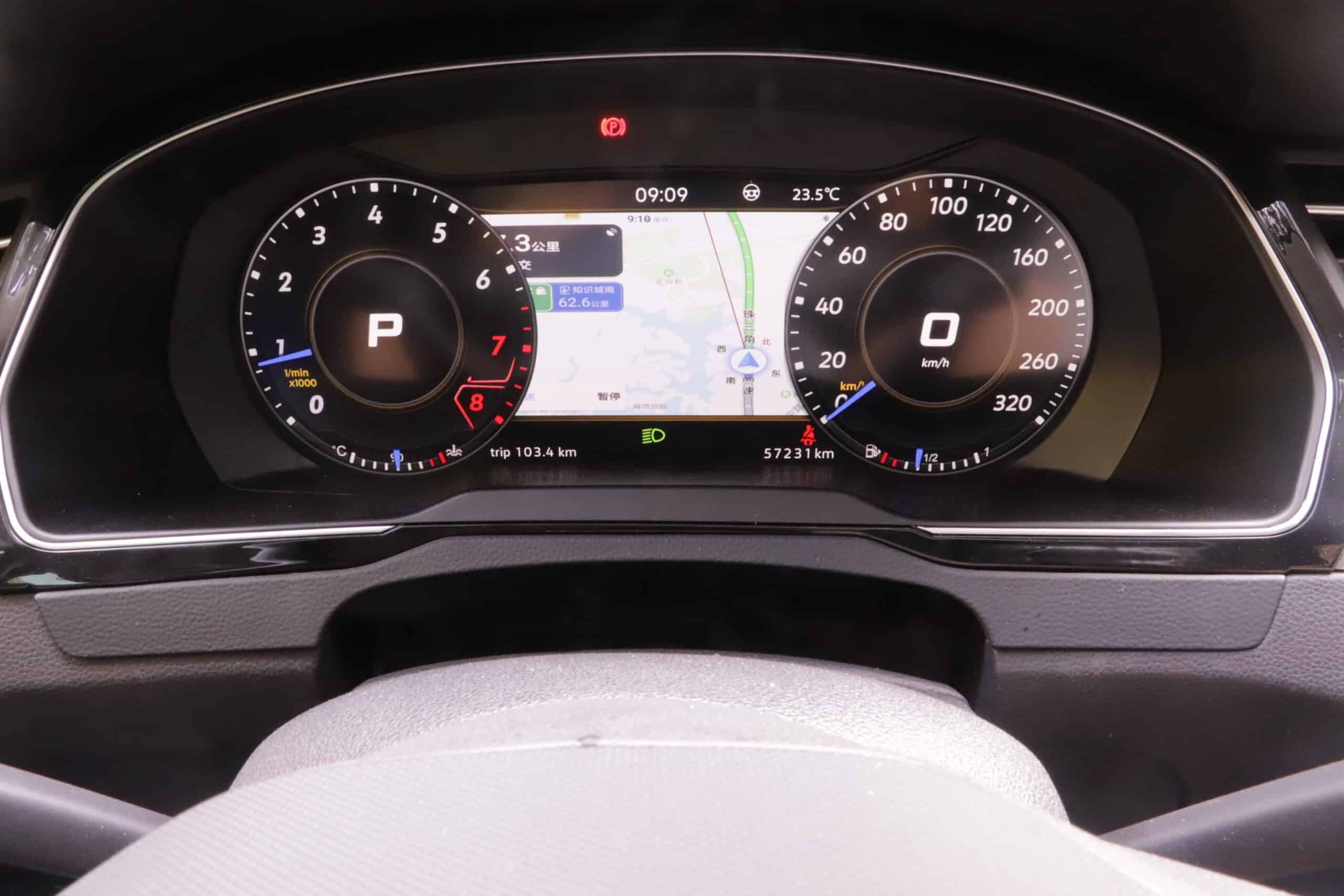
Trang này là hướng dẫn kỹ thuật về việc mua và lắp đặt. Trước khi đặt hàng, quý khách nên xác nhận lại tính tương thích cuối cùng bằng cách cung cấp một bức ảnh rõ nét của cụm đồng hồ nguyên bản và các thông tin cơ bản về xe.
Ý nghĩa của công nghệ "Plug-and-Play" đối với cụm đồng hồ kỹ thuật số của Volkswagen Passat B8
Nhiều người mua đang tìm kiếm một Bảng điều khiển "cắm là chạy" cho Volkswagen Passat B8, nhưng cụm từ này có thể bị hiểu nhầm. Trong bối cảnh nâng cấp có trách nhiệm, “plug-and-play” có nghĩa là bộ phụ kiện được hỗ trợ sử dụng đường dây điện tương thích và không yêu cầu cắt, nối hoặc thay đổi vĩnh viễn hệ thống dây điện gốc của xe.
Các tính năng thường có trong Plug-and-Play
- Lộ trình đi dây phù hợp cho các cấu hình Passat B8 / MQB được hỗ trợ.
- Không được cắt, hàn hoặc thực hiện bất kỳ thay đổi vĩnh viễn nào đối với bộ dây điện gốc.
- Kết nối qua đường dây cáp cụm ban đầu nếu được hỗ trợ.
- Quy trình lắp đặt dành riêng cho từng loại xe thay vì sử dụng màn hình bảng điều khiển chung.
- Có thể khôi phục lại trạng thái ban đầu nếu các bộ phận và hệ thống dây điện gốc vẫn được giữ nguyên.
"Plug-and-Play" không có nghĩa là gì
- Điều đó không có nghĩa là không cần tháo lớp ốp bảng điều khiển.
- Điều đó không có nghĩa là cụm đồng hồ nguyên bản không cần phải tháo ra.
- Điều đó không có nghĩa là mọi mẫu xe Passat B8, Arteon hay các mẫu xe sử dụng nền tảng MQB khác đều tự động tương thích.
- Điều này không có nghĩa là bạn không cần kiểm tra tốc độ, số vòng quay động cơ (RPM), mức nhiên liệu, đèn cảnh báo, đèn xi-nhan, độ sáng và tình trạng xe sau khi lắp đặt.
- Điều này không đảm bảo rằng mọi chức năng của nhà máy đều được hỗ trợ nếu không kiểm tra cấu hình xe trước.
Lưu ý quan trọng: Nếu xe của bạn đã được trang bị bảng điều khiển kỹ thuật số nguyên bản hoặc Active Info Display, xin đừng cho rằng bộ phụ kiện nâng cấp này phù hợp. Các xe có bảng điều khiển kỹ thuật số nguyên bản có thể sử dụng cấu trúc bảng điều khiển, đường dẫn kết nối hoặc logic hệ thống khác biệt.
Danh sách kiểm tra tính tương thích trước khi mua
A Nâng cấp hệ thống Virtual Cockpit cho Volkswagen Passat B8 hoặc không nên mua bộ đồng hồ kỹ thuật số nâng cấp sau khi xuất xưởng chỉ dựa trên tên mẫu xe. Các mẫu xe sử dụng nền tảng MQB có thể khác nhau tùy theo năm sản xuất, khu vực, phiên bản trang trí bảng điều khiển, loại đồng hồ nguyên bản và hướng tay lái.
| Hạng mục kiểm tra | Tại sao quan trọng | Những thông tin cần cung cấp trước khi đặt hàng |
|---|---|---|
| Loại cụm ban đầu | Hướng dẫn nâng cấp này chủ yếu dành cho các phương tiện ban đầu được trang bị đồng hồ đo analog. | Một bức ảnh chụp mặt trước rõ nét của cụm đồng hồ nguyên bản đầy đủ cùng khung bao quanh. |
| Năm sản xuất và kiểu dáng thân xe | Các mẫu xe Passat B8 sedan, Variant, Alltrack, Arteon và các mẫu xe sử dụng nền tảng MQB có thể có sự khác biệt tùy theo năm sản xuất và thị trường. | Mẫu xe, năm sản xuất, kiểu dáng thân xe và phiên bản trang bị (nếu có). |
| LHD hoặc RHD | Các bộ phận trên bảng điều khiển, góc nhìn và cách bố trí các chi tiết trang trí có thể khác nhau giữa các xe lái bên trái và xe lái bên phải. | Vui lòng xác nhận bên lái trước khi đặt hàng. |
| Phiên bản thị trường | Các mẫu xe dành cho thị trường EU, Anh, Úc, Trung Đông và châu Á có thể có các tính năng hoặc chi tiết bảng điều khiển khác nhau. | Quốc gia hoặc thị trường nơi chiếc xe được bán lần đầu tiên. |
| Buồng lái kỹ thuật số tại nhà máy | Các phương tiện đã được trang bị màn hình kỹ thuật số nguyên bản có thể không phù hợp với phương án nâng cấp từ analog sang kỹ thuật số. | Hình ảnh cụm hiện tại và xác nhận loại cụm nhà máy. |
| Các hàm cụm hiện có | Phải kiểm tra hệ thống ACC, TPMS, trạng thái cửa, cảnh báo dây an toàn, dữ liệu bảo dưỡng và các biểu tượng cảnh báo sau khi lắp đặt. | Hình ảnh hoặc ghi chú mô tả các chức năng hiện tại của cụm máy chủ mà phải tiếp tục được duy trì. |
Hướng di chuyển của phương tiện được hỗ trợ
- VW Passat B8 / Passat Variant: phù hợp với nhiều loại xe có đồng hồ đo analog nguyên bản, sau khi xác nhận thông qua hình ảnh và năm sản xuất.
- VW Passat Alltrack: điều này chỉ khả thi khi hình dạng bảng điều khiển và đường dẫn kết nối phù hợp với cấu hình được hỗ trợ.
- VW Arteon: phù hợp với một số mẫu xe được trang bị sẵn cụm đồng hồ analog, tùy thuộc vào việc xác nhận tính tương thích.
- Một số mẫu xe sử dụng nền tảng MQB: chỉ sau khi kiểm tra hình dáng bảng điều khiển, cụm đồng hồ nguyên bản, năm sản xuất và phiên bản thị trường.
Đừng chỉ đặt hàng dựa trên tên mẫu xe. Hai chiếc xe có tên tương tự nhau có thể có khung cụm đồng hồ, đầu nối hoặc các chức năng tiêu chuẩn khác nhau.
Kiểm tra kích thước trước khi mua
Vui lòng gửi ảnh cụm đồng hồ nguyên bản của xe, năm sản xuất, phiên bản thị trường và hướng tay lái (LHD/RHD). Điều này giúp giảm thiểu rủi ro đặt mua cụm đồng hồ không phù hợp với xe của bạn.
Xem thông tin sản phẩm Bảng điều khiển kỹ thuật số Passat
Đọc Hướng dẫn cài đặt
Bảng điều khiển kỹ thuật số dựa trên Linux: Tại sao thiết kế hệ thống lại quan trọng
Bảng đồng hồ kỹ thuật số là màn hình hiển thị trên xe hướng về phía người lái. Màn hình này cần khởi động nhanh, luôn đảm bảo độ rõ nét và hiển thị các dữ liệu hỗ trợ của xe một cách ổn định. Đối với loại màn hình bảng điều khiển này, một hệ thống chuyên dụng dựa trên Linux có thể phù hợp hơn so với một nền tảng Android chung chung với nhiều ứng dụng.
Tại sao Android không phải lúc nào cũng là lựa chọn lý tưởng cho khu vực cụm đồng hồ
Hệ điều hành Android có thể rất hữu ích cho các ứng dụng giải trí và thông tin vì các ứng dụng, dịch vụ phát trực tuyến, định vị và các tính năng phần mềm mở đóng vai trò quan trọng trên nền tảng này. Trong khi đó, cụm đồng hồ điều khiển của người lái lại đặt ra những ưu tiên khác: khởi động nhanh, giảm thiểu sự phân tâm, logic hiển thị rõ ràng, hành vi hoạt động dễ dự đoán và hạn chế tối đa các phần mềm chạy ngầm không cần thiết.
Những lợi ích thiết thực của hệ thống cụm máy tính chuyên dụng
Một chuyên dụng Khoang lái kỹ thuật số của Passat B8 Màn hình nên tập trung vào việc hiển thị dữ liệu xe thay vì các nội dung giải trí chung. Mức độ ổn định thực tế vẫn phụ thuộc vào khả năng tương thích của xe, chất lượng nguồn điện, kết nối dây điện, công tác lắp đặt và cấu hình phần mềm.
| Lĩnh vực kỹ thuật | Hướng phát triển cụm công nghiệp số | Tại sao quan trọng |
|---|---|---|
| Hành vi của các công ty khởi nghiệp | Được thiết kế để truy cập nhanh vào thông tin người lái, tùy thuộc vào cấu hình. | Người lái xe cần biết thông tin về tốc độ, vòng tua máy và các cảnh báo ngay sau khi khởi động. |
| Tác vụ hệ thống | Tập trung vào giao diện bảng điều khiển thay vì việc sử dụng ứng dụng nói chung. | Giúp giảm thiểu các chi tiết thừa gây rối mắt trong khu vực cụm đồng hồ. |
| Bố cục hiển thị | Giao diện kỹ thuật số hiện đại với các chủ đề và trang dữ liệu xe được hỗ trợ. | Giúp cải thiện diện mạo buồng lái và cách bố trí thông tin. |
| Đường đi của dây | Chế độ cắm và chạy được tối ưu hóa trên các dòng xe được hỗ trợ. | Không cần cắt đứt cụm dây điện gốc nếu cấu hình xe phù hợp. |
| Kiểm tra sau khi cài đặt | Cần kiểm tra tốc độ, vòng quay động cơ (RPM), mức nhiên liệu, các biểu tượng cảnh báo, đèn báo và chức năng điều chỉnh độ sáng. | Chỉ việc bật nguồn thôi chưa đủ để chứng minh xe hoàn toàn tương thích. |
Trước khi mua, quý khách nên kiểm tra kích thước màn hình, độ phân giải, các chủ đề có sẵn và các tính năng được hỗ trợ trên trang sản phẩm cụ thể. Đừng cho rằng mọi sản phẩm cụm đồng hồ kỹ thuật số MQB đều sử dụng cùng một kích thước màn hình hoặc bộ tính năng.
Màn hình thông tin hoạt động OEM so với cụm đồng hồ kỹ thuật số Passat B8 sau khi lắp đặt
Một số chủ xe so sánh phụ tùng thay thế Bảng điều khiển kỹ thuật số của Volkswagen Passat B8 với bộ nâng cấp màn hình Active Info Display nguyên bản của VW. Cả hai phương án đều có thể hợp lý, nhưng chúng không thuộc cùng một loại nâng cấp.
| Tiêu chí so sánh | Màn hình thông tin chủ động OEM của Volkswagen | Nâng cấp cụm đồng hồ kỹ thuật số iKagoo |
|---|---|---|
| Mức độ phức tạp khi cài đặt | Có thể cần phải thực hiện các thao tác bảo vệ linh kiện, đánh dấu, ghép nối các bộ phận và sử dụng các dụng cụ chuyên dụng. | Được thiết kế như một giải pháp nâng cấp dành riêng cho các dòng xe được hỗ trợ có bảng đồng hồ analog. |
| Lập trình | Thường yêu cầu phần mềm VCDS, ODIS, quyền truy cập cấp đại lý hoặc dịch vụ lập trình chuyên nghiệp. | Thông thường không cần phải lập trình qua VCDS hoặc ODIS nếu cấu hình xe được hỗ trợ. |
| Các yếu tố chi phí | Phụ tùng OEM đã qua sử dụng, chi tiết ốp, mã hóa và công lao động có thể làm tăng tổng chi phí. | Chi phí phụ thuộc vào phiên bản sản phẩm, quốc gia giao hàng, nhu cầu hỗ trợ và phương thức lắp đặt. |
| Xử lý số km đã đi | Cụm đồng hồ OEM đã qua sử dụng có thể tạo ra sự phức tạp về mặt kỹ thuật và pháp lý. | Xử lý số km phụ thuộc vào tuyến dữ liệu xe được hỗ trợ và cấu hình. |
| Phù hợp nhất | Phù hợp nhất cho những chủ xe muốn phương án gần với cấu hình gốc nhất và có thể tiếp cận hỗ trợ mã hóa phù hợp. | Phù hợp nhất cho những chủ xe muốn có màn hình kỹ thuật số hiện đại với logic lắp đặt aftermarket dành riêng cho từng mẫu xe. |
Giải pháp iKagoo này không phải là nâng cấp trang bị nguyên bản từ nhà máy Volkswagen chính thức. Đây là tùy chọn cụm đồng hồ kỹ thuật số aftermarket dành cho những chủ xe muốn có màn hình hiện đại nhưng vẫn giữ cách lắp đặt riêng theo từng dòng xe.
Nội dung gói và chuẩn bị sản phẩm
Nội dung gói hàng chính xác có thể thay đổi tùy theo phiên bản sản phẩm và cấu hình xe. Một bộ điển hình Passat B8 cụm đồng hồ LCD bộ kit có thể bao gồm cụm đồng hồ kỹ thuật số chính, khung hoặc chi tiết viền tương ứng, đường đi dây, và cáp USB để hỗ trợ các chức năng hoặc sử dụng cho việc cập nhật phần mềm.
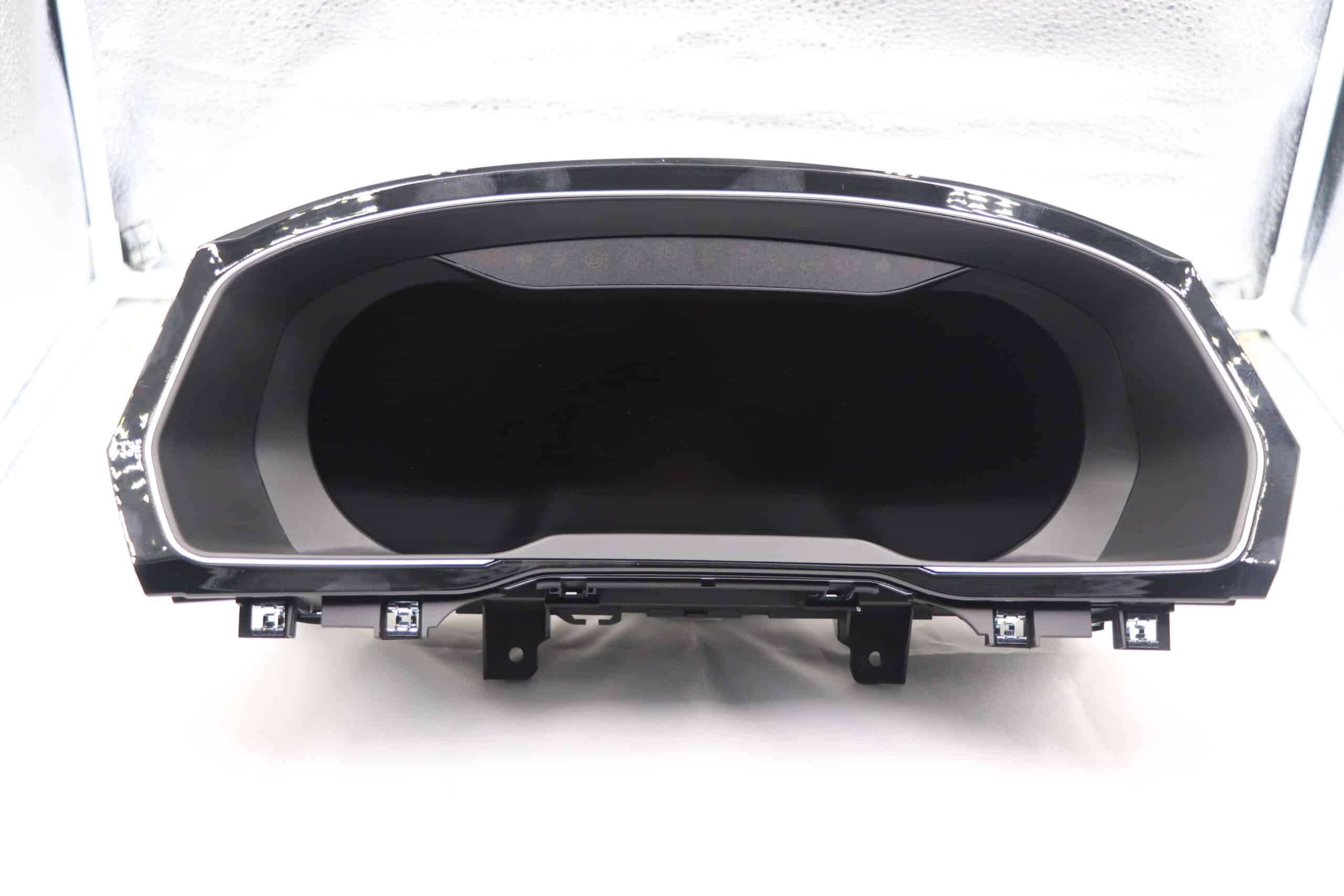
- Cụm đồng hồ kỹ thuật số, bộ chính.
- Khung hoặc phần viền tương ứng, tùy theo phiên bản sản phẩm.
- Cáp kết nối chính cho cấu hình xe được hỗ trợ.
- Cáp USB để cập nhật hoặc các chức năng bổ sung được hỗ trợ.
- Ghi chú lắp đặt hoặc hướng dẫn hỗ trợ.
Tổng quan lắp đặt: Nâng cấp cụm đồng hồ kỹ thuật số VW Passat B8
Việc lắp đặt được thiết kế theo hướng Plug-and-Play cho các xe tương thích, nhưng đây vẫn là một công việc kỹ thuật. Hãy làm cẩn thận, sử dụng dụng cụ tháo lắp nội thất phù hợp, bảo vệ bảng táp-lô và kiểm tra hệ thống trước khi lắp ráp lại hoàn toàn xe.
Các công cụ thường cần thiết
- Dụng cụ tháo ốp nhựa để tránh làm trầy xước bảng điều khiển.
- Torx T20 tuốc nơ vít hoặc dụng cụ cần thiết cho xe của bạn.
- Khăn mềm để đặt cụm đồng hồ nguyên bản an toàn trong quá trình tháo lắp.
- Tùy chọn móc tháo lỗ thông gió tùy thuộc vào phiên bản bảng điều khiển.
- Ánh sáng tốt và đủ thời gian để tháo dỡ cẩn thận và kiểm tra.
Trước khi lắp đặt
Kiểm tra các lỗi hiện có
Ghi chú bất kỳ đèn cảnh báo, vấn đề pin hoặc lỗi điện tử nào trước khi nâng cấp. Các sự cố sẵn có của xe không nên bị nhầm lẫn với các vấn đề phát sinh do lắp đặt mới.
Giữ nguyên các phần gốc
Giữ nguyên tình trạng của cụm, ốc vít, viền và kết nối đã được ghi lại. Điều này giúp khắc phục sự cố và có thể khôi phục lại nếu cần.
Logic cài đặt từng bước
Bước 1: Chuẩn bị xe
Hạ vô lăng xuống và kéo về phía người lái để tạo thêm không gian làm việc. Tắt khóa điện. Không nên làm quá vội vì các ngàm táp-lô cũ có thể bị gãy nếu dùng lực.
Bước 2: Tháo viền cụm đồng hồ
Viền xung quanh cụm đồng hồ thường được gắn bằng ngàm. Hãy dùng dụng cụ nạy ốp bằng nhựa và thao tác từ từ từ một mép dễ tiếp cận. Trên một số bảng táp-lô Passat B8, các cửa gió hoặc phần ốp lân cận có thể được liên kết với nhau.
Bước 3: Tháo cụm đồng hồ nguyên bản
Sau khi tháo viền, nới lỏng các ốc vít nhìn thấy được và cẩn thận kéo cụm đồng hồ nguyên bản ra phía trước. Không kéo hoặc xoắn bó dây điện.
Bước 4: Nhả đầu nối chính
Mở đầu nối chính một cách chậm rãi. Nếu có thêm cáp, tab khóa hoặc đường quang, hãy ghi lại vị trí ban đầu trước khi ngắt kết nối bất cứ thứ gì.
Bước 5: Kết nối cụm đồng hồ kỹ thuật số iKagoo
Kết nối đầu cắm gốc với bộ chuyển đổi tương ứng hoặc đường đi dây dự kiến. Đầu nối phải được khóa chắc chắn. Dây cáp không được bị kẹp, kéo căng hoặc đi qua các cạnh sắc của bảng điều khiển.
Bước 6: Kiểm tra trước khi lắp ráp cuối cùng
Bật khóa điện và kiểm tra màn hình trước khi lắp lại ốp trang trí. Kiểm tra tốc độ, RPM, mức nhiên liệu, đèn xi-nhan, đèn pha, trạng thái cửa, cảnh báo dây an toàn, độ sáng và bất kỳ thông báo lỗi nào hiển thị.
Video: Tài liệu tham khảo lắp đặt cụm đồng hồ kỹ thuật số VW Passat B8 / Magotan
Trình duyệt của bạn không hỗ trợ định dạng video này.
Danh sách kiểm tra sau lắp đặt
| Mục kiểm tra | Tại sao quan trọng |
|---|---|
| Tốc độ và RPM | Tỷ lệ hiển thị hoặc độ trễ sai có thể cho thấy các vấn đề về cấu hình hoặc đường dẫn dữ liệu. |
| Hiển thị nhiên liệu | Chỉ số nhiên liệu nên được kiểm tra sớm trước khi lái xe hằng ngày bình thường. |
| Đèn xi-nhan và đèn pha | Các chỉ báo cơ bản của người lái phải rõ ràng và dễ nhìn. |
| Đèn cảnh báo | ABS, túi khí, động cơ, dây an toàn và các cảnh báo bắt buộc khác không được bỏ qua. |
| Cảnh báo trạng thái cửa và dây an toàn | Các chức năng này thường xác nhận giao tiếp dữ liệu xe chính xác. |
| Độ sáng ngày/đêm | Khả năng đọc nên được kiểm tra trong điều kiện ánh sáng ban ngày và ánh sáng yếu. |
Không tháo rời loa gốc, còi báo, bo mạch nhỏ hoặc các bộ phận bên trong trừ khi bạn hiểu rõ chức năng của chúng trong cụm đồng hồ. Việc thiếu các bộ phận gốc có thể gây ra thông báo lỗi hoặc sự cố hiển thị.
Chức năng và trải nghiệm hiển thị sau khi nâng cấp
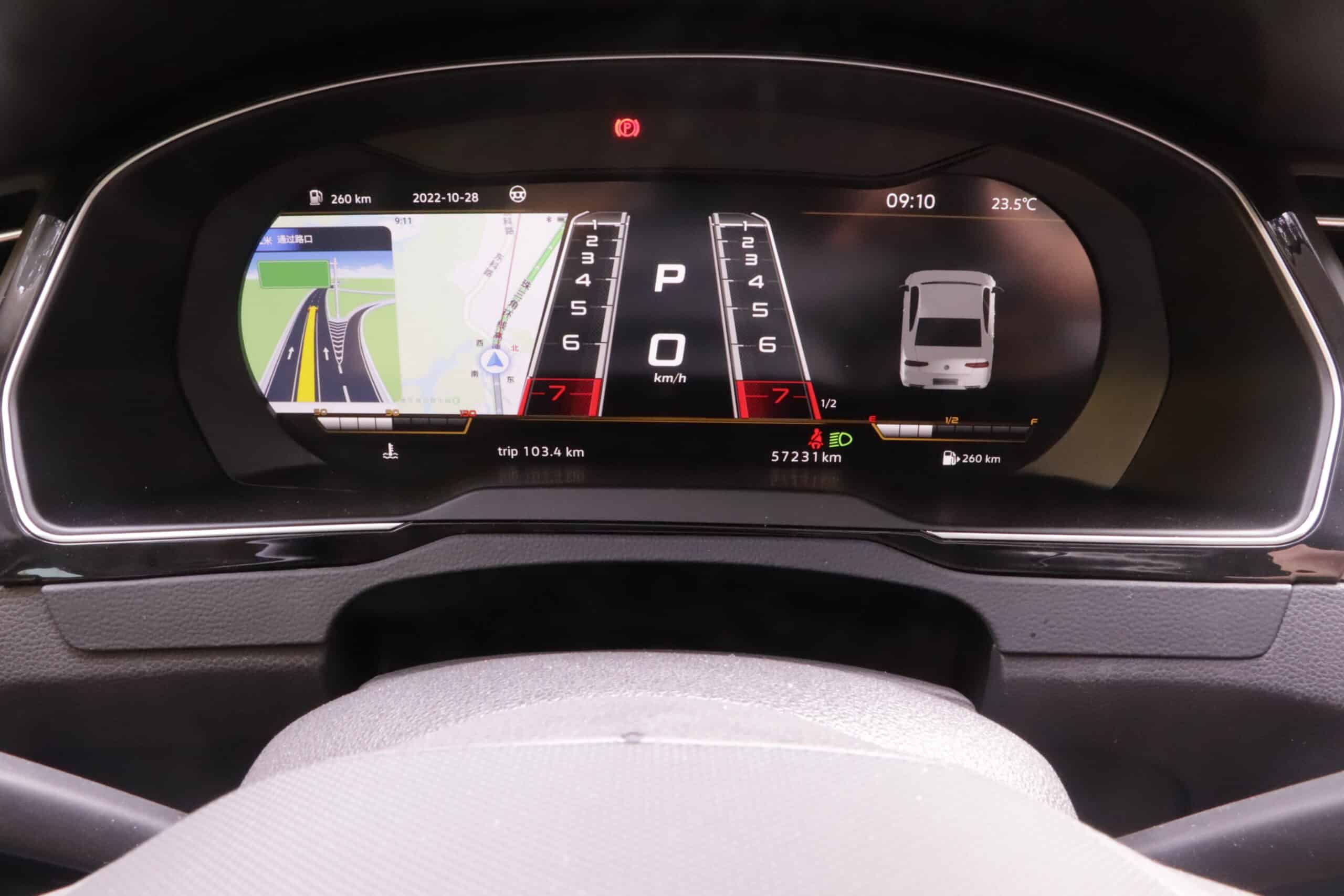
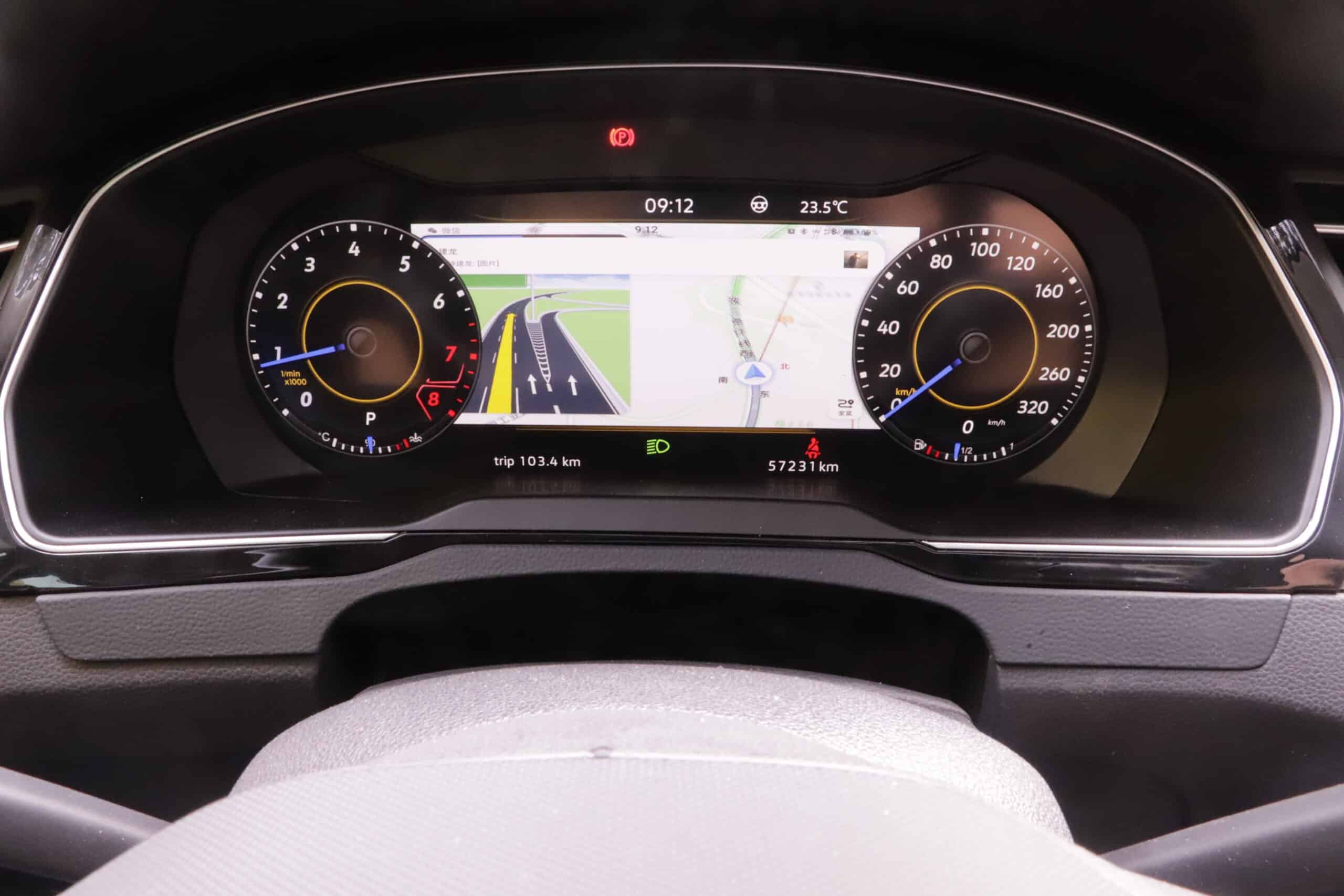
Sau khi Nâng cấp cụm đồng hồ Passat B8, khu vực lái trông hiện đại và mang tính kỹ thuật hơn. Lợi ích chính không chỉ là màn hình kỹ thuật số lớn hơn mà còn là cấu trúc rõ ràng hơn cho thông tin xe được hỗ trợ.
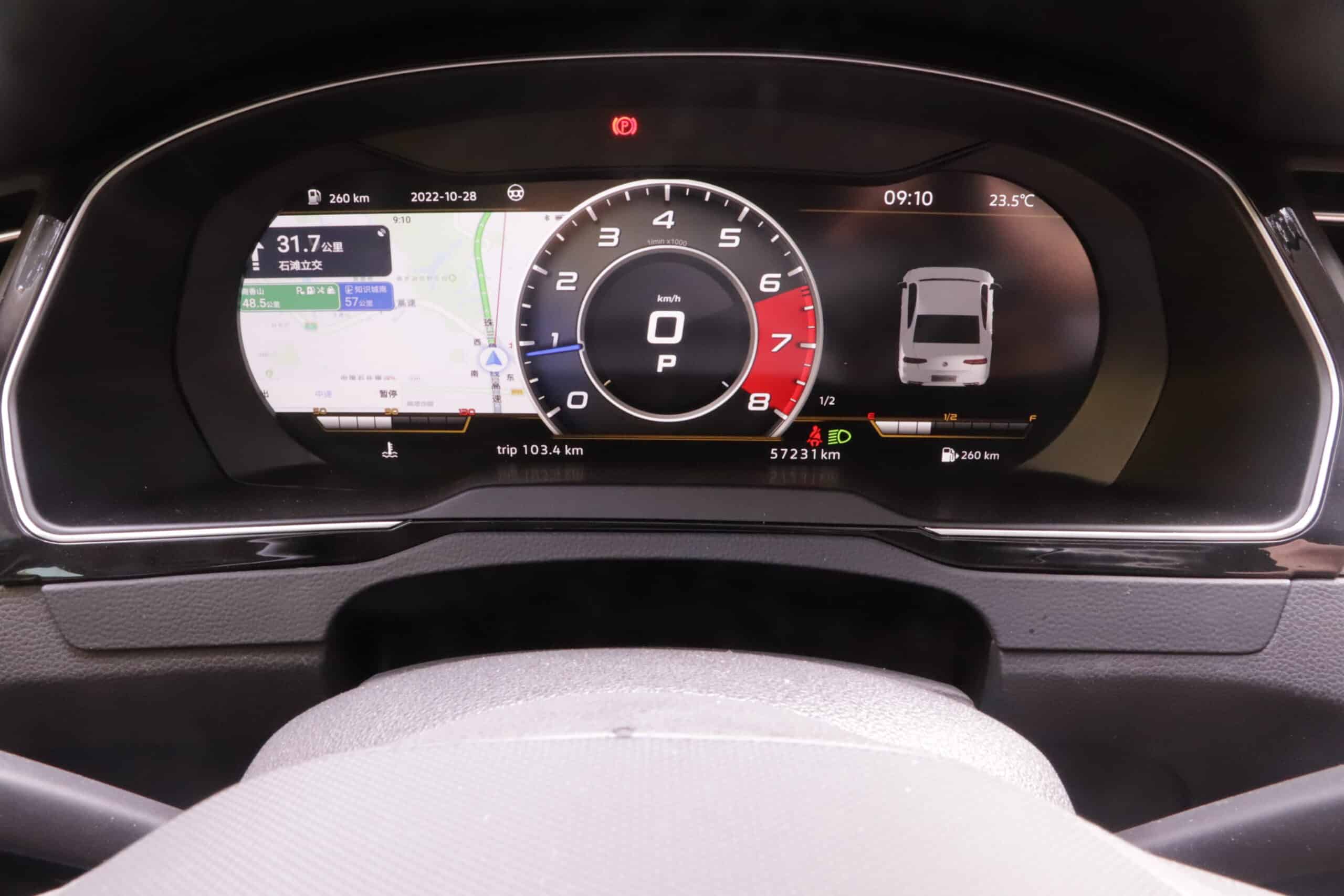
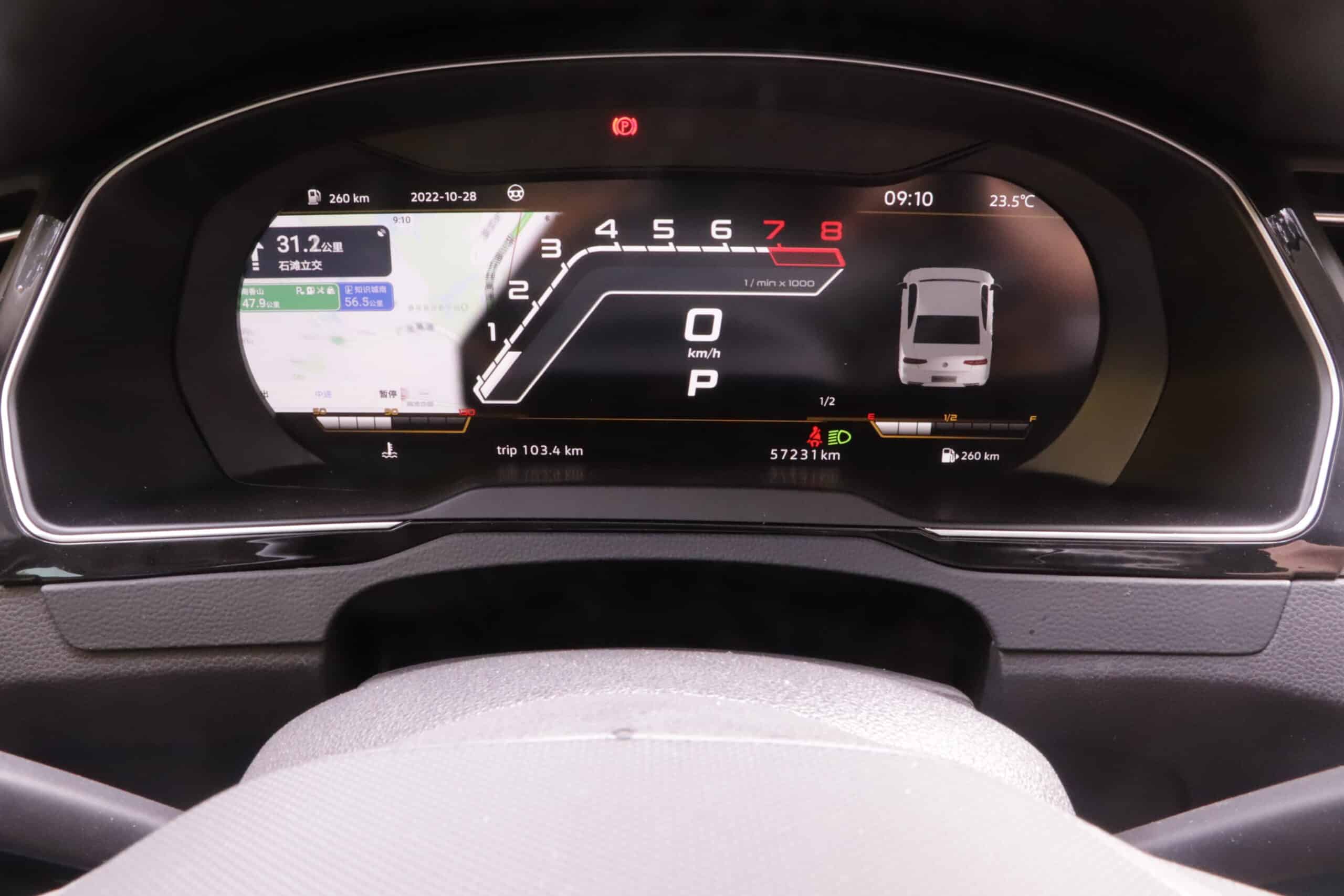
Nhiều bố cục hiển thị
Tùy theo phiên bản sản phẩm và phần mềm, hệ thống có thể cung cấp một số giao diện hiển thị như đồng hồ kiểu cổ điển, bố cục thể thao hoặc các thiết kế giao diện kỹ thuật hơn. Các bố cục khả dụng có thể thay đổi theo phiên bản sản phẩm.
Điều hướng và phản chiếu điện thoại thông minh
Một số phiên bản sản phẩm hỗ trợ phản chiếu màn hình điện thoại thông minh qua USB, cho phép nội dung dẫn đường được chọn hiển thị trong tầm nhìn của người lái. Điều này phụ thuộc vào phiên bản hệ thống, mẫu điện thoại, cáp, hỗ trợ phần mềm và phương thức phản chiếu màn hình.
Hiển thị dữ liệu xe được hỗ trợ
Hệ thống hiển thị dữ liệu xe được hỗ trợ thông qua đường dẫn dữ liệu dự kiến. Tùy thuộc vào cấu hình xe và phiên bản sản phẩm, điều này có thể bao gồm:
- Tốc độ và RPM.
- Thông tin mức nhiên liệu và nhiệt độ.
- Trạng thái cửa, cốp sau hoặc nắp ca-pô.
- Cảnh báo dây an toàn và các biểu tượng cảnh báo đã chọn.
- Hiển thị trạng thái TPMS hoặc ACC khi được xe và hệ thống hỗ trợ.
Các yếu tố chi phí cho nâng cấp cụm đồng hồ kỹ thuật số VW Passat B8
Tổng chi phí của một Nâng cấp cockpit VW Passat B8 phụ thuộc vào nhiều yếu tố hơn bản thân thiết bị hiển thị. Một ước tính chi phí thực tế nên xem xét xác nhận tính tương thích, phiên bản sản phẩm, khu vực vận chuyển, phương pháp lắp đặt và liệu có cần hỗ trợ bổ sung hay không.
- Phiên bản sản phẩm cụm đồng hồ kỹ thuật số đã chọn.
- Mẫu xe, năm và phiên bản thị trường.
- Cấu hình bảng táp-lô LHD hoặc RHD.
- Quốc gia vận chuyển, phương thức giao hàng, thuế và quy định nhập khẩu.
- Tự lắp đặt so với lắp đặt tại xưởng chuyên nghiệp.
- Kiểm tra khả năng tương thích và nhu cầu hỗ trợ sau khi lắp đặt.
Khả năng tương thích cần được kiểm tra trước khi đánh giá về giá. Một màn hình rẻ hơn sẽ không hữu ích nếu nó không khớp với bảng điều khiển nguyên bản, đường đi của đầu nối hoặc cấu hình dữ liệu của xe.
Tại sao nên mua cụm đồng hồ kỹ thuật số Passat B8 từ iKagoo?
Cụm đồng hồ kỹ thuật số không phải là một bộ phận trang trí đơn giản. Người mua cần kiểm tra tính tương thích rõ ràng, hướng dẫn lắp đặt thực tế và được hỗ trợ nếu có thắc mắc về hành vi hiển thị, dữ liệu xe, cài đặt hoặc kiểm tra sau khi lắp đặt.
- Đánh giá độ tương thích theo từng xe: Khả năng tương thích được kiểm tra bằng dữ liệu xe và ảnh cụm đồng hồ nguyên bản.
- Ranh giới Plug-and-Play rõ ràng: Không có tuyên bố phi thực tế rằng mọi lần lắp đặt đều hoạt động mà không cần kiểm tra hoặc thử nghiệm.
- Nội dung tập trung vào lắp đặt: Ảnh, video và ghi chú kỹ thuật giúp chủ xe và các xưởng sửa chữa chuẩn bị đúng cách.
- Đường dẫn hỗ trợ sau bán hàng: Hướng dẫn cho các câu hỏi liên quan về lắp đặt, cài đặt cơ bản và kiểm tra chức năng.
- Giao hàng quốc tế: Vận chuyển có theo dõi; người mua nên kiểm tra thuế và quy định nhập khẩu tại địa phương trước khi mua.
Sẵn sàng nâng cấp cụm đồng hồ kỹ thuật số cho VW Passat B8 của bạn?
Bắt đầu với việc xác nhận khả năng tương thích. Nếu xe của bạn có cụm đồng hồ analog được hỗ trợ, nâng cấp cụm đồng hồ kỹ thuật số có thể giúp khoang lái trông hiện đại hơn trong khi vẫn giữ được lộ trình nâng cấp phù hợp với từng xe.
Xem sản phẩm Passat Digital Cluster
Khám phá thêm các nâng cấp Virtual Cockpit
Các hướng dẫn liên quan của iKagoo và các liên kết nội bộ
Hãy tham khảo các hướng dẫn nội bộ này để xác nhận tính tương thích, rủi ro khi lắp đặt, giá trị nâng cấp và các biện pháp bảo vệ người mua trước khi đặt hàng bộ đồng hồ kỹ thuật số nâng cấp cho xe VW Passat B8.
Sản phẩm Bảng đồng hồ kỹ thuật số VW Passat
Hãy xem trang sản phẩm của cụm đồng hồ kỹ thuật số Passat, quy trình đặt hàng, hướng lắp đặt và các thông tin chi tiết cụ thể về sản phẩm.
Hướng dẫn lắp đặt cụm đồng hồ kỹ thuật số VW / Audi
Xem lại quy trình lắp đặt, các lưu ý khi tháo dỡ bảng điều khiển, trình tự kiểm tra và các bước kiểm tra thông thường khi nâng cấp.
Hướng dẫn nâng cấp buồng lái ảo
So sánh Passat B8 với các tùy chọn nâng cấp Virtual Cockpit khác và các bản nâng cấp cụm đồng hồ liên quan đến nền tảng MQB.
Tiêu chuẩn về mức độ cần thiết của việc nâng cấp
Hiểu rõ khi nào việc nâng cấp hệ thống điện tử trên ô tô là đáng làm, thay vì giữ nguyên bảng điều khiển ban đầu.
Tiêu chuẩn tương thích với xe nguyên bản
Kiểm tra cách đánh giá các chức năng gốc của xe, thông tin cảnh báo, các bộ điều khiển, cách hiển thị và độ phù hợp.
Mức độ khó lắp đặt: Tiêu chuẩn
Hãy tìm hiểu lý do tại sao việc nâng cấp cụm đồng hồ kỹ thuật số kiểu này lại được coi là một hệ thống lắp đặt cấp L3 thay vì chỉ là một phụ kiện cắm sẵn đơn thuần.
Chính sách về khả năng tương thích và cài đặt
Hãy xác nhận lý do tại sao các hình ảnh cụm đồng hồ gốc, hình ảnh bảng điều khiển, năm sản xuất, phiên bản thị trường và loại vô lăng bên trái (LHD)/bên phải (RHD) lại quan trọng trước khi giao hàng.
Chính sách bảo hành của iKagoo
Xem xét phạm vi bảo hành, giới hạn hỗ trợ và trách nhiệm của khách hàng đối với các sản phẩm nâng cấp thiết bị điện tử.
Chính sách Hoàn tiền và Trả hàng
Vui lòng đọc kỹ các điều kiện đổi trả trước khi đặt hàng, đặc biệt là trong trường hợp tính tương thích của xe phụ thuộc vào hình ảnh do khách hàng cung cấp.
Câu hỏi thường gặp
Hướng độ lại này chủ yếu dành cho các xe ban đầu được trang bị đồng hồ analog. Nếu xe của bạn đã có sẵn Active Info Display hoặc bảng đồng hồ kỹ thuật số từ nhà máy, cần kiểm tra kỹ khả năng tương thích trước khi mua vì cấu trúc bảng điều khiển và đầu nối có thể khác nhau.
Đối với các cấu hình xe được hỗ trợ, thường không cần mã hóa VCDS hoặc ODIS. Tuy nhiên, dữ liệu xe, hành vi hiển thị và các chức năng cần thiết vẫn nên được kiểm tra sau khi lắp đặt.
Việc xử lý số km phụ thuộc vào tuyến dữ liệu xe được hỗ trợ và cấu hình. Hãy xác nhận điều này trước khi đặt hàng, đặc biệt nếu xe có mã hóa khác thường, các mô-đun thay thế hoặc hành vi cụm đồng hồ đặc thù theo thị trường.
Plug-and-play nghĩa là các bộ kit được hỗ trợ sẽ kết nối mà không cần cắt hoặc sửa đổi vĩnh viễn dây điện nguyên bản. Cụm đồng hồ nguyên bản vẫn cần được tháo ra, thiết bị mới cần được kết nối, và tất cả các chức năng phải được kiểm tra sau khi lắp đặt.
Có thể phù hợp với một số xe facelift nếu xe ban đầu được trang bị đồng hồ analog và đường đi của bảng điều khiển/đầu nối khớp với cấu hình được hỗ trợ. Nên kiểm tra ảnh rõ nét của cụm đồng hồ nguyên bản trước khi mua.
Camera lùi thường được hiển thị trên màn hình giải trí trung tâm, không phải trên cụm đồng hồ. Cụm đồng hồ kỹ thuật số không nên thay thế chức năng đó, nhưng tất cả các chức năng hiện có của xe vẫn cần được kiểm tra sau khi lắp đặt.
Màn hình bản đồ VW nguyên bản có thể không tự động chuyển sang cụm đồng hồ aftermarket. Một số phiên bản sản phẩm hỗ trợ hiển thị dẫn đường thay thế hoặc phản chiếu điện thoại thông minh. Hãy xác nhận chế độ dẫn đường bạn cần trước khi đặt hàng.
Quy định kiểm định khác nhau tùy theo quốc gia và cơ quan địa phương. Các đèn cảnh báo bắt buộc, hành vi hiển thị số km và các chỉ báo liên quan đến an toàn phải được giữ đúng. Hãy kiểm tra quy định địa phương trước khi lắp đặt, đặc biệt tại các thị trường kiểm định nghiêm ngặt.
Gửi một ảnh rõ nét của toàn bộ cụm đồng hồ nguyên bản, một ảnh rộng hơn của bảng táp-lô, năm xe, mẫu xe, phiên bản thị trường và bên lái LHD/RHD. Những chi tiết này giúp giảm rủi ro về lắp đặt và tương thích.








Add comment