


Nâng cấp màn hình Porsche 718 Cayman: Giữ nguyên xe thể thao, hiện đại hóa khoang lái
A Nâng cấp màn hình Porsche 718 Cayman hợp lý nhất khi bản thân chiếc xe vẫn cảm giác hoàn toàn đúng, nhưng PCM của nó không còn phù hợp với cách bạn điều hướng, phát nhạc, gọi điện hay dùng điện thoại ngày nay.
Quyết định thực sự không chỉ là liệu màn hình 12.3 inch có trông đẹp hơn không. Mà là liệu bạn chỉ cần CarPlay, liệu bạn muốn Android Auto và các ứng dụng Android độc lập, hay liệu bạn muốn khoang lái hiển thị cảm giác mới hơn đáng kể mà không phải thay chiếc xe thể thao bạn mua vì đặc tính lái của nó.
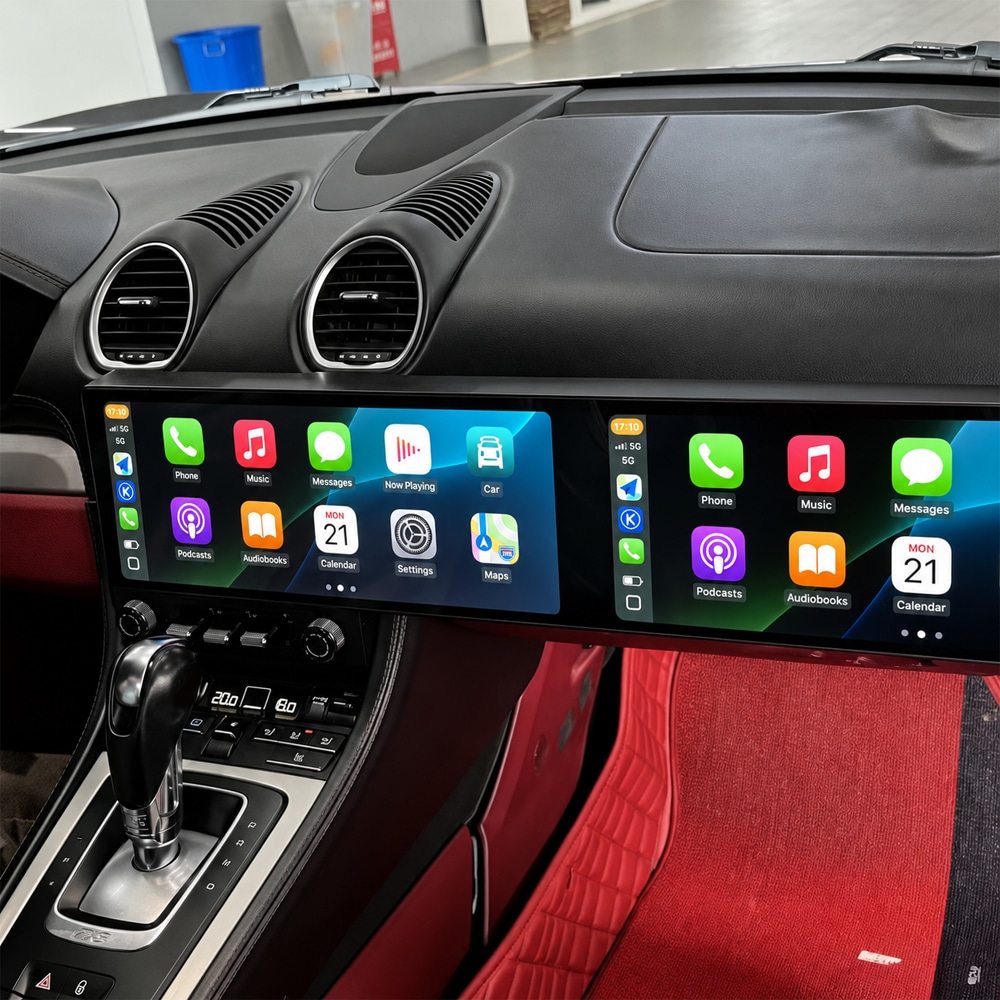
Nâng cấp màn hình Porsche 718 Cayman: Vì sao nên mua nếu chiếc xe vẫn cảm giác tuyệt vời?
Đó là lý do mạnh nhất cho nâng cấp này. Bạn không cố biến một chiếc Porsche cũ thành một chiếc xe khác. Bạn đang xóa bỏ một trong những khoảng cách công nghệ lớn nhất giữa chiếc 718 bạn thích lái và hệ sinh thái điện thoại bạn dùng mỗi ngày.
Với một chủ xe 718 tương thích, kết quả mang tính thực tiễn trước khi mang tính kỹ thuật: lên xe, kết nối không dây, mở bản đồ bạn đã dùng, tiếp tục nhạc hoặc podcast, nhận cuộc gọi qua xe và xem thông tin trên một môi trường hiển thị lớn hơn đáng kể.
Nâng cấp màn hình Porsche 718 Cayman: Sáu tình huống chủ xe nhận ra sự khác biệt
Nếu mọi hành trình đều bắt đầu bằng Google Maps, Waze, Spotify, Apple Music hay cuộc gọi, CarPlay không dây hoặc Android Auto đưa những thói quen đó vào một màn hình tích hợp lớn hơn.
Android Auto cùng với nền tảng Android độc lập mang đến cho chủ sở hữu điện thoại Android một con đường trực tiếp hơn nhiều đến bản đồ, phương tiện và các ứng dụng kết nối được hỗ trợ.
Trên những chuyến đi dài hơn, các cung đường núi và hành trình đường bộ, một môi trường điều hướng rộng hơn mang lại cho hướng dẫn lộ trình và phương tiện nhiều không gian hơn mà không cần liên tục quay lại một menu nhỏ.
Nếu bạn dự định giữ 718 thêm vài năm nữa, việc cải thiện một phần khoang cabin mà bạn tương tác gần như mỗi chuyến đi có thể quan trọng hơn việc thay thế toàn bộ xe.
CarPlay nguyên bản có thể giải quyết việc chiếu điện thoại trong khi vẫn giữ nguyên kích thước màn hình gốc, môi trường giao diện và diện mạo tổng thể của bảng điều khiển.
PCM, amply, sợi quang MOST, camera, bên vô lăng, bộ điều khiển và các sửa đổi trước đó có thể quan trọng sau khi hộp hàng đến ngay cả khi hai màn hình trực tuyến trông gần như giống hệt nhau.
Nâng cấp màn hình Porsche 718 Cayman: Đã có CarPlay—Tại sao bạn vẫn nâng cấp?
Sự phân biệt này ngăn chặn việc so sánh giá sai. Một mô-đun chỉ CarPlay và một khoang lái kép 12.3 inch không giải quyết cùng một vấn đề.
Một bộ nâng cấp CarPlay chủ yếu trả lời: “Làm thế nào để tôi đưa điện thoại của mình lên màn hình Porsche hiện có?”
Một bản đầy đủ Nâng cấp màn hình Porsche 718 Cayman trả lời một câu hỏi lớn hơn: “Làm thế nào để tôi làm cho điều hướng, kết nối, chức năng Android và bảng điều khiển hiển thị cảm thấy hiện đại hơn đáng kể?”
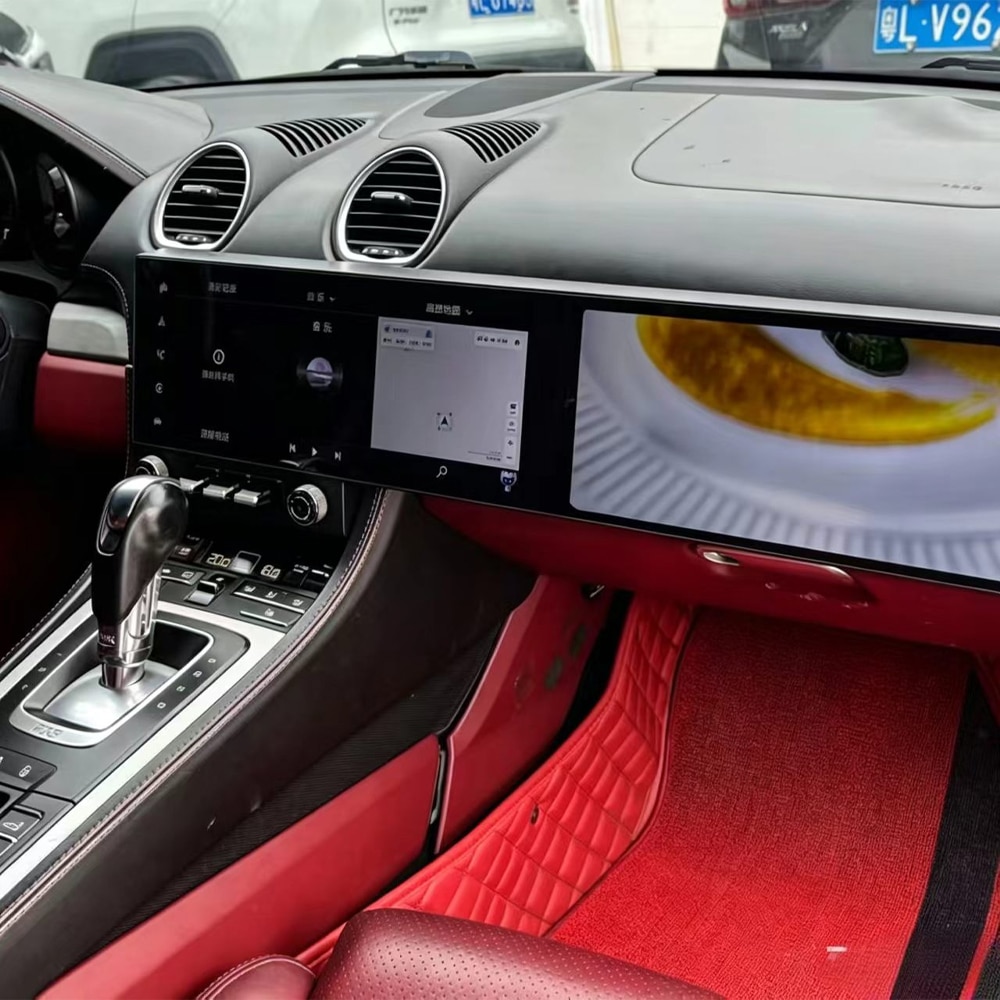
Nâng cấp màn hình Porsche 718 Cayman: Nâng cấp CarPlay hay khoang lái kép 12.3″?
Quyết định theo kết quả bạn muốn—không phải theo sản phẩm nào có danh sách tính năng dài nhất.
Chọn cách chỉ CarPlay khi bạn hài lòng với màn hình gốc và mục tiêu chính của bạn chỉ là chiếu các chức năng điện thoại tương thích.
Chọn lộ trình màn hình kép đầy đủ khi bạn muốn chính bảng điều khiển thay đổi: khu vực điều hướng rộng hơn, CarPlay không dây, Android Auto, ứng dụng Android, GPS, kết nối Wi-Fi/4G và một sự biến đổi nội thất dễ thấy hơn nhiều.
Nâng cấp Màn hình Porsche 718 Cayman: Bạn Nên Chọn Tuyến nào Trước khi Mua?
Phù hợp nhất khi màn hình, kết nối và ngoại quan hiện tại đã đáp ứng bạn. Không có lý do gì để thay thế một hệ thống vốn đã mang lại trải nghiệm bạn mong muốn.
Hợp lý khi chiếu điện thoại là chức năng còn thiếu chính và bạn muốn giữ nguyên môi trường màn hình nguyên bản hiển thị.
Phù hợp nhất với chủ xe muốn buồng lái hiển thị, dẫn đường, tích hợp điện thoại và môi trường Android thay đổi cùng nhau.
Đang tìm tuyến buồng lái đầy đủ?
Xem cấu hình LHD/RHD và bộ nhớ hiện tại trên trang sản phẩm Porsche 718 trực tiếp.
Nâng cấp Màn hình Porsche 718 Cayman: Vì sao Chủ sở hữu Điện thoại Android có Quyết định Mua khác biệt
Nếu Google Maps, Waze, Spotify và điện thoại Android đã là một phần trong thói quen hàng ngày của bạn, câu hỏi hữu ích là liệu bạn muốn tiếp tục thích nghi điện thoại với môi trường thông tin giải trí cũ hay làm cho xe hoạt động tự nhiên hơn với điện thoại bạn đang dùng.
Tuyến iKAGOO hiện tại hỗ trợ Android Auto và cũng cung cấp nền tảng Android 15 đầy đủ. Điều đó có nghĩa là bản nâng cấp không chỉ giới hạn ở việc phản chiếu điện thoại tương thích. Các ứng dụng dẫn đường và media được hỗ trợ cũng có thể hoạt động thông qua chính hệ thống Android.
Nâng cấp Màn hình Porsche 718 Cayman: Hướng dẫn này đề cập đến những Model và Tên gọi 2016–2023 nào?
| Thị trường / Ngôn ngữ Tìm kiếm | Tên gọi Chủ xe Thường dùng | Ý nghĩa khi Đặt hàng |
|---|---|---|
| Hoa Kỳ / Canada | Porsche 718 Cayman, 718 Cayman S, 718 Cayman GTS, 718 Cayman GT4 | Gửi chính xác năm sản xuất, phiên bản và bảng điều khiển nguyên bản. Chỉ tên phiên bản không xác nhận được khả năng tương thích màn hình. |
| Vương quốc Anh / Ireland | Porsche 718 Cayman, Cayman 718, Porsche 982 Cayman | Phải xác nhận RHD. Chi tiết âm thanh, camera và PCM nguyên bản vẫn quan trọng. |
| Đức / Lục địa Châu Âu | Porsche 718 Cayman, 718 Cayman, Cayman 982 / 982 Cayman | Tuyến sản phẩm vẫn dành riêng cho xe bất kể ngôn ngữ địa phương hay thị trường đăng ký. |
| Úc / New Zealand | Porsche 718 Cayman, 982 Cayman | Xác nhận RHD cùng với cấu hình infotainment, ampli và camera nguyên bản. |
| Trung Đông / Châu Á | Porsche 718 Cayman, Cayman 718, Porsche 982 | Xác nhận xe thị trường, vị trí vô lăng và thiết bị bảng táp-lô thực tế trước khi chuẩn bị. |
982 được sử dụng rộng rãi như một tham chiếu thế hệ/nền tảng cho dòng 718 này. Chiếc 718 Boxster liên quan thuộc cùng thế hệ rộng hơn, nhưng trang sản phẩm iKAGOO hiện tại được thảo luận ở đây được liệt kê cụ thể là một Porsche 718 Cayman 2016–2023 sản phẩm. Không giả định khả năng tương thích với Boxster chỉ từ tên dòng xe.
Cảnh báo tương tự cũng áp dụng cho các phiên bản như S, GTS và GT4: huy hiệu giúp nhận diện xe, nhưng bảng táp-lô và hệ thống điện tử thực tế quyết định lộ trình sản phẩm cuối cùng.
Nâng cấp Màn hình Porsche 718 Cayman: Làm thế nào để Hiện đại hóa Khoang lái mà Không khiến Nó trông như một Máy tính bảng Đa năng?
Trong một chiếc Porsche, sự tích hợp hình ảnh quan trọng gần như chức năng mới. Một màn hình lớn về mặt kỹ thuật có thể hoạt động và vẫn khiến khoang lái trông kém hài hòa nếu nó có vẻ được gắn thêm thay vì được thiết kế xung quanh bảng táp-lô.
Lộ trình iKAGOO sử dụng một cụm màn hình rộng hoàn chỉnh được định vị xung quanh cấu trúc bảng táp-lô 718. Mục tiêu là một cuộc chuyển đổi buồng lái có chủ đích thay vì một máy tính bảng gắn phía trên ốp nguyên bản.
Điều đó quan trọng với một chủ xe vẫn thích nội thất Porsche. Việc nâng cấp nên khiến công nghệ cảm giác mới hơn mà không khiến chiếc xe cảm giác bớt giống chiếc xe bạn đã chọn.
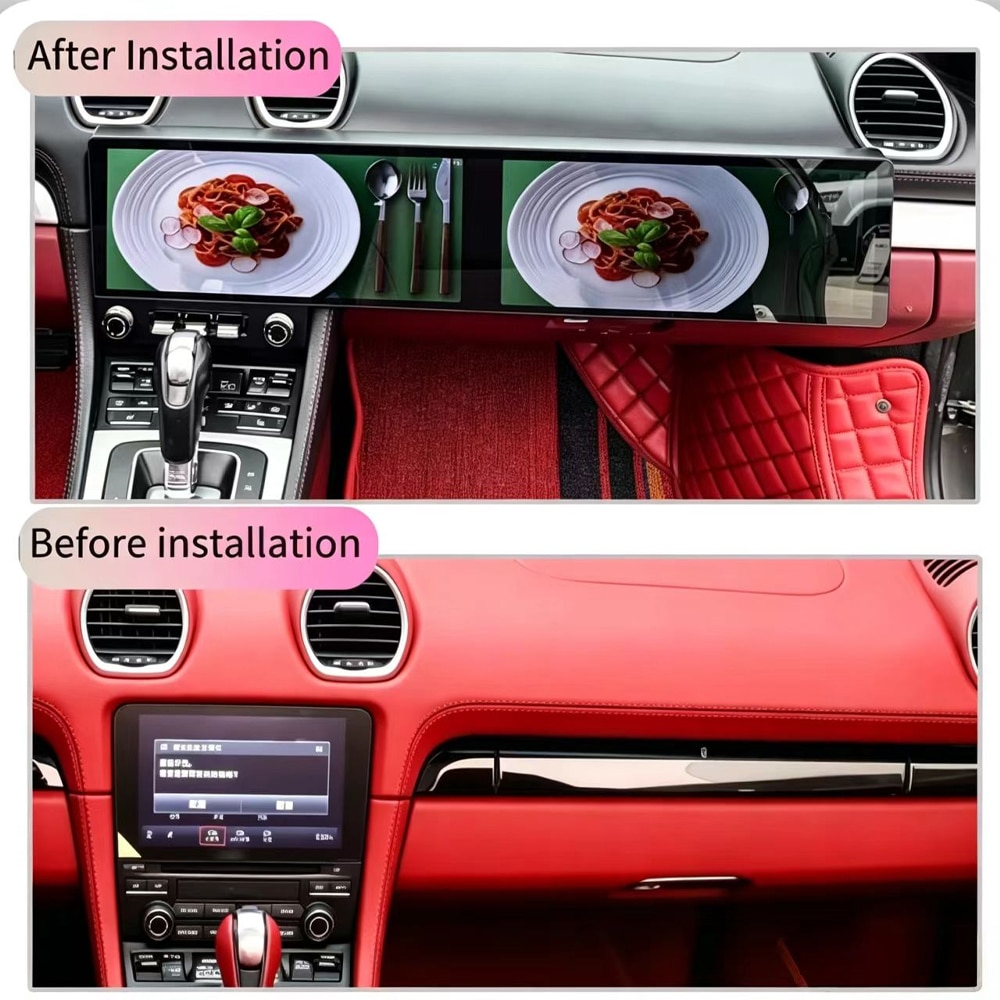
Nâng cấp Màn hình Porsche 718 Cayman: Bạn Thực sự Được gì Mỗi lần Lái xe?
Sản phẩm hiện tại cũng liệt kê GPS, Wi-Fi và kết nối 4G tương thích. Những điều này hữu ích vì màn hình có thể hoạt động như một hệ thống đa phương tiện được kết nối, thay vì trở nên vô dụng mỗi khi điện thoại không được phản chiếu.
Nâng cấp Màn hình Porsche 718 Cayman: Điều gì Xảy ra với các Chức năng Porsche Nguyên bản?
Đây là một trong những điểm quan trọng nhất để ngừng chỉ so sánh RAM, phiên bản Android và kích thước màn hình. Sai lầm tốn kém không phải là mua một màn hình có dung lượng lưu trữ ít hơn một chút. Mà là mua sai lộ trình tích hợp cho chiếc Porsche thực tế.
Nâng cấp màn hình Porsche 718 Cayman: Tại sao hai màn hình trông giống nhau lại có thể là những giao dịch rất khác nhau?
| Những gì người mua nhìn thấy | Những gì thực sự ảnh hưởng đến kết quả | Cách iKAGOO xử lý điều đó |
|---|---|---|
| Hai màn hình rộng 12.3″ | Cấu trúc vật lý của bảng táp-lô và bố cục LHD/RHD | Các cấu hình sản phẩm LHD/RHD riêng biệt được liệt kê. |
| Logo CarPlay không dây | Bạn chỉ cần phản chiếu hay một buồng lái Android hoàn chỉnh | Sản phẩm kết hợp CarPlay, Android Auto và Android đầy đủ thay vì trình bày CarPlay như toàn bộ gói nâng cấp. |
| Các cổng kết nối phía sau trông giống nhau | PCM gốc, bộ khuếch đại, sợi quang MOST, camera và các nút điều khiển | Thông tin chi tiết xe có thể được xem xét trước khi bộ kit cuối cùng được chuẩn bị. |
| Thông số kỹ thuật Android tương tự | Cấu hình CAN/giao diện chính xác và hỗ trợ lắp đặt | Đơn hàng gốc vẫn là tham chiếu cho việc thiết lập và chẩn đoán. |
| Giá mua thấp hơn | Điều gì xảy ra nếu camera, tuyến âm thanh hoặc cài đặt cần được hỗ trợ sau khi lắp đặt | iKAGOO giữ tính tương thích và lịch sử hậu mãi gắn liền với đơn hàng đã được xác minh. |
Đó là lý do tại sao so sánh hữu ích nhất không phải là “Người bán nào có màn hình 12.3 inch?” Mà là “Giao dịch mua nào cho tôi cơ hội tốt nhất để đạt được kết quả tôi mong đợi trên chiếc 718 thực tế của mình?”
Nâng cấp màn hình Porsche 718 Cayman: Bạn nên mua 6GB+128GB hay 12GB+256GB?
Lựa chọn thực tế khi việc sử dụng thông thường của bạn là CarPlay không dây, Android Auto, dẫn đường, âm nhạc và một số lượng vừa phải các ứng dụng Android.
Phù hợp hơn với những người mua dự kiến sử dụng ứng dụng Android nhiều hơn, bản đồ ngoại tuyến lớn hơn hoặc nhiều phương tiện lưu trữ cục bộ hơn trong thời gian sở hữu lâu dài.
Cả hai cấu hình hiện tại đều sử dụng thiết kế màn hình kép được liệt kê, nền tảng Android, bộ xử lý tám nhân và tuyến kết nối điện thoại.
Nên chọn nhiều bộ nhớ hơn vì mục đích sử dụng dự kiến của bạn biện minh cho điều đó. Không nên coi đó là bằng chứng rằng mọi tác vụ CarPlay hay dẫn đường sẽ tự động có cảm giác khác biệt.
Muốn xem các cấu hình trực tiếp?
Hãy sử dụng trang sản phẩm để biết các tùy chọn hiện tại và giá thanh toán thay vì dựa vào giá trong một bài viết cũ.
Porsche 718 Cayman Screen Upgrade: How Much Does It Cost and What Should You Compare?
When you search Porsche 718 screen upgrade cost, compare the complete route: display assembly, memory configuration, LHD/RHD version, required vehicle-specific harness/interface, compatibility review, installation requirements, shipping and the support available after installation.
The iKAGOO product page shows the current price and selectable configuration. Shipping is calculated for the destination, and eligible tax-prepaid/DDP routes depend on the current checkout or confirmed shipping route.
Porsche 718 Cayman Screen Upgrade: Is the Dual-Screen System Really Plug-and-Play?
The current iKAGOO route is designed around vehicle-matched connections without intentionally cutting the original main harness under the approved configuration. Installation still includes dashboard work, cable routing, interface connection, setup and complete function testing.
Professional installation is recommended, especially when the vehicle has premium audio, MOST fiber, factory camera equipment, previous aftermarket wiring or a configuration that requires additional interface verification.
| Before Closing the Dashboard | Tại sao quan trọng |
|---|---|
| Test audio output | Confirms the amplifier and audio route before trim is reinstalled. |
| Test steering controls | Confirms the matched control/CAN configuration. |
| Test factory camera | Allows camera settings or adapters to be corrected while wiring remains accessible. |
| Test CarPlay / Android Auto | Confirms phone pairing, audio and projection before final assembly. |
| Test original-system switching | Confirms supported original interface access on the approved vehicle route. |
| Test startup / shutdown / sleep | Helps identify configuration or power-management issues before the job is considered finished. |
Porsche 718 Cayman Screen Upgrade: What About a Digital Instrument Cluster?
Aftermarket digital instrument-cluster solutions for the 718/982 platform do exist. However, iKAGOO does not currently list a dedicated Porsche 718 Cayman digital instrument cluster for direct purchase. The current iKAGOO Porsche cluster category lists a Cayenne-specific product, and that product should not be presented as a 718 solution simply because both vehicles carry a Porsche badge.
If your goal is a more complete cockpit transformation, start with the confirmed 718 dual-screen route and send a clear powered-on photograph of the original instrument cluster when requesting compatibility review. That gives iKAGOO a real vehicle reference before discussing any future driver-display route.
Want the center screen now and also want us to review the instrument area?
Send both the center dashboard and powered-on original cluster in the compatibility request.
Porsche 718 Cayman Screen Upgrade: What Should You Confirm Before You Pay?
If you already know the correct product, you can order directly. If you are uncertain, use the iKAGOO Compatibility & Installation Guide before purchasing.
After payment, the order follows the iKAGOO vehicle-specific preparation process before dispatch.
Porsche 718 Cayman Screen Upgrade: Why Buy the Upgrade from iKAGOO?
This is the difference between buying a photograph of a screen and buying a vehicle-specific upgrade route. Automotive electronics can still need configuration, troubleshooting, software guidance or replacement parts long after the first installation day.
iKAGOO's current warranty and long-term support policy explains the 12-month hardware warranty and the separate software and parts-support commitments. The return and compatibility protection policy explains how approved compatibility and return cases are handled.
International buyers can also review the current chính sách vận chuyển before checkout.
Porsche 718 Cayman Screen Upgrade: High-Intent Questions Buyers Ask Before Ordering
Is a Porsche 718 Cayman Screen Upgrade worth it?
It is most compelling when you still want to keep the 718 but want a substantially newer navigation, phone and cockpit experience. The value is strongest when you regularly use maps, music, calls, CarPlay or Android Auto and want more than the original screen environment provides.
Which years does the Porsche 718 Cayman Screen Upgrade support?
The current iKAGOO product is listed for selected Porsche 718 Cayman vehicles from 2016–2023. Year alone does not confirm compatibility. The original dashboard, PCM, audio, camera and LHD/RHD configuration should still be checked.
Does every 2016–2023 Porsche 718 Cayman have Apple CarPlay?
No assumption should be made from the model year alone. Factory connectivity varies with year and original equipment. Check what your actual PCM already provides before deciding whether you need a CarPlay-only solution or a complete screen upgrade.
Can a Porsche 718 Cayman Screen Upgrade add Wireless Apple CarPlay?
Đúng vậy. Wireless Apple CarPlay is included in the current iKAGOO dual-screen configuration for compatible phones and supported applications.
Can a Porsche 718 Cayman Screen Upgrade add Android Auto?
Đúng vậy. Android Auto is included in the current iKAGOO product, together with an independent Android 15 multimedia platform.
Should I add CarPlay or buy a full Porsche 718 Cayman Screen Upgrade?
Choose according to what you want to change. A CarPlay-focused retrofit is appropriate when the original screen is satisfactory and phone projection is the main missing function. Choose the dual-screen route when you want a much larger cockpit change plus CarPlay, Android Auto and Android applications.
What is the difference between a CarPlay retrofit and a Porsche 718 Cayman Screen Upgrade?
A CarPlay retrofit mainly changes phone connectivity; the dual-screen upgrade changes the visible infotainment environment as well. The iKAGOO route uses dual 12.3-inch QLED displays with Android 15, Wireless CarPlay, Android Auto, GPS, Wi-Fi and compatible 4G connectivity.
Will a Porsche 718 Cayman Screen Upgrade keep the original steering-wheel controls?
Supported original steering-wheel controls remain available after correct installation and configuration. Common supported functions include volume, track selection and applicable call controls.
Can I still access the original Porsche system after a Porsche 718 Cayman Screen Upgrade?
Original/Android system switching is supported where the confirmed original configuration and matched interface support it. This is one reason the original system should be identified before shipment.
Will a Porsche 718 Cayman Screen Upgrade work with the factory reverse camera?
The factory-camera route depends on the actual vehicle configuration. Tell iKAGOO which camera system is installed so the required integration can be reviewed before the final kit is prepared.
Will a Porsche 718 Cayman Screen Upgrade work with BOSE, premium audio or MOST fiber?
Premium amplifier and fiber-optic configurations must be identified rather than assumed. Send the audio-system information during compatibility review so iKAGOO can check the appropriate connection route.
Does the Porsche 718 Cayman Screen Upgrade fit both LHD and RHD cars?
The current product lists separate Black/LHD and Black/RHD configurations. Confirm the steering position when ordering so the correct physical version can be prepared.
Is Porsche 982 the same generation discussed in this Porsche 718 Cayman Screen Upgrade guide?
982 is a commonly used generation/platform reference for the 718 Cayman family discussed here. The actual iKAGOO product scope should still be followed rather than using the platform code alone as a fitment guarantee.
How much does a Porsche 718 Cayman Screen Upgrade cost?
Use the live product page for the current configured price. The final purchase can vary with memory configuration, destination, shipping and the applicable tax/DDP route. Compare the complete matched and supported upgrade rather than screen hardware alone.
Which memory should I choose for a Porsche 718 Cayman Screen Upgrade?
6GB+128GB is the practical route for normal CarPlay, Android Auto, navigation, music and everyday app use. Choose 12GB+256GB when you expect heavier Android application use, larger offline maps or more local media storage.
Is the Porsche 718 Cayman Screen Upgrade plug-and-play?
The approved product uses a vehicle-matched connection route, but professional installation is still recommended. Dashboard removal, harness connection, cable routing, setup and complete function testing remain part of the job.
What photos should I send before ordering a Porsche 718 Cayman Screen Upgrade?
Send the complete center dashboard and the original system switched on. Also provide the exact vehicle year, LHD/RHD position, audio system, factory-camera information and details of previous aftermarket modifications where applicable.
Can iKAGOO check my Porsche 718 Cayman Screen Upgrade compatibility before I buy?
Đúng vậy. Use the iKAGOO compatibility route when you are unsure. If you already know the correct product, you can order directly and the paid order still enters the final pre-shipment compatibility/configuration process.
What happens if my Porsche 718 Cayman Screen Upgrade needs configuration after installation?
Your original iKAGOO order remains the reference for the supplied product version and reviewed vehicle information. This gives installation and after-sales diagnosis a known starting point instead of treating the screen as unidentified third-party hardware.
Is there a digital instrument cluster to match a Porsche 718 Cayman Screen Upgrade?
Digital-cluster solutions for the 718/982 platform exist in the aftermarket, but iKAGOO does not currently list a dedicated 718 Cayman digital cluster for direct purchase. Send a powered-on original-cluster photo if you want iKAGOO to review the driver-display route rather than substituting an unconfirmed Porsche cluster.
Porsche 718 Cayman Screen Upgrade: Useful iKAGOO Pages Before You Order
Porsche 718 Cayman Screen Upgrade: Keep What You Love About the Car and Change What Feels Old
The strongest reason to upgrade a 718 is not that the Porsche itself has become obsolete. It is almost the opposite: the car can still be worth keeping precisely because the driving experience has aged better than the technology you touch every day.
If you only need CarPlay, solve the CarPlay problem. If you want the dashboard, navigation, Android connectivity and overall cabin experience to feel substantially newer, the dual 12.3-inch route is a different level of upgrade.
And once you decide that is the result you want, the next question should not be whether another seller has a screen that looks similar. It should be whether the product is being matched to your actual Porsche, whether the original equipment has been considered, and whether somebody still knows which hardware you received after the installation is complete.
That is where iKAGOO is intended to be different: vehicle-specific review before shipment, a matched product route, installation support tied to the order and a published long-term support path after delivery.
Current product scope: selected Porsche 718 Cayman 2016–2023 · dual 12.3″ QLED · 2400×896 · Android 15 · UIS7870SC octa-core · 6GB+128GB / 12GB+256GB · Wireless Apple CarPlay · Android Auto · GPS · 4G · Wi-Fi · Black/LHD or Black/RHD. Final fitment and retained-function behavior follow the confirmed vehicle configuration and current product terms.








Add comment
Bạn phải đăng nhập để gửi bình luận.