


Nâng cấp buồng lái kỹ thuật số VW Golf Mk6: Đồng bộ bản đồ CarPlay, Chế độ xem chuyển đổi & Ghế lái như mới
Một chiếc Golf Mk6 được chăm sóc tốt vẫn có thể đúng là chiếc xe bạn muốn sở hữu. Kích thước hợp lý, tư thế lái quen thuộc, và một chiếc GTI hay Golf R vẫn có thể khiến hành trình thường ngày trở nên thú vị.
Rồi bạn nhìn qua vô lăng và các đồng hồ kim nguyên bản ngay lập tức nhắc bạn nhớ khoang lái này thuộc thế hệ nào.
A Nâng cấp buồng lái kỹ thuật số cho Golf Mk6 thay đổi góc nhìn đó bằng màn hình buồng lái LCD 12.3 inch, các chế độ hiển thị đồng hồ có thể chuyển đổi, dữ liệu xe nguyên bản được hỗ trợ và—trên tuyến đường được kết nối đúng cách—CarPlay và đồng bộ bản đồ hiển thị trực tiếp trên màn hình đồng hồ.
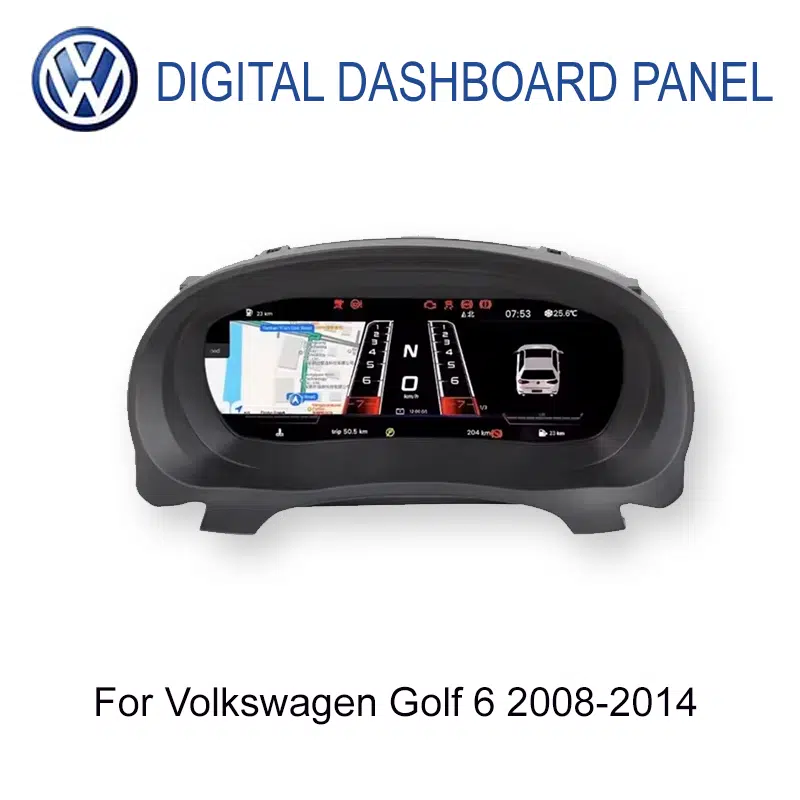
Nâng cấp buồng lái kỹ thuật số cho Golf Mk6 có đáng không?
Với chủ sở hữu Golf 6 đời 2008–2014 thường xuyên sử dụng xe và có ý định giữ lại lâu dài, đây có thể là một nâng cấp đáng giá vì nó hiện đại hóa phần khoang lái mà bạn nhìn thấy mỗi hành trình, cho phép bạn chuyển đổi các chế độ hiển thị đồng hồ hiện có, giữ thông tin lái xe được hỗ trợ ngay trước mắt và có thể thêm hiển thị CarPlay/bản đồ thông qua tuyến multimedia tương thích.
Nó đặc biệt hấp dẫn khi bản thân chiếc Golf vẫn cho cảm giác ổn nhưng khu vực đồng hồ kim cố định giờ đây lại có vẻ cũ hơn phần còn lại của xe.
Điều gì thực sự khiến cụm đồng hồ nguyên bản của Golf Mk6 trông cũ?
Các đồng hồ nguyên bản của Golf 6 không được thiết kế tồi. Màn hình đa chức năng của Volkswagen ở các phiên bản cao cấp đã hiển thị thông tin hành trình và xe hữu ích. Vấn đề nằm ở chỗ sau thêm một thập kỷ sử dụng: thông tin hữu ích vẫn được trình bày trong một bố cục đồng hồ gần như cố định.
Chiếc xe có thể trông trẻ trung hơn bảng táp-lô.
Một chiếc Mk6 tốt vẫn có thể cho cảm giác chắc chắn và quen thuộc trên đường, nhưng hai mặt đồng hồ cơ lớn và khu vực thông tin trung tâm nhỏ khiến tuổi tác của buồng lái lộ rõ mỗi khi bạn khởi động xe.
Chiếc xe nguyên bản đã biết nhiều thông tin hữu ích—nhưng không gian hiển thị thì hạn chế.
Thông tin hành trình, dữ liệu nhiên liệu và tình trạng xe vốn đã có trong hệ thống nguyên bản. Hạn chế nằm ở chỗ có bao nhiêu thông tin trong số đó phải nằm trong màn hình trung tâm tương đối nhỏ giữa các đồng hồ kim cố định.
Bố cục đồng hồ giống nhau sẽ theo bạn vào mọi kiểu lái xe.
Đồng hồ tốc độ và đồng hồ vòng tua nguyên bản vẫn làm tốt nhiệm vụ của chúng, nhưng chúng không thay đổi chỉ vì hôm nay là một chuyến đi làm, một hành trình dài trên đường cao tốc hay một chuyến lái cuối tuần trong chiếc GTI hay Golf R của bạn.
Bạn có thể đã có CarPlay hiện đại ở trung tâm—và một giao diện thời 2010 ngay trước mặt.
Nâng cấp radio hoặc màn hình trung tâm giải quyết kết nối điện thoại, âm nhạc và dẫn đường, nhưng nó không thay đổi cụm đồng hồ ngay sau vô lăng.
Bạn có thể thay đổi màn hình buồng lái kỹ thuật số Golf Mk6 một cách tự do không?
Có. Các thông số đồng hồ và chế độ hiển thị có sẵn có thể được chuyển đổi từ menu cụm đồng hồ.
Điều đó thay đổi trải nghiệm sở hữu nhiều hơn những gì một bảng thông số gợi ý. Cụm đồng hồ Golf nguyên bản cho bạn một cấu trúc hình ảnh cơ bản mỗi ngày. Buồng lái kỹ thuật số cho phép bạn chọn cách trình bày có sẵn xoay quanh những gì bạn muốn thấy.
Tài liệu sản phẩm hiện tại bao gồm các kiểu mặt đồng hồ và chế độ khác nhau như bố cục gọn gàng thường ngày, tập trung dẫn đường và phong cách thể thao. Đồ họa có sẵn chính xác tuân theo phiên bản hệ thống được cung cấp.
Tại sao điều này quan trọng trong sử dụng hàng ngày?
Bởi vì việc tùy chỉnh chỉ trở nên có ý nghĩa khi bạn thấy nó lặp lại nhiều lần.
Vào sáng thứ Hai, bạn có thể muốn một màn hình sạch sẽ, đơn giản. Trong một chuyến đi dài hơn, bạn có thể thích bố cục làm nổi bật thông tin khác. Nếu bạn thích khía cạnh hình ảnh khi lái chiếc Golf của mình, khả năng thay đổi buồng lái lần nữa sau này giữ cho việc nâng cấp không giống như một linh kiện thay thế cố định khác.
Đó là sự khác biệt giữa thay thế một cụm đồng hồ cũ và mang đến cho người lái một buồng lái có thể cấu hình.
Điều đó cũng có nghĩa là việc nâng cấp không phụ thuộc hoàn toàn vào CarPlay hay dẫn đường để biện minh cho chính nó. Ngay cả khi bạn biết rõ tuyến đường và điện thoại vẫn nằm trong túi, màn hình người lái đã thay đổi.

Buồng lái kỹ thuật số Golf Mk6 có hỗ trợ CarPlay và đồng bộ bản đồ không?
Có. Tuyến Golf Mk6 được hỗ trợ có thể hiển thị thông tin liên quan đến CarPlay và đồng bộ nội dung dẫn đường tương thích lên màn hình đồng hồ khi tuyến đa phương tiện và kết nối phù hợp được khớp đúng.
Điều đó không có nghĩa cụm đồng hồ là một đầu Android hay nó tự tạo CarPlay. Kết nối điện thoại, đầu ra của đầu đơn vị và đường hiển thị cụm đồng hồ vẫn phải hoạt động cùng nhau.
Tại sao điều đó hữu ích nếu bạn đã có màn hình trung tâm?
Bởi vì màn hình trung tâm và màn hình đồng hồ đảm nhận những nhiệm vụ khác nhau.
Màn hình trung tâm vẫn là nơi tốt hơn cho toàn bộ giao diện CarPlay, nhạc, cuộc gọi và bản đồ đầy đủ. Cụm đồng hồ có thể mang thông tin tuyến đường hữu ích đến gần hơn với cùng khu vực mà bạn vẫn thường kiểm tra tốc độ và dữ liệu lái xe.
Điều đó trở nên hữu ích khi ra khỏi đường cao tốc lạ, một chuỗi các ngã rẽ trong thành phố, lối vào khách sạn vào ban đêm hoặc bất kỳ chuyến lái nào mà bạn không muốn cứ phải chuyển sự chú ý về phía màn hình trung tâm.
Nâng Cấp Này Thay Đổi Gì Trong Một Tuần Bình Thường?
Bạn biết tuyến đường. Bạn vẫn thấy buồng lái.
Hầu hết những ngày đi làm không cần điều hướng chút nào. Bạn khởi động Golf, kiểm tra nhiên liệu và tốc độ, rồi lái trên con đường bạn đã quen.
Đó là lý do nâng cấp hình ảnh quan trọng: nó không cần dịp đặc biệt nào để hữu ích. Góc nhìn mới của người lái đã ở đó trước khi bạn rời khỏi sân nhà.
Giờ đây CarPlay và đồng bộ bản đồ trở nên thực dụng thay vì chỉ để trang trí.
Bạn vẫn có giao diện điều hướng đầy đủ trên màn hình trung tâm, trong khi tuyến cụm đồng hồ được khớp đúng có thể mang thông tin bản đồ tương thích vào màn hình của người lái.
Lợi ích không phải là “hai màn hình CarPlay.” Mà là đưa thông tin tuyến đường hữu ích đến gần hơn nơi mắt bạn vẫn hướng tới trong khi lái.
Bạn cảm thấy muốn đi con đường dài hơn để về nhà.
Một cụm đồng hồ kim cố định trông vẫn như vậy dù bạn đang kẹt xe hay thực sự tận hưởng một cung đường yên tĩnh trên GTI hoặc Golf R.
Khả năng chuyển đổi cách hiển thị có sẵn mang lại cho buồng lái thêm chút cá tính giống như điều khiến nhiều chủ xe vẫn quan tâm đến chính chiếc xe.
Sự khác biệt trở nên khó bỏ qua hơn vào ban đêm.
Khu vực đồng hồ là một trong những bề mặt được chiếu sáng chính trong tầm nhìn của người lái. Do đó, màn hình kỹ thuật số hoàn toàn thay đổi cảm nhận về độ cũ của buồng lái nhiều hơn hẳn một phụ kiện nội thất nhỏ khác.
Tốc độ, nhiên liệu, tình trạng xe và thông tin tuyến đường vẫn liên quan trong nhiều giờ.
Trên một chuyến lái đường cao tốc dài, giá trị không nằm ở việc bấm nhiều nút hơn. Mà là có thông tin xe bạn dùng lặp lại nhiều lần được sắp xếp trong một màn hình người lái hiện đại hơn suốt hành trình.
Nếu động cơ, hộp số, ghế, kích thước và tính thực dụng vẫn phù hợp với bạn, việc đổi cả chiếc xe chỉ để có buồng lái mới hơn là một quyết định rất khác so với việc thay đổi chính buồng lái.
Một cụm đồng hồ kỹ thuật số sẽ không giả vờ rằng một chiếc Golf 2010 hay 2012 là xe mới. Nó làm điều thực tế hơn: cập nhật một trong những phần của khoang cabin mà bạn tương tác trong mỗi chuyến đi.
Với một chủ xe dự định giữ Mk6 thêm ba, bốn hoặc năm năm nữa, giá trị lặp lại hằng ngày đó là một trong những lý do mạnh mẽ nhất khiến việc nâng cấp này hợp lý.
Will the Digital Cockpit Still Show the Golf's Original Driving Information?
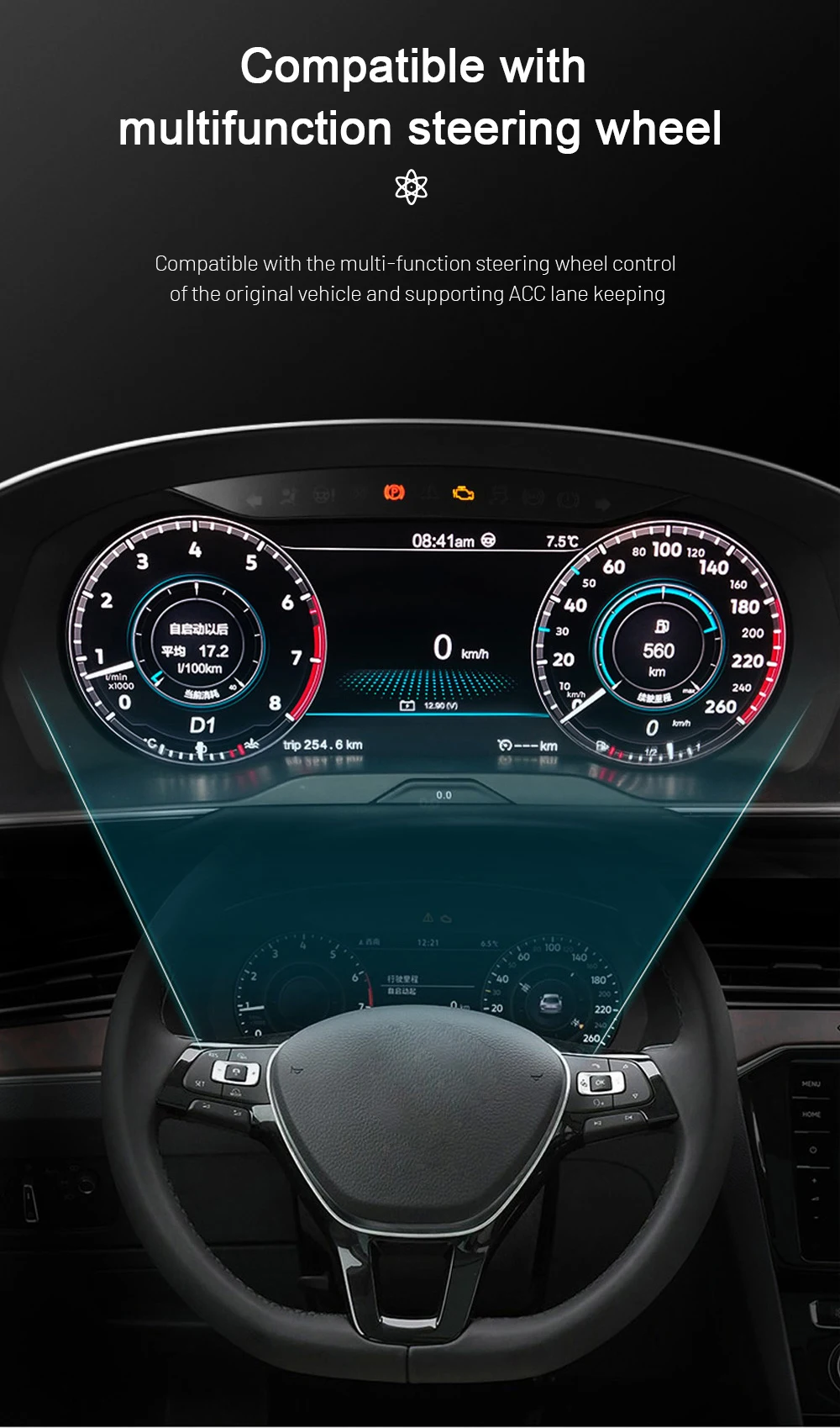
Yes, on the correctly matched configuration. The current Golf 6 route retains supported everyday driving information instead of turning the instrument area into a decorative LCD screen.
Supported driving-status and warning information remain available after correct connection and setup, and supported multifunction steering-wheel interaction is retained through the appropriate vehicle-interface route.
This matters because the best-looking display is still a poor upgrade if it stops behaving like an instrument cluster.
The iKAGOO matching process therefore looks at the actual original cluster, steering side, connector configuration and expected functions—not only the words “Golf Mk6” on the order.
Which 2008–2014 Golf 6 Models Can Use This Digital Cockpit?
The current product range covers Volkswagen Golf 6 / Golf Mk6 / Golf VI / Typ 5K vehicles from 2008–2014. There is an important evidence boundary between the product range and the currently documented installation procedure.
The current product route also checks LHD/RHD configuration and body-style differences. A model badge or production year alone is therefore useful for starting the match, but it is not the final preparation decision.
You do not need to treat this as a reason to delay the purchase indefinitely. The normal process can be: choose the product and place the order, provide the requested year, LHD/RHD and original-cluster information, then let the stricter final configuration review happen before the unit is prepared and dispatched.
What Does a Real Golf Mk6 Digital Cluster Installation Involve?

This is a proper dashboard retrofit, not a clip-on accessory. The original cluster and surrounding trim have to be handled carefully, and the relevant retained components, connectors, settings and functions need to be checked before final reassembly.
For the matched supported route, intentional cutting of the original factory wiring is not part of the normal installation plan. That does not make it a five-minute job; dashboard handling and complete final testing still matter.
The practical difference of the supported iKAGOO route is that your installer can start with a Golf 6-specific reference. If the actual frame, connector or behaviour differs from the documented route, the sensible next step is to stop and verify the difference rather than force the installation.
Three Checks That Matter Before You Spend the Money
These are the current Golf 6 product results. They answer three different buyer questions: is the upgrade worth doing, how closely can the route match the original car, and how seriously should the installation be treated?
Very strong if this is a Golf you intend to keep
The score is high because the original instrument area is one of the clearest visual age points in the Mk6, the new cockpit is visible every drive, supported vehicle information remains useful, the display can be changed to suit the driver, and CarPlay/map display can add another recurring benefit on the correct route.
It stops short of 99 because a healthy original analogue cluster still performs its basic job well. If you love the factory gauges or will sell the car soon, the upgrade becomes more preference than necessity.
Strong vehicle-specific fit without pretending every Golf is identical
The Golf-specific dashboard route, retained vehicle-data direction, steering-wheel support, connector matching and real PQ installation evidence create a strong compatibility case.
It is not presented as 100/100 because regional versions, LHD/RHD, body style, original cluster structure, connector route, previous modifications and map-display requirements can change the final configuration.
A real retrofit that deserves a competent installer
The matched route does not plan intentional factory-wire cutting, but the job still requires dashboard trim removal, original-cluster handling, matched connections, configuration and full function testing.
An experienced DIY installer may be comfortable with L3 work. For most owners, an automotive-electronics installer is the easier choice. If the cluster frame or connector differs from the documented route, stop before forcing parts together.
Why Doesn't It Make Sense to Treat Every Golf Mk6 Digital Cluster as the Same Product?
Because the part you can compare most easily—the LCD screen—is not the part that usually creates the difficult questions.
The difficult part is whether the correct cluster arrives for the actual Golf, whether the original information and controls behave as expected, whether the CarPlay/map route matches the installed multimedia system, and whether somebody can still identify the product later if your installer needs help.
If all you need is the lowest-priced screen and you are comfortable solving those questions yourself, cheaper marketplace listings exist. iKAGOO is intended for owners who want the hardware and the support route to remain connected.
Eligible hardware is covered by the current 12-month limited hardware warranty. After the commercial warranty period, troubleshooting, software guidance, parts support and repair coordination may still be available; out-of-warranty costs can apply.
Useful Guides Before You Upgrade
Golf Mk6 Digital Cockpit Upgrade FAQ
Is a Golf Mk6 digital cockpit upgrade worth it?
It can be a strong upgrade for a Golf 6 you drive regularly and intend to keep. The cockpit changes every journey, the available display views can be switched, supported vehicle information remains available, and the correctly matched route can add CarPlay and map synchronization to the instrument display.
If you prefer the original analogue instruments or expect to sell the Golf soon, leaving it original can make more sense.
Does the Golf Mk6 digital cockpit support CarPlay?
Yes, on the supported matched connectivity route. CarPlay-related information can be displayed through the appropriate phone-link or connected multimedia path.
The cluster is not an Android head unit or independent CarPlay box, so the installed head unit, cluster version and interconnection route still matter.
Can Google Maps, Waze or Apple Maps be synchronized to the Golf 6 instrument cluster?
Compatible navigation content can be displayed in the cluster when the required multimedia and projection route is present. Google Maps, Waze or Apple Maps availability therefore depends on the source system and connection route, not simply on the LCD screen itself.
If map synchronization is one of your main reasons for buying, include the centre-screen/head-unit information with the order so the appropriate route can be checked.
Can I freely switch the Golf Mk6 digital cockpit parameters and display views?
Yes. The available instrument parameters and display views can be changed from the cluster menu. The current product route includes multiple style directions, including cleaner everyday, navigation-focused and sport-style displays where supported by the supplied version.
The exact graphics and available options follow the confirmed system version, so not every marketing image should be interpreted as a promise that every version has the identical menu.
What years does the Golf Mk6 digital cockpit support?
The current product range covers Golf 6 / Golf Mk6 / Golf VI / Typ 5K models from 2008–2014. The detailed published PQ installation guide currently documents the 2009–2014 route, so 2008 vehicles should have the original cluster frame and connector arrangement matched before final preparation.
Will speed, RPM, fuel, trip information and warning data still display?
Đúng vậy, trên tuyến đường phù hợp. Current Golf 6 product documentation confirms supported speed, RPM, fuel, trip, driving-status and warning information after correct connection and setup.
Will the multifunction steering-wheel controls still work?
Supported multifunction steering-wheel interaction remains available on the matched vehicle-interface route. Exact menu behaviour can vary with the original Golf configuration, so it should be included in final function testing before dashboard reassembly.
Is this an Android instrument cluster?
Không. This product is a dedicated LCD digital instrument cluster for the Golf 6 dashboard. It should not be confused with an Android head unit or a universal Android tablet installed behind the steering wheel.
Is this a factory Volkswagen OEM Virtual Cockpit retrofit?
Không. It is an aftermarket iKAGOO LCD digital cockpit designed for an OEM-style Golf 6 installation direction. It should not be described as an original factory-coded Volkswagen Virtual Cockpit.
Does the digital cluster fit a Golf Mk6 GTI or Golf R?
GTI and Golf R are included in the documented 2009–2014 Golf 6 PQ installation coverage when the original cluster/frame matches the supported route. The final match still uses the actual original cluster, dashboard and connector configuration rather than the GTI or R badge alone.
What about Golf Variant, Estate, Wagon or Cabriolet?
Golf Cabriolet is included in the documented 2009–2014 PQ installation route. Variant, Estate and Wagon versions are part of the current product fitment review, but their body-style name alone is not enough to confirm the exact dashboard and connector route.
Do I need to cut the original Golf wiring?
Intentional cutting of supported factory wiring is not planned on the normal matched route. The retrofit still involves trim removal, original-cluster handling, matched connections, configuration and final testing. Previous wiring modifications or unusual connectors should be disclosed before final preparation.
Can I install the Golf 6 digital cluster myself?
The current iKAGOO Installation Ease result is L3 — Advanced DIY. An experienced DIY installer with automotive-electronics experience may be comfortable with the work, but many owners will prefer a professional automotive-electronics installer because the original cluster and dashboard have to be handled carefully.
Why buy a Golf Mk6 digital cluster from iKAGOO instead of a cheaper marketplace listing?
The LCD hardware is only one part of the retrofit. The vehicle year, steering side, original cluster, connector route, expected retained functions, CarPlay/map-display requirement, installation reference and later technical support all affect whether the upgrade becomes a usable result.
iKAGOO keeps those items connected to the order so the buyer is not expected to solve the entire vehicle-specific route alone after the parcel arrives.
Do I have to complete a compatibility check before I can order?
Not as a default barrier. You can select the product and place the order, then provide the requested Golf year, LHD/RHD information and original-cluster/dashboard photos. The vehicle-specific review takes place before final product preparation and dispatch.
If the car has previous dashboard or wiring modifications, or you need a specific CarPlay/map synchronization route, supplying those details early helps the correct configuration be prepared.
What support is available after installation?
The original order remains the reference for installation questions, troubleshooting, supported software guidance, compatible parts and repair coordination. Eligible hardware currently carries a 12-month limited hardware warranty. Support can continue after the warranty period, although out-of-warranty parts, repairs or shipping may involve additional cost.
Keep the Golf You Still Enjoy. Upgrade the View You See Every Day.
A Nâng cấp buồng lái kỹ thuật số cho Golf Mk6 does not make sense because there is something inherently wrong with analogue gauges.
It makes sense when the Golf itself still deserves to stay in your driveway, but the driver's view no longer feels like the car you want to sit in for the next several years.
The 12.3-inch display changes that view. The available instrument parameters and modes can be switched. Core supported vehicle information remains part of the cockpit. And with the correctly matched route, CarPlay and compatible map information can move into the driver display as well.
If you choose iKAGOO, the next step is not simply “buy a screen and hope it fits.” The product, vehicle information, display requirement, installation reference and later support remain connected to the same order.
Product range: Volkswagen Golf 6 / Golf Mk6 / Golf VI / Typ 5K 2008–2014. The detailed published PQ installation route currently documents 2009–2014 vehicles; 2008 vehicles require original-cluster/frame and connector matching before final preparation. CarPlay and map synchronization depend on the confirmed cluster, multimedia source and connected display route.








Add comment
Bạn phải đăng nhập để gửi bình luận.