


CarPlay không dây và Android Auto trên bảng điều khiển VW của bạn
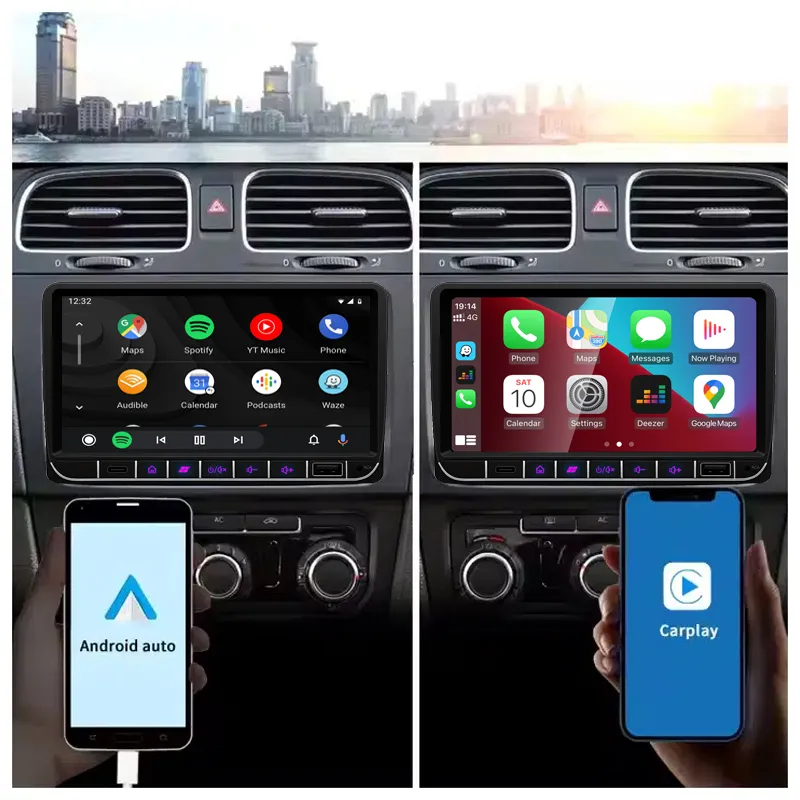
Sử dụng bản đồ, nhạc và cuộc gọi điện thoại quen thuộc ngay trên màn hình trung tâm trong khi vẫn giữ giao diện bảng điều khiển gần giống với bố cục VW nguyên bản.

| Cân nặng | 2.5 kg |
|---|---|
| Kích thước | 35 × 27 × 17 cm |
| Màu sắc: | Màu đen |
| DriveMaster: | 12GB/256GB – 8 nhân A76 – CP/AA/360/DSP/5G/WiFi, 2GB/32GB – 4 nhân A53 – FM/WiFi, 4GB/64GB – 8 nhân A55 – CP/AA/DSP/4G/WiFi, 8GB/128GB - 8 nhân A75 – CP/AA/DSP/4G/WiFi |
| Tên | Volkswagen Android Stereo Đa năng |
| Bộ nhớ | 12GB/512GB – Bộ xử lý lõi A76 – 360/DSP/5G, 2GB/32GB – Bộ xử lý 4 lõi FM/WiFi, 4GB/64GB – Bộ xử lý 8 lõi CP/AA/DSP/4G, 8+128GB – Bộ xử lý 8 lõi CP/AA/DSP/4G |
| Cốt lõi | 4 nhân, 8 nhân |
| Hình ảnh trên màn hình | 1024 × 600 pixel |
| Kích thước màn hình | 7,0 inch" |
| Chất liệu mặt sau | Nhựa/Kim loại |




Từ: $295.00

Chúng tôi sẽ chịu trách nhiệm thanh toán thuế GTGT và thuế nhập khẩu áp dụng đối với các đơn hàng đủ điều kiện từ EU và Hoa Kỳ. Số tiền tiết kiệm ước tính: $120–$280 .
Phí vận chuyển được tính riêng. Chi phí vận chuyển chính xác được tính dựa trên địa điểm nhận hàng và sẽ được hiển thị trong giỏ hàng của bạn trước khi thanh toán.
Phí vận chuyển cuối cùng được xác nhận dựa trên địa chỉ giao hàng của bạn tại bước thanh toán.
Kiểm tra khả năng tương thích, bảo vệ khả năng tương thích toàn diện, bảo hành phần cứng 12 tháng và hỗ trợ liên tục sau khi cài đặt.
 Chính sách bảo vệ hoàn tiền đầy đủ
Đảm bảo tính tương thích
Đã xác nhận là không tương thích với xe của bạn? Bạn sẽ được hoàn lại toàn bộ số tiền.
→
Chính sách bảo vệ hoàn tiền đầy đủ
Đảm bảo tính tương thích
Đã xác nhận là không tương thích với xe của bạn? Bạn sẽ được hoàn lại toàn bộ số tiền.
→
 12-Month Bảo hành phần cứng
Sản phẩm được bảo hành phần cứng trong 12 tháng đầu tiên.
→
Dịch vụ hỗ trợ sau bán hàng dài hạn
Hướng dẫn sử dụng phần mềm, hỗ trợ linh kiện và điều phối việc sửa chữa luôn được liên kết với đơn hàng ban đầu của quý khách.
→
12-Month Bảo hành phần cứng
Sản phẩm được bảo hành phần cứng trong 12 tháng đầu tiên.
→
Dịch vụ hỗ trợ sau bán hàng dài hạn
Hướng dẫn sử dụng phần mềm, hỗ trợ linh kiện và điều phối việc sửa chữa luôn được liên kết với đơn hàng ban đầu của quý khách.
→
Mục tiêu của chúng tôi là đảm bảo đơn hàng của bạn chính xác trước khi rời khỏi chúng tôi. Chúng tôi kiểm tra tính tương thích, chuẩn bị cấu hình chính xác và chỉ liên hệ với bạn nếu có điều gì cần xác nhận.
Nâng cấp đầu Android cho VW / SEAT / Skoda
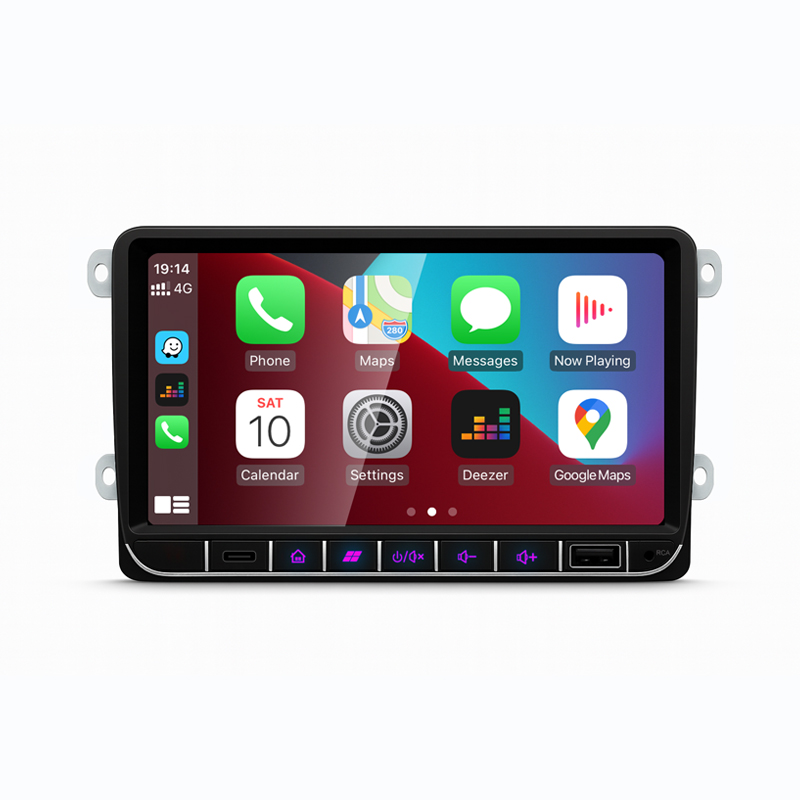
Nâng cấp táp-lô phong cách VW nguyên bản của bạn bằng đầu Android dành riêng cho từng dòng xe, sẵn sàng cho CarPlay không dây, Android Auto, định vị GPS, Bluetooth, các tùy chọn DSP và tích hợp chức năng nguyên bản thông qua bộ dây và thiết lập CANBUS chính xác.
Truyền thông nổi bật trước tiên
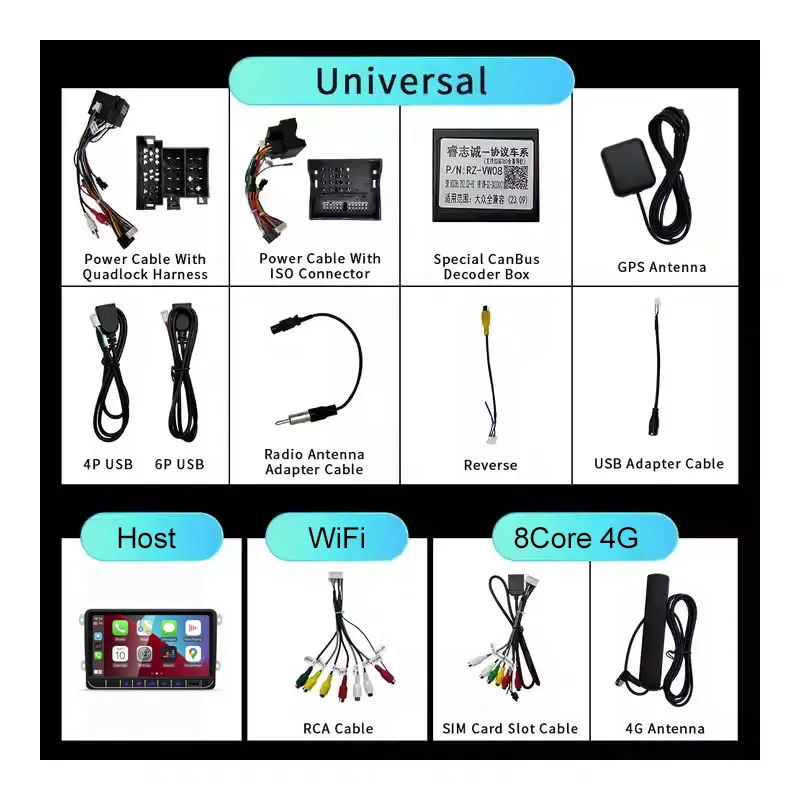
Những hình ảnh này giúp bạn hiểu rõ giao diện bảng điều khiển, khả năng kết nối điện thoại thông minh, bố trí cổng kết nối phía sau, bộ dây cáp đi kèm và kiểu dáng radio nguyên bản mà bạn cần kiểm tra trước khi chọn phiên bản.
Sử dụng bản đồ, nhạc và cuộc gọi điện thoại quen thuộc ngay trên màn hình trung tâm trong khi vẫn giữ giao diện bảng điều khiển gần giống với bố cục VW nguyên bản.
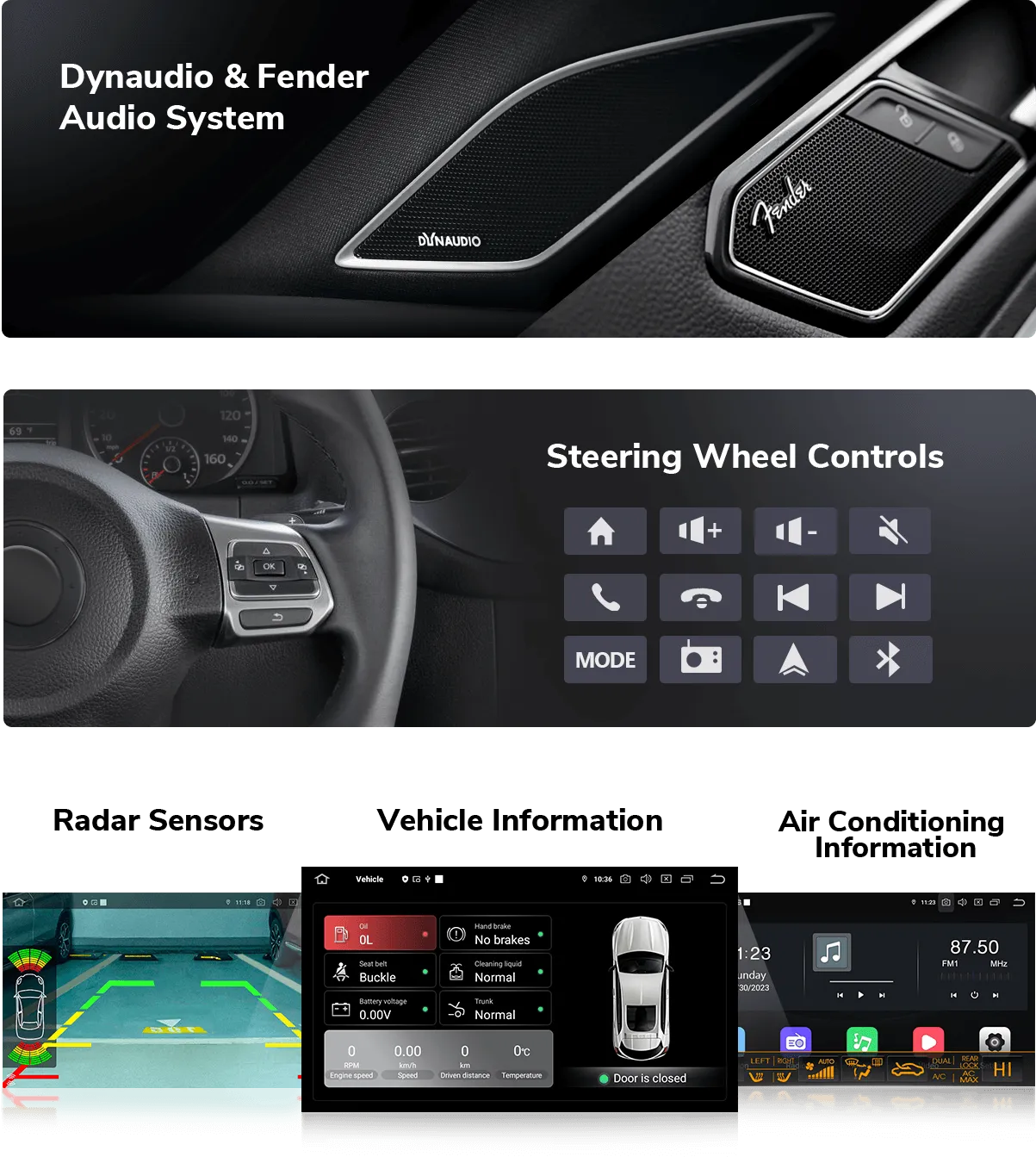
Điều khiển trên vô lăng, hiển thị camera, thông tin xe và hỗ trợ âm thanh cao cấp phụ thuộc vào việc khớp đúng bộ dây và thiết lập CANBUS cho xe của bạn.
Bộ dây điện phù hợp giảm rủi ro lắp sai và giúp Android stereo giao tiếp với hệ thống xe sau khi lắp đặt.
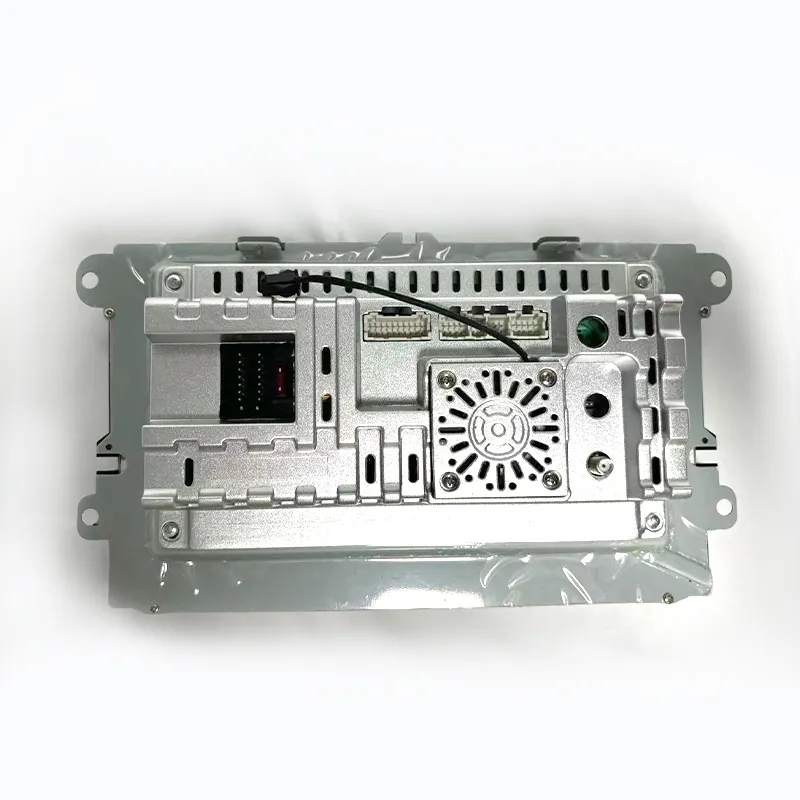
Mặt sau của thiết bị hiển thị khu vực đầu nối và thiết kế vỏ, giúp thợ lắp đặt lên kế hoạch kết nối nguồn, ăng-ten, USB, camera và âm thanh trước khi lắp lại bảng điều khiển.
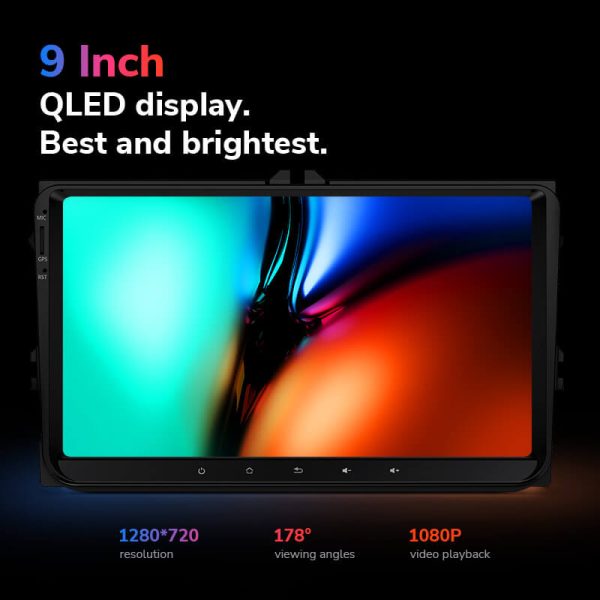
Màn hình rõ nét cải thiện điều hướng hàng ngày, điều khiển nhạc và khả năng quan sát camera lùi so với màn hình radio gốc cũ.
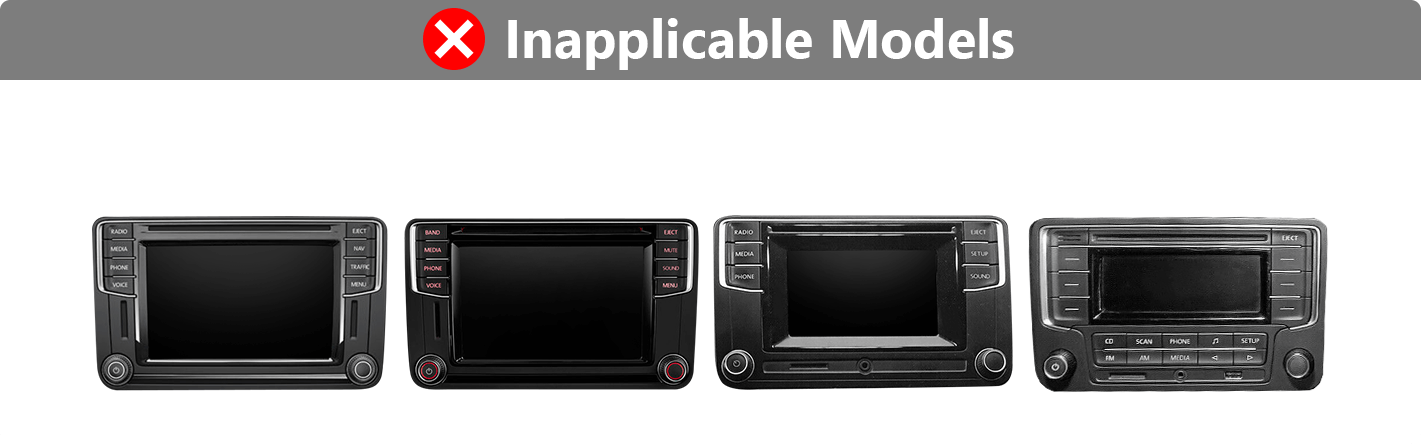
Nếu hình dạng radio nguyên bản của bạn nằm trong nhóm không phù hợp, bạn có thể cần một bộ lắp đặt khác hoặc phiên bản sản phẩm khác.
Trả lời nhanh
Android Head Unit Volkswagen này là một stereo Android thay thế cho nhiều bảng điều khiển VW, SEAT và Skoda, bao gồm các mẫu phổ biến như Golf, Passat, Jetta, Polo, Tiguan và các mẫu liên quan. Nó nâng cấp trải nghiệm radio gốc với CarPlay không dây, Android Auto, định vị GPS, Bluetooth, truy cập ứng dụng và các tính năng DSP, 4G/5G và 360 tùy chọn tùy theo phiên bản DriveMaster đã chọn. Điều khiển vô lăng nguyên bản, chức năng camera, âm thanh cao cấp và thông tin xe có thể tiếp tục hoạt động khi bộ dây nối và giao diện CANBUS chính xác được chuẩn bị. Trước khi đặt hàng, hãy cung cấp mẫu xe, năm sản xuất, ảnh bảng điều khiển và cấu hình âm thanh/camera gốc để iKAGOO có thể khớp đúng phiên bản. Hãy chọn iKAGOO khi bạn muốn màn hình, bộ dây và giao diện được chuẩn bị phù hợp với xe của mình thay vì mua một Android radio thông thường một cách mù quáng.
Các lý do chính để mua hàng
CarPlay không dây và Android Auto đưa bản đồ, cuộc gọi, tin nhắn và nhạc từ điện thoại lên màn hình trung tâm mà không phụ thuộc vào giao diện radio nguyên bản cũ.
Sử dụng Google Maps, các ứng dụng định vị ngoại tuyến và ứng dụng Android trên màn hình cảm ứng lớn hơn để có bố trí lái xe hàng ngày hữu ích hơn.
Các phiên bản Lite, Pro, Ultra và Max cho phép bạn chọn mức sử dụng cơ bản, CPU/RAM mạnh hơn, âm thanh DSP, kết nối 4G/5G hoặc hỗ trợ camera 360.
Hỗ trợ các chức năng gốc của xe
Hỗ trợ chức năng xuất xưởng phụ thuộc vào cấu hình gốc và giao diện dây dẫn được chọn. iKAGOO chuẩn bị đơn hàng của bạn dựa trên thông tin xe bạn cung cấp.
Được giữ lại khi CANBUS và bộ dây kết nối đúng khớp với hệ thống xe nguyên bản của bạn.
Được hỗ trợ thông qua đầu vào camera và đường dây chính xác. Việc giữ lại camera xuất xưởng phụ thuộc vào hệ thống camera gốc.
Trong hầu hết các trường hợp, được hỗ trợ với giao diện chính xác. Hệ thống âm thanh cao cấp nên được xác nhận trước khi đặt hàng.
Giao tiếp CANBUS giúp giữ cho các điều khiển vô lăng, tình trạng xe và thông tin xe liên quan khả dụng sau khi lắp đặt.
Phương pháp lắp đặt được xây dựng dựa trên các đầu nối xuất xưởng và bộ dây phù hợp, tránh cắt dây chính không cần thiết.
Đầu vào camera lùi có sẵn trên tất cả các phiên bản; chế độ xem toàn cảnh 360 chỉ dành riêng cho phiên bản Max khi cấu hình xe được hỗ trợ.
Các hệ thống âm thanh nguyên bản của nhà máy, camera không theo tiêu chuẩn, các bản độ sau khi xuất xưởng trước đó hoặc các cấu hình khu vực không phổ biến có thể cần thêm hướng dẫn kết nối. Vui lòng cung cấp thông tin xe theo yêu cầu khi đặt hàng để iKAGOO có thể chuẩn bị phiên bản phù hợp.
Chuẩn bị cho iKAGOO
iKAGOO kiểm tra model, năm sản xuất, ảnh taplo và thông tin hệ thống gốc của bạn trước khi đề xuất phiên bản sản phẩm chính xác.
Đơn hàng của bạn được chuẩn bị dựa trên các yêu cầu về kiểu màn hình, dây nguồn, hộp CANBUS, đầu vào camera và giao diện âm thanh chính xác.
Các nút điều khiển trên vô lăng, hiển thị camera, amply và dữ liệu xe được xử lý thông qua đường dây và quy trình thiết lập chính xác nếu được hỗ trợ.
Mục tiêu là bảo toàn dây điện chính gốc và tránh việc lắp đặt gây hư hại khi xe sử dụng cấu hình taplo được hỗ trợ.
iKAGOO hỗ trợ kiểm tra kết nối, cài đặt cơ bản, lựa chọn CANBUS và kiểm tra chức năng sau khi lắp đặt.
Thiết bị của quý khách được bảo hành trong vòng 12 tháng, kèm theo dịch vụ hỗ trợ sau bán hàng để giải đáp các thắc mắc về sản phẩm và cấu hình sau khi giao hàng.
Chuẩn bị đơn hàng
Bạn cung cấp model, năm sản xuất, vị trí vô lăng, ảnh radio gốc và thông tin hệ thống gốc.
iKAGOO chuẩn bị bộ dây nguồn chính xác, bộ giải mã CANBUS, phụ kiện USB/GPS và hướng kết nối camera.
Chọn Lite, Pro, Ultra hoặc Max dựa trên yêu cầu RAM, bộ nhớ, DSP, mạng và camera 360.
Sau khi lắp đặt, hãy kiểm tra radio, âm thanh, điều khiển vô lăng, camera, CarPlay, Android Auto, GPS và dữ liệu xe trước khi lắp lại các tấm ốp.
Đánh giá mua sắm iKAGOO
Bản nâng cấp này có giá trị sử dụng hàng ngày cao nếu radio VW nguyên bản của bạn thiếu định vị hiện đại, tích hợp điện thoại không dây hoặc hỗ trợ ứng dụng hữu ích.
Xem tiêu chuẩnViệc thiết lập đúng bộ dây và CANBUS rất quan trọng để duy trì điều khiển vô lăng, âm thanh, camera và dữ liệu xe.
Xem tiêu chuẩnSản phẩm này được khuyến nghị dành cho những người có kinh nghiệm tự lắp đặt hoặc các kỹ thuật viên lắp đặt hệ thống âm thanh ô tô chuyên nghiệp, vì quá trình này yêu cầu tháo bảng điều khiển, đi dây và thiết lập hệ thống CANBUS.
Xem tiêu chuẩnPhương tiện truyền thông nổi bật
Sử dụng bản đồ, cuộc gọi và nhạc iPhone trên màn hình đầu.
Kết nối điện thoại Android để điều hướng, gọi điện và điều khiển ứng dụng.
Các phiên bản Pro, Ultra và Max bổ sung hỗ trợ DSP để điều chỉnh âm thanh tốt hơn.
Các phiên bản được chọn hỗ trợ dữ liệu di động cho điều hướng trực tuyến và ứng dụng.
Kết nối điện thoại và thiết bị âm thanh để gọi điện và phát đa phương tiện.
Sử dụng radio FM hoặc FM/AM tùy theo phiên bản DriveMaster được chọn.
Thêm hoặc giữ hiển thị camera lùi thông qua kết nối camera chính xác.
Dòng DriveMaster được liệt kê với hỗ trợ hệ thống Android 13.
So sánh khi mua hàng
Thông số kỹ thuật
Chọn phiên bản dựa trên nhu cầu về hiệu năng, dung lượng lưu trữ, âm thanh và camera của bạn.
Lựa chọn phiên bản
Chọn sản phẩm này để có điều hướng cơ bản, nhạc, Bluetooth và chiếu điện thoại khi ngân sách là ưu tiên chính.
Chọn sản phẩm này để có hiệu năng hàng ngày mạnh mẽ hơn, âm thanh DSP và hỗ trợ 4G mà không cần chuyển lên các phiên bản cao cấp hơn.
Chọn sản phẩm này để có khả năng đa nhiệm tốt hơn, nhiều RAM/bộ nhớ hơn, DSP, hỗ trợ mạng và trải nghiệm Android hàng ngày thoải mái hơn.
Chọn sản phẩm này nếu bạn cần cấu hình cao nhất, khả năng mở rộng mạnh mẽ hơn và tích hợp camera 360 được hỗ trợ.
Độ phù hợp với xe
Sản phẩm này dành cho nhiều bảng điều khiển nền tảng VW. Xác nhận hình dạng radio nguyên bản, năm sản xuất và thiết lập âm thanh/camera trước khi đặt hàng.
So sánh hình dạng radio nguyên bản của bạn trước khi đặt hàng. Kiểu bảng điều khiển đúng giúp iKAGOO chuẩn bị đúng phiên bản.
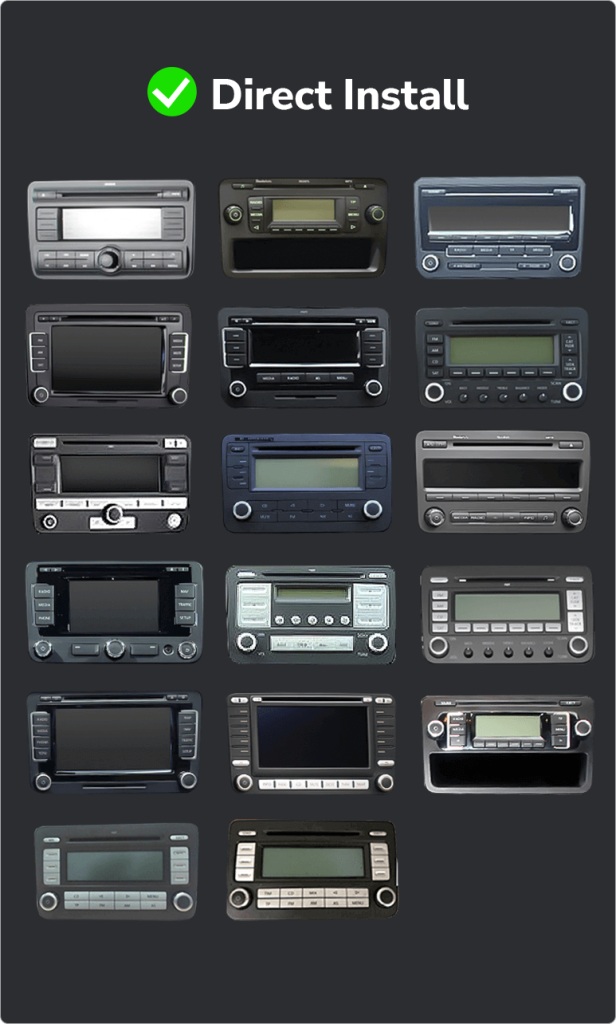
Nếu bảng điều khiển của bạn khớp với các hình dạng này, đừng đặt hàng một cách mù quáng. Bạn có thể cần một bộ kit khác hoặc một định dạng stereo khác.
Dây điện, giao diện và phụ kiện
Kết nối đầu đơn vị với hệ thống nguồn và loa của xe thông qua đường dây điện đã chuẩn bị.
Giúp giữ lại điều khiển trên vô lăng, dữ liệu xe và tương tác nguyên bản ở những nơi cấu hình xe hỗ trợ.
Hỗ trợ thu tín hiệu điều hướng và truy cập USB để kết nối điện thoại, phương tiện, phụ kiện và cập nhật.
Hỗ trợ đầu vào camera lùi, cần kiểm tra thêm đối với hệ thống camera nguyên bản và các bộ camera 360.
Được bao gồm hoặc sử dụng trên các phiên bản được chọn hỗ trợ kết nối mạng di động.
Hành vi của DSP, amply và đầu ra âm thanh phụ thuộc vào phiên bản được chọn và hệ thống âm thanh nguyên bản của nhà máy.
Hướng dẫn cài đặt
Đây là Cấp độ 3 — Lắp đặt DIY nâng cao. Người dùng DIY có kinh nghiệm có thể tự lắp đặt, nhưng nên thuê thợ lắp đặt âm thanh ô tô chuyên nghiệp nếu bạn không thoải mái khi tháo ốp và kiểm tra dây điện.
Hỗ trợ sau khi mua hàng
Đơn hàng của quý khách sẽ được gửi kèm mã theo dõi. Thời gian giao hàng tùy thuộc vào địa điểm nhận hàng và phương thức vận chuyển đã chọn.
Các lỗi phần cứng được bảo hành trong vòng 12 tháng theo các điều khoản bảo hành của iKAGOO.
Chúng tôi cung cấp hỗ trợ về kiểm tra kết nối, thiết lập CANBUS, kiểm tra chức năng cơ bản và các thắc mắc liên quan đến cấu hình.
Câu hỏi thường gặp
Trong hầu hết các trường hợp, có, nếu năm sản xuất và hình dạng radio nguyên bản của bạn khớp với danh sách bảng táp-lô nền tảng VW được hỗ trợ. Hãy gửi ảnh bảng táp-lô của bạn trước khi đặt hàng để iKAGOO có thể xác nhận phiên bản chính xác.
Đúng vậy, các phiên bản DriveMaster được liệt kê cho sản phẩm này đều hỗ trợ CarPlay và Android Auto cả qua kết nối có dây lẫn không dây.
Đúng vậy, các nút điều khiển trên vô-lăng sẽ vẫn được giữ nguyên nếu bộ dây cáp và bộ giải mã CANBUS phù hợp với cấu hình ban đầu của xe.
Điều này còn tùy thuộc, vì hệ thống camera nguyên bản có sự khác biệt tùy theo mẫu xe, năm sản xuất và loại hệ thống dây điện. Vui lòng cung cấp thông tin về camera nguyên bản của xe khi đặt hàng.
Trong hầu hết các trường hợp, đúng vậy, nhưng đối với các hệ thống âm thanh cao cấp, cần phải có giao diện âm thanh phù hợp và xác nhận hệ thống dây dẫn trước khi giao hàng.
Không, phương pháp lắp đặt dự kiến sử dụng bộ dây điện phù hợp và đầu nối nguyên bản. Hãy dừng việc lắp đặt nếu thấy cần phải cắt bộ dây điện chính của xe.
Còn tùy. Lite dành cho nhu cầu cơ bản, Pro bổ sung hiệu năng hàng ngày tốt hơn và DSP, Ultra phù hợp hơn cho việc sử dụng Android nặng, và Max dành cho cấu hình cao nhất và nhu cầu camera 360 được hỗ trợ.
Đúng vậy, phiên bản Max là phiên bản được liệt kê là hỗ trợ đầy đủ tính năng 360. Tuy nhiên, khả năng duy trì tính năng 360 trên thực tế vẫn phụ thuộc vào hệ thống camera và hệ thống dây điện nguyên bản của xe.
Trong hầu hết các trường hợp, vui lòng cung cấp thông tin về mẫu xe, năm sản xuất, vị trí vô-lăng, ảnh bảng điều khiển, ảnh đầu đĩa nguyên bản, loại camera được lắp đặt sẵn và thông tin về hệ thống âm thanh nguyên bản.
Đúng vậy, điều này rất hợp lý khi bạn muốn thực hiện các bước chuẩn bị dành riêng cho từng loại xe. iKAGOO sẽ kiểm tra bảng điều khiển, hệ thống dây điện, CANBUS và đường dẫn duy trì chức năng trước khi đề xuất phiên bản phù hợp.
Sẵn sàng nâng cấp
Chọn phiên bản DriveMaster của bạn, xác nhận kiểu bảng táp-lô và gửi thông tin xe cần thiết để iKAGOO có thể chuẩn bị màn hình, dây điện và giao diện phù hợp cho VW, SEAT hoặc Skoda của bạn.


Thông tin rõ ràng về khả năng tương thích xe, chuẩn bị đơn hàng, giao hàng quốc tế, bảo hành, trả hàng và hỗ trợ sau bán hàng.
Điện tử đặc thù cho xe yêu cầu đúng phiên bản, hệ thống dây điện và cấu hình. Quy trình của chúng tôi được thiết kế để giảm các vấn đề tương thích và lắp đặt có thể tránh được.
Thông tin về mẫu xe, năm sản xuất, hệ thống gốc và cấu hình liên quan có thể được xem xét trước khi mua để giảm rủi ro chọn sai phiên bản.
Trước khi giao hàng, đơn hàng được kiểm tra với thông tin xe đã xác nhận để chuẩn bị phiên bản, cấu hình và các thành phần cụ thể cho xe cần thiết.
Mục tiêu của chúng tôi là đảm bảo đơn hàng của bạn chính xác trước khi rời khỏi chúng tôi. Chúng tôi xác minh tính tương thích, chuẩn bị cấu hình chính xác và liên hệ với bạn chỉ khi có điều gì đó vẫn cần xác nhận.
Tóm tắt thực tế về các điều khoản chính áp dụng cho các đơn hàng iKAGOO dành riêng cho xe.
Hầu hết các đơn hàng iKAGOO được gửi từ kho hàng của chúng tôi tại Trung Quốc sau khi cấu hình sản phẩm và thông tin xe đã được kiểm tra.
Thời gian xử lý đơn hàng bình thường khoảng 1–3 ngày làm việc. Thời gian giao hàng dự kiến sau khi gửi hàng thường là:
Việc thông quan, ngày lễ, thời tiết, sự chậm trễ của hãng vận chuyển và giao hàng đến khu vực xa có thể ảnh hưởng đến các ước tính này.
Vận chuyển quốc tế tiêu chuẩn thường không bao gồm VAT của nước đến, thuế nhập khẩu, phí môi giới hoặc phí thông quan.
Đối với các điểm đến đủ điều kiện trong Liên minh Châu Âu, Vận chuyển DDP có thể khả dụng. Các khoản phí liên quan đến nhập khẩu chỉ được bao gồm khi DDP được chọn tại bước thanh toán hoặc được iKAGOO xác nhận bằng văn bản trước khi gửi hàng.
Khi DDP không được chọn, các khoản phí do hải quan địa phương hoặc đơn vị vận chuyển thu thường là trách nhiệm của người nhận.
Vận chuyển nhanh hoặc giao nhanh có thể khả dụng cho các sản phẩm và điểm đến được chọn. Tình trạng sẵn có, đơn vị vận chuyển và mọi chi phí bổ sung được xác nhận trước khi gửi hàng.
Tùy thuộc vào tuyến đường và loại sản phẩm, iKAGOO có thể sử dụng DHL, FedEx, UPS, EMS, 4PX hoặc một nhà cung cấp dịch vụ logistics có theo dõi khác.
Sau khi gửi hàng, mã theo dõi hoặc liên kết theo dõi thường được gửi đến địa chỉ email được sử dụng cho đơn hàng. Các cập nhật theo dõi có thể mất vài ngày làm việc để xuất hiện trong quá trình chuyển giao giữa các đơn vị vận chuyển quốc tế.
Khả năng được trả hàng phụ thuộc vào lý do trả hàng, tình trạng sản phẩm, trạng thái lắp đặt, bằng chứng hỗ trợ và liệu việc trả hàng đã được iKAGOO phê duyệt hay chưa.
Đối với trường hợp trả hàng không do lỗi được phê duyệt, sản phẩm thường phải còn chưa sử dụng, chưa lắp đặt, đầy đủ và có thể bán lại. Khách hàng thường chịu phí vận chuyển trả hàng đã được phê duyệt.
Phí vận chuyển gốc, DDP, VAT, thuế hải quan và các chi phí logistics khác thường không được hoàn lại trừ khi pháp luật yêu cầu hoặc được iKAGOO xác nhận khác.
Không gửi trả sản phẩm trước khi nhận được địa chỉ trả hàng đã được phê duyệt và hướng dẫn trả hàng từ iKAGOO.
Có thể có thêm biện pháp bảo vệ khi iKAGOO đã xem xét tính tương thích của xe, khách hàng cung cấp thông tin xe chính xác và đã hoàn thành các bước lắp đặt và chẩn đoán hợp lý.
Nếu iKAGOO xác nhận rằng không có giải pháp kỹ thuật hợp lý nào và sự cố được báo cáo trong vòng 7 ngày kể từ ngày giao hàng, khách hàng có thể đủ điều kiện được hoàn lại giá sản phẩm mà không cần phải trả lại sản phẩm.
Phí vận chuyển ban đầu, DDP, VAT, thuế hải quan và các khoản phí của bên thứ ba khác không được bao gồm trong khoản hoàn lại giá sản phẩm này.
Các sản phẩm đủ điều kiện bao gồm một Bảo hành phần cứng có thời hạn 12 tháng bao gồm các lỗi sản xuất đã được xác minh và các hư hỏng phần cứng đủ điều kiện trong điều kiện sử dụng bình thường.
Tùy thuộc vào vấn đề đã được xác minh, hỗ trợ có thể bao gồm chẩn đoán từ xa, trợ giúp cấu hình, phụ tùng thay thế, sửa chữa, thay thế, hoàn tiền một phần hoặc hoàn tiền toàn bộ.
Việc kiểm tra hoặc kiểm định bởi bên thứ ba không tự động hủy bỏ toàn bộ bảo hành. Tuy nhiên, hư hỏng do sửa chữa trái phép, thay đổi sai quy cách, đứt mạch, lắp ráp không đúng cách, đấu dây sai, va đập, nước xâm nhập hoặc sử dụng sai mục đích thường không được bảo hành.
Liên hệ iKAGOO trước khi tháo rời, sửa đổi hoặc sửa chữa sản phẩm để có thể cung cấp quy trình chẩn đoán chính xác.
Liên hệ với iKAGOO trong vòng 7 ngày kể từ ngày giao hàng và giữ nguyên bao bì gốc, nhãn vận chuyển, phụ kiện và sản phẩm.
Vui lòng cung cấp các bức ảnh hoặc video rõ nét thể hiện:
Sau khi xác minh, iKAGOO có thể sắp xếp gửi bổ sung phần còn thiếu, thay thế, sửa chữa, hoàn tiền hoặc một giải pháp hợp lý khác.
Hãy liên hệ với iKAGOO càng sớm càng tốt và trước khi lắp đặt. Để thay đổi địa chỉ, cấu hình xe hoặc sản phẩm, vui lòng liên hệ với chúng tôi trong thời gian tốt nhất là trong vòng 12 giờ sau khi đặt hàng.
Việc đổi hoặc trả hàng có thể được chấp thuận khi sản phẩm chọn sai vẫn chưa qua sử dụng, chưa lắp đặt, còn nguyên vẹn và phù hợp để bán lại. Khách hàng thường chịu trách nhiệm về chi phí vận chuyển liên quan và chênh lệch giá.
Các sản phẩm dành riêng cho xe có thể bắt đầu quá trình mua sắm, lập trình, kiểm tra hoặc cấu hình ngay sau khi thanh toán. Khi việc chuẩn bị hoặc vận chuyển đã bắt đầu, việc hủy đơn có thể không còn khả thi, hoặc các chi phí hợp lý đã phát sinh có thể bị khấu trừ.
Nội dung gói sản phẩm thay đổi tùy theo sản phẩm, mẫu xe, hệ thống nguyên bản và cấu hình đã chọn.
Tùy thuộc vào sản phẩm, gói sản phẩm có thể bao gồm thiết bị chính dây điện chuyên dụng cho xe, giao diện CANBUS, bộ chuyển đổi, cáp USB, ăng-ten, micro, phần cứng lắp đặt hoặc các phụ kiện lắp đặt cần thiết khác.
Vui lòng tham khảo hình ảnh sản phẩm, thông số kỹ thuật và xác nhận đơn hàng để biết nội dung chính xác của đơn hàng.
Bạn có thể liên hệ với iKAGOO qua biểu mẫu liên hệ trên trang web, WhatsApp hoặc các kênh hỗ trợ khả dụng khác. Thời gian phản hồi thông thường là trong vòng 24 giờ làm việc.
Để chẩn đoán kỹ thuật nhanh hơn, hãy cung cấp số đơn hàng, mẫu xe và năm sản xuất, hình ảnh hệ thống nguyên bản liên quan, hình ảnh sản phẩm và video rõ ràng cho thấy sự cố.
Thanh toán được xử lý thông qua các phương thức thanh toán an toàn hiển thị khi thanh toán.
Các tùy chọn thẻ, ví và trả góp hiện có có thể thay đổi tùy theo quốc gia, loại tiền tệ, nhà cung cấp thanh toán và điều kiện của khách hàng.
Các dịch vụ trả góp, bao gồm các tùy chọn do PayPal hoặc nhà cung cấp thanh toán khác cung cấp, vẫn phụ thuộc vào tính khả dụng theo khu vực và các yêu cầu phê duyệt của nhà cung cấp đó.
Phần này là hướng dẫn khách hàng đơn giản hóa. Các trang chính sách được công bố đầy đủ, xác nhận đơn hàng và luật bảo vệ người tiêu dùng hiện hành sẽ được ưu tiên nếu có bất kỳ sự khác biệt nào về từ ngữ.
Bảng đồng hồ kỹ thuật số Volkswagen VW T6 dành cho các mẫu Transporter, Multivan và Caravelle đời 2015-2019, với...
Từ: $295.00
Phí vận chuyển cuối cùng được xác nhận dựa trên địa chỉ giao hàng của bạn tại bước thanh toán.

Chọn sản phẩm bạn định mua. Chúng tôi chỉ hiển thị các thông tin cần thiết cho sản phẩm đó.
Chúng tôi sẽ xem xét các chi tiết và gửi phiên bản sản phẩm được đề xuất đến email của quý khách.
Chúng tôi sử dụng cookie thiết yếu để giữ cho trang web an toàn và hoạt động bình thường. Với sự đồng ý của bạn, chúng tôi cũng có thể sử dụng cookie phân tích để cải thiện trải nghiệm duyệt web. Xem Chính sách bảo mật.




John Doe –
Tôi mới lắp đặt dàn âm thanh Android Ikagoo vào chiếc VW Golf 2012 của mình, và sự cải thiện thật đáng kinh ngạc. Việc lắp đặt diễn ra đơn giản, và thiết bị vừa khít vào bảng táp-lô. Màn hình QLED 10.33″ sống động và nhạy bén, và các tính năng CarPlay không dây cùng Android Auto hoạt động hoàn hảo. Tôi cũng đánh giá cao DSP tích hợp giúp nâng cao chất lượng âm thanh. Nhìn chung, đây là một nâng cấp đáng kể giúp tăng cường cả chức năng lẫn tính thẩm mỹ cho xe của tôi.
Jiménez Andrés –
Tôi đã lắp đặt thiết bị Android này trên chiếc Volkswagen của mình và rất hài lòng. Màn hình rõ nét và sự tích hợp với bảng táp-lô nguyên bản thật hoàn hảo. Điều hướng GPS và khả năng tương thích với CarPlay không dây giúp việc lái xe an toàn và thú vị hơn. Việc lắp đặt đơn giản và giao diện trực quan.