
















Audi A4 B8 Digital Instrument Cluster 01 Upgrade Guide 2009–2012
Audi A4 B8 Digital Instrument Cluster (2009–2012), 12.3" LCD is a full LCD retrofit that replaces the original analog gauges with a wide digital panel. This article explains what changes in daily driving, which models it fits, how it integrates with steering-wheel controls and wipers, and what you should check before upgrading.
This guide is written for owners who want a long-term upgrade, not a quick cosmetic mod. For current pricing and detailed specifications, see the product page: Audi A4 B8 Digital Instrument Cluster 2009–2012 .
The Part of the Car You Actually Look At
The exterior of a car is for other people; the cockpit is for you. In an Audi A4 B8, the part you read most is not the trim or the ambient lights – it is the instrument cluster. If the center screen has already been upgraded but the cluster is still a pair of old mechanical dials, the whole interior never quite feels modern.
For a car that once carried a large share of Audi’s sales, the A4 B8 looks surprisingly conservative in one key area: the instrument cluster. There is no factory "Virtual Cockpit", and most trims never received the fully digital display that is now close to standard on newer models. You still get traditional analog dials and a small central screen, even though the rest of the market has moved towards full LCD clusters.
Audi’s answer in later generations is the fully digital instrument panel commonly known as the Buồng lái ảo. Instead of separate gauges and small LCD windows, it uses a 12.3" display to bring together speed, revs, navigation and driving data directly in front of you. In recent models, Audi officially describes the virtual cockpit plus as a customizable digital instrument cluster that puts key information in the driver’s field of view on a 12.3" HD display, with different viewing modes for performance and everyday driving ( see Audi RS Q8 overview ). The idea is not just to look modern, but to concentrate important information in one place so you glance less, think less and drive with a clearer picture of what the car is doing.
From Mechanical Needles to a Full LCD Cluster
A digital instrument cluster replaces the old mechanical gauges with a single LCD panel that shows speed, revs and driving data electronically. Physical needles disappear; everything is drawn on the screen. The benefit is not just a "techy" look. A full LCD cluster can combine more information in one place, offer clearer layouts for night driving and create a cockpit that feels closer to current Audi models in terms of interaction and perceived technology.
If you are comparing this retrofit with similar upgrades for other Audi models, you can review the broader Audi Digital Instrument Cluster range to see how the A4 B8 solution sits within the overall line-up.
Why a Digital Cluster Is Better Than the Old Analog Dials
Compared with the original analog cluster in the Audi A4 B8, a full LCD Audi A4 B8 digital dash brings three very practical advantages. It does not make the car faster or add horsepower, but it changes how clearly you can read and control the information you already have.
- More information in the driver’s line of sight. A traditional needle cluster can only show basic speed and revs, with a small window for trip data. A digital instrument cluster can combine speed, RPM, fuel and temperature with extra data such as tyre pressure status, navigation prompts, door and trunk open warnings and driving mode information on the same screen, without adding more physical gauges.
- Better use of the steering-wheel buttons. Many A4 B8 cars already have multi-function buttons on the steering wheel, but with the old cluster their role is limited. Once you upgrade to a digital cluster, those buttons can be used more effectively to change layouts, scroll through on-screen menus, adjust audio volume or switch information pages without taking your hands off the wheel.
- A cleaner, more modern look with sharper graphics. This is the most visible change. A full LCD cluster simply looks more current than aging mechanical dials. Fonts are sharper, colours are controlled instead of being fixed by printed faces, and night-time readability is noticeably better. For many owners, this visual upgrade and the stronger sense of a modern Audi cockpit is one of the main reasons to move to a digital dash in the first place.
If all you ever want is a basic speedometer and tachometer, the original analog cluster still does the job. But if you care about how much information you can see at a glance and how well the steering-wheel controls work with the display, the Audi A4 B8 digital instrument cluster is simply the more complete solution for an A4 B8 you plan to keep.
A Cleaner, More Modern Cockpit for the Audi A4 B8
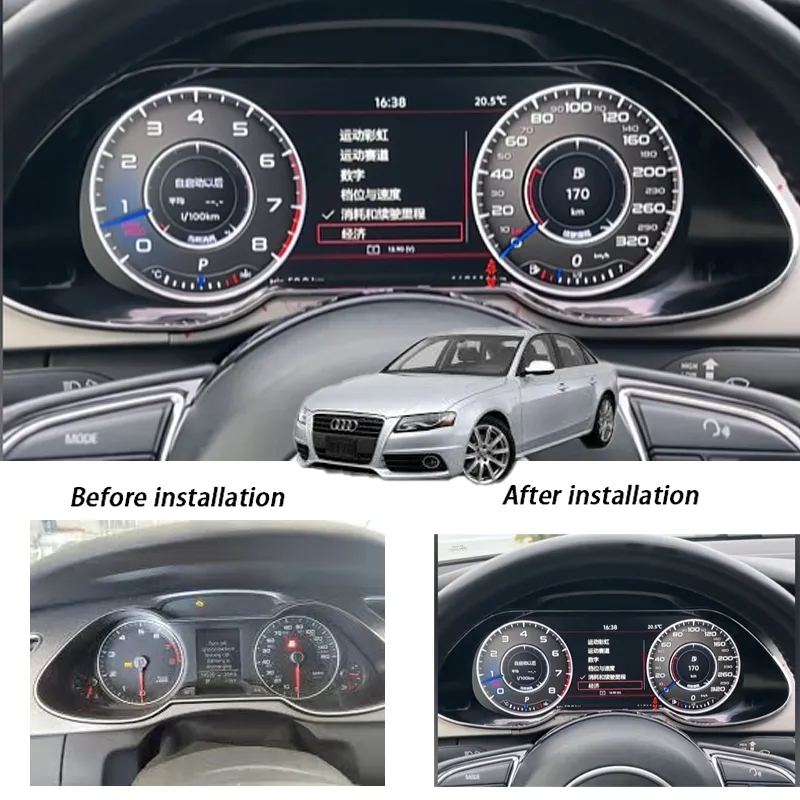
Many Audi A4 B8 owners like everything about the car except one thing: the instrument cluster still looks and behaves like a product from a different decade. The stock analog dials do their job, but once you have seen a virtual cockpit in newer models, the old cluster makes the interior feel dated. This 12.3" Audi A4 B8 digital instrument cluster retrofit is designed to close that gap for 2009–2012 cars.
Instead of a pair of mechanical gauges and a small central display, you get a full-width LCD panel with digital speed, rev counter, trip data and optional navigation views. It is not a universal cluster forced into your car; it is a dedicated solution for the B8 generation with mounting points, wiring and software matched to the platform.
Before and After: Audi A4 B8 Cluster
Compatible Models: Audi A4 B8 2009–2012
Điều này Audi A4 B8 instrument cluster upgrade is intended for left-hand-drive Audi A4 B8 models built between 2009 and 2012. In most markets, that includes:
- Audi A4 Sedan (B8, 2009–2012)
- Audi A4 Avant (B8, 2009–2012)
Right-hand-drive cars or vehicles with non-standard retrofits, accident repairs or heavily modified wiring may require additional checks. Before you assume it will fit, it is worth confirming:
- Model year as shown on the registration and VIN sticker
- Original cluster type and connector layout
- Any previous coding changes or aftermarket electronics behind the dashboard
The conservative approach is simple: collect clear photos of your original cluster powered on and the back side with connectors visible, and have them reviewed before you order a retrofit kit. Guessing is the fastest way to create unnecessary problems with immobiliser and warning lights.
Physical Frame vs. Remote Matching
In practice, the hardest limit for a digital cluster retrofit on the Audi A4 B8 is not the software, but the physical instrument frame and dashboard design. The opening in the dashboard, the mounting points and the trim shape decide which cluster housing can be installed cleanly without cutting or modifying the structure.
On the electronic side, the LCD cluster itself is far more flexible. As long as the car belongs to the correct platform and the wiring has not been heavily damaged or altered, the digital cluster can be remotely configured to match the vehicle’s engine type, transmission, fuel system and market-specific protocols. In many cases, technicians can adjust CAN-bus parameters and software profiles over a remote session rather than replacing hardware.
This means that, for a standard Audi A4 B8 2009–2012, the main question is whether the cluster housing fits the original instrument frame. Once that is confirmed, software matching and protocol fine-tuning can usually be handled by remote support, provided the car is not already suffering from previous wiring mistakes or unknown retrofits.
What You Actually Gain from the 12.3" LCD Panel
It is easy to say "12.3 inch LCD" and leave it there. In reality, the screen size only matters if the software and layout make good use of it. The goal of this Audi A4 B8 digital dash is not to flood you with information, but to present the essential data more clearly than the original dials.
- Larger, sharper speed readout for quick glances on the motorway.
- Digital rev counter with a clean, modern arc that is easier to read than small analog numbers.
- Trip and fuel data in a proper, readable font instead of squeezed characters in a narrow LCD window.
- Themed layouts so you can choose between a classic twin-dial look or a more minimalist digital view.
On compatible systems, the 12.3" LCD cluster can also display navigation information and turn-by-turn instructions taken from the car’s head unit, so you do not have to keep switching focus between the center screen and the cluster. That is a subtle change that you only appreciate fully after a few weeks of daily driving.
Daily Driving: Before and After the Upgrade
On paper, an Audi A4 dashboard upgrade looks like a cosmetic project. In use, you notice the difference most on days when you are not thinking about the car at all: commuting to work, moving through slow traffic or driving in heavy rain at night.
With the stock analog cluster, highway driving often becomes a game of "guess where the needle is now". At a glance, it is not always obvious whether you are at 120 or 130 km/h without staring a bit longer than you want. With the digital instrument cluster, you have a clear numeric speed readout plus a more legible scale. It is a small change, but it reduces the mental load when speed limits change frequently.
At night, the difference is even more pronounced. Backlighting on older dials can be uneven, and bright warning icons sometimes stand out more than the actual driving information. The 12.3" LCD cluster offers a more controlled brightness curve and a consistent visual style. The cockpit feels calmer and easier to read, not just "brighter".
Integration with Original Audi A4 Functions
A digital instrument cluster only makes sense if it plays along with the rest of the car. A proper Audi A4 B8 cluster upgrade should not feel like an aftermarket gadget strapped to the dashboard; it should behave like an OEM component from day one.
On a correctly configured installation, you can expect:
- Retention of basic warning lights (ABS, airbag, engine check, etc.).
- Display of turn indicators, high beam status and other standard icons.
- Compatibility with steering-wheel buttons for cycling through cluster menus, where applicable.
- Support for odometer display, trip meters and service interval reminders.
Some features will still depend on the exact specification of your car. If your A4 did not come with certain driver assistance systems from the factory, the digital cluster will not invent those sensors. The goal here is to modernise the display of information you already have, not to promise equipment that is not present in your vehicle.
Navigation and Map Views: What to Expect
One of the most common questions about any Audi A4 B8 digital cockpit is whether it can show maps inside the cluster, similar to factory virtual cockpit in newer models. The honest answer is that it depends on how your head unit delivers navigation data and what integration path is available.
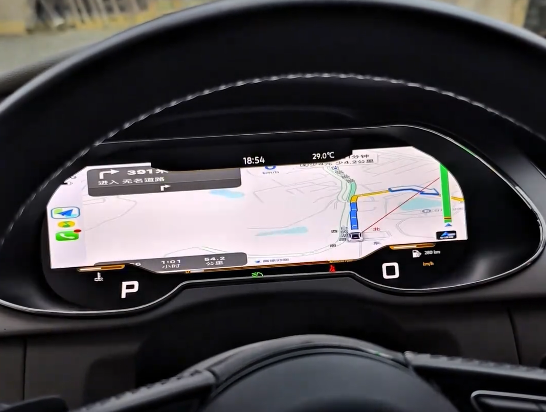
On some setups, the 12.3" LCD cluster can show simplified navigation information: arrows, distance to turn, street name and similar elements. On others, it may only show basic route prompts while the main map stays on the center screen. Full moving-map integration is not guaranteed on all B8 configurations and markets.
If map-in-cluster is a deciding factor for you, treat it as a compatibility question, not as an automatic feature. It is better to confirm what your specific car can support than to order based on screenshots from a different market or software version.
Real-World Navigation Display Example
The example below shows how the cluster renders navigation data when the head unit and vehicle configuration support it. It is not a promise for every A4 B8 globally, but a reference for what a successful integration can look like.
Technical Specifications: Audi A4 B8 Digital Instrument Cluster
This Audi A4 B8 digital instrument cluster is built on an automotive Linux platform rather than a generic tablet board. The goal is fast start-up, stable operation in real cabin temperatures and enough performance for fluid animations and multiple layouts.
- Operating system: Linux-based automotive firmware
- Processor: Quad-core SoC with a dedicated GPU for 2D/3D cluster graphics
- Memory & storage: 8 GB onboard flash for themes, layouts and OTA updates
- Boot time: Around 3 seconds from ACC ON to a usable gauge display
- Display size: 12.3" LCD panel for the Audi A4 B8; a 10.25" HD version is available for certain PQ-platform VW models
- Resolution: 1920 × 720 px (wide format for two main gauges plus a central information area)
- Operating temperature range: –35 °C to +80 °C (designed for real in-car environments rather than office use)
- Bluetooth: Bluetooth 4.2 for connectivity with supported devices
- Wi-Fi: 802.11 b/g/n for phone linking and over-the-air software updates
- Language support: 12 built-in UI languages for menus and basic prompts
These specifications do not turn the cluster into a full infotainment system, but they do mean the screen wakes up quickly, stays readable in heat and cold, and has enough performance to render smooth transitions instead of laggy gauge movements.
Startup Speed: Real 3-Second Boot Demo
The cluster is specified to boot in around three seconds, but the more important point is what you actually see when you turn the key. The video below shows a cold start from ACC ON to a usable gauge display on an Audi A4 B8.
Key Functional Highlights
Beyond replacing the analog dials, this Audi A4 B8 digital instrument cluster is designed to work with modern smartphones and Android head units, while still respecting the original car electronics.
- Wireless screen casting support. The system can work with wireless mirroring from compatible head units and devices, so supported apps can be displayed in dedicated layouts instead of only on the center screen.
- Apple CarPlay, Android Auto and Huawei HiCar integration. When paired with a compatible Android head unit or AI box, the cluster can receive video or HDMI signals from CarPlay, Android Auto or Huawei HiCar. On supported setups this allows simplified in-cluster views that match the connected phone ecosystem. Exact behaviour depends on the head unit and software configuration.
- Multiple UI layouts. Up to eight main UI themes are available on standard versions (Audi-style kits support up to nine layouts), including classic twin-dial, sport, minimalist and navigation-focused views. You can switch layouts to match day, night or long-trip preferences instead of being locked into one factory design.
- HDMI signal input. An HDMI input is available for external sources, allowing advanced integrations or custom display modes where the vehicle setup and local regulations permit it.
- Support for diesel, hybrid and manual-transmission models. Software profiles can be configured for overseas diesel engines, hybrid variants and manual gearboxes, so the rev band, gear indicators and status fields match the actual drivetrain instead of being hard-coded to one petrol automatic setup.
- Non-destructive, plug-and-play style installation. The retrofit harness is designed for no-cut, no-splice installation on compatible cars. The original Audi A4 B8 cluster mainboard is retained in the system, so the digital display works on top of the existing electronics instead of bypassing them. No engine ECU flashing is required, although basic coding or adaptation may still be needed on some cars.
- 100% retention of OEM information flow. Because the original mainboard stays in the loop, vehicle data such as warning lights, mileage, door-open status and indicator signals continue to follow the factory logic. The digital cluster is effectively a new "face" for the same CAN-bus information, rather than a separate aftermarket computer guessing what the car is doing.
- Remote debugging and protocol capture. If unusual behaviour appears on a specific market or configuration, technicians can remotely capture CAN-bus protocols and refine the software. This matters more for diesel, hybrid and manual-transmission cars outside the original design market, where small differences in protocols are common.
- Smartphone-assisted OTA software updates. Software updates can be delivered over the air via a linked smartphone or Wi-Fi connection, so minor bugs and protocol improvements do not require removing the cluster once it is installed.
- Three-year hardware warranty. The digital instrument cluster is supplied with a three-year limited warranty under normal use, which is longer than most generic aftermarket electronics and reflects an expectation that the unit will stay in the car for the remaining life of the vehicle.
None of these features change the fact that this is still an Audi A4 B8 at its core. The point of the upgrade is to bring the information layer and day-to-day interaction closer to current Audi standards, while keeping the underlying vehicle electronics intact and serviceable.
Limits with Steering-Wheel Buttons and Wiper Controls
A digital instrument cluster cannot compensate for missing hardware or non-original control modules. Before you expect every button and stalk to behave like a factory virtual cockpit, it is important to understand the limits of your Audi A4 B8.
If your car does not have an original Audi multi-function steering wheel, or if the steering wheel and control module have been changed to a different protocol, the cluster will not magically unlock functions that are not supported by the car. In those cases, some buttons may do nothing, or only basic functions such as volume and track skip will be available.
The same applies to the wiper stalk and related controls. The digital instrument cluster can display status information that the car already sends on the CAN bus, but it does not replace the physical stalk or add new wiper modes. If the original wiring or control module has been modified, the display may not show all wiper information, even though the wipers themselves still operate mechanically.
Before installation, it is worth checking:
- Whether the car still uses the original Audi multi-function steering wheel and factory steering-wheel control module
- Whether any aftermarket steering wheel, paddle or control unit has been installed with a different protocol
- Whether the wiper stalk and its wiring are unchanged and follow the standard A4 B8 configuration
If your A4 B8 has a non-original steering wheel or non-standard control modules, treat full button integration as a bonus, not as a guaranteed feature. The priority of this retrofit is to upgrade the display of driving information; it cannot repair, extend or normalise every custom wiring change that has been made to the car over the years.
How to Check Steering-Wheel and Wiper Control Compatibility
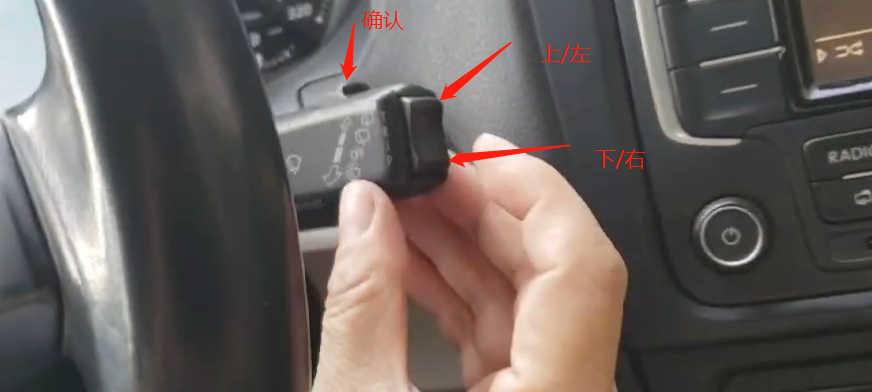
Use the steps below to quickly check whether your steering-wheel buttons and wiper controls are in a good condition for a digital cluster upgrade. The examples are based on a typical Audi A4 B8, but your wiring may differ if the car has been heavily modified.
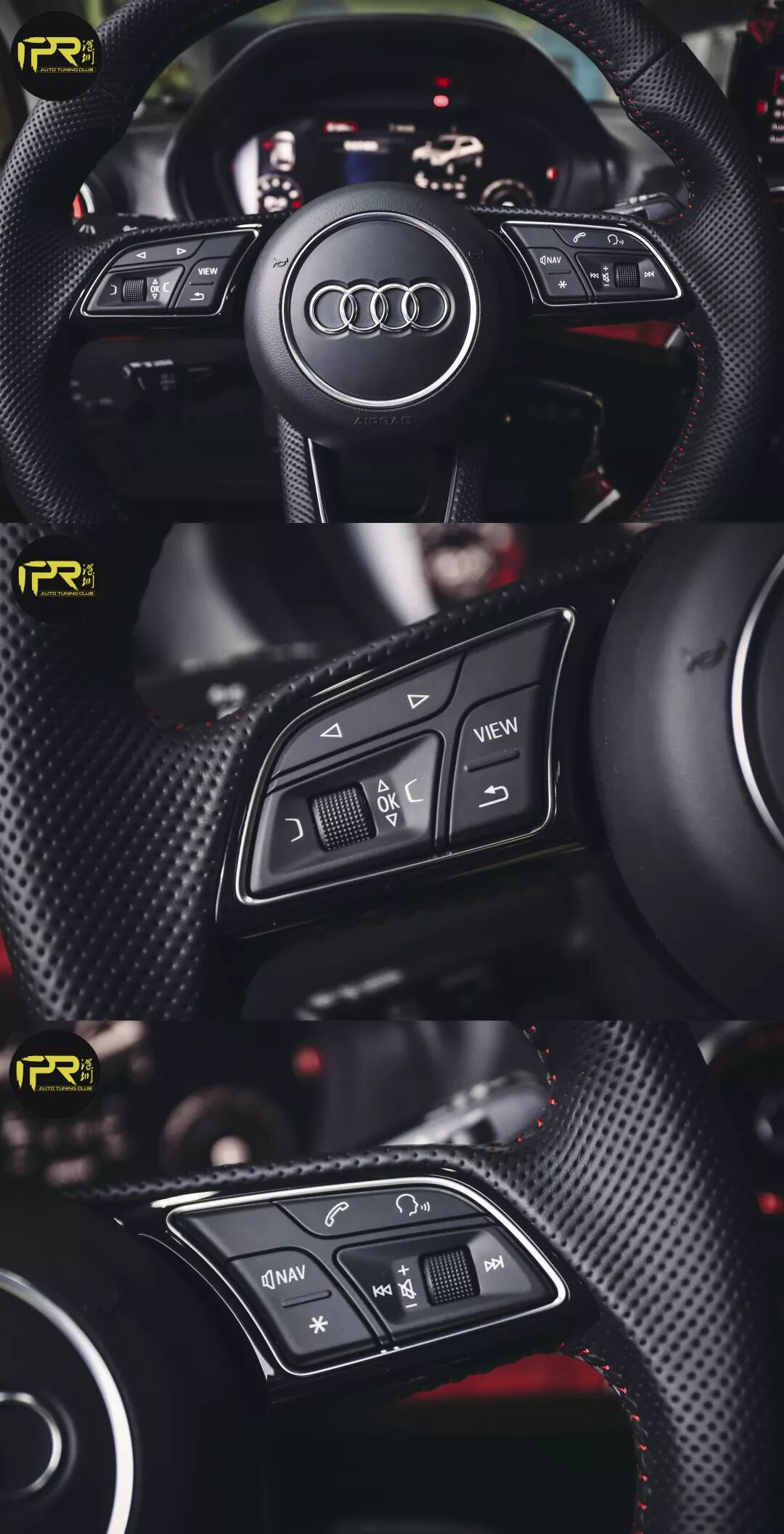
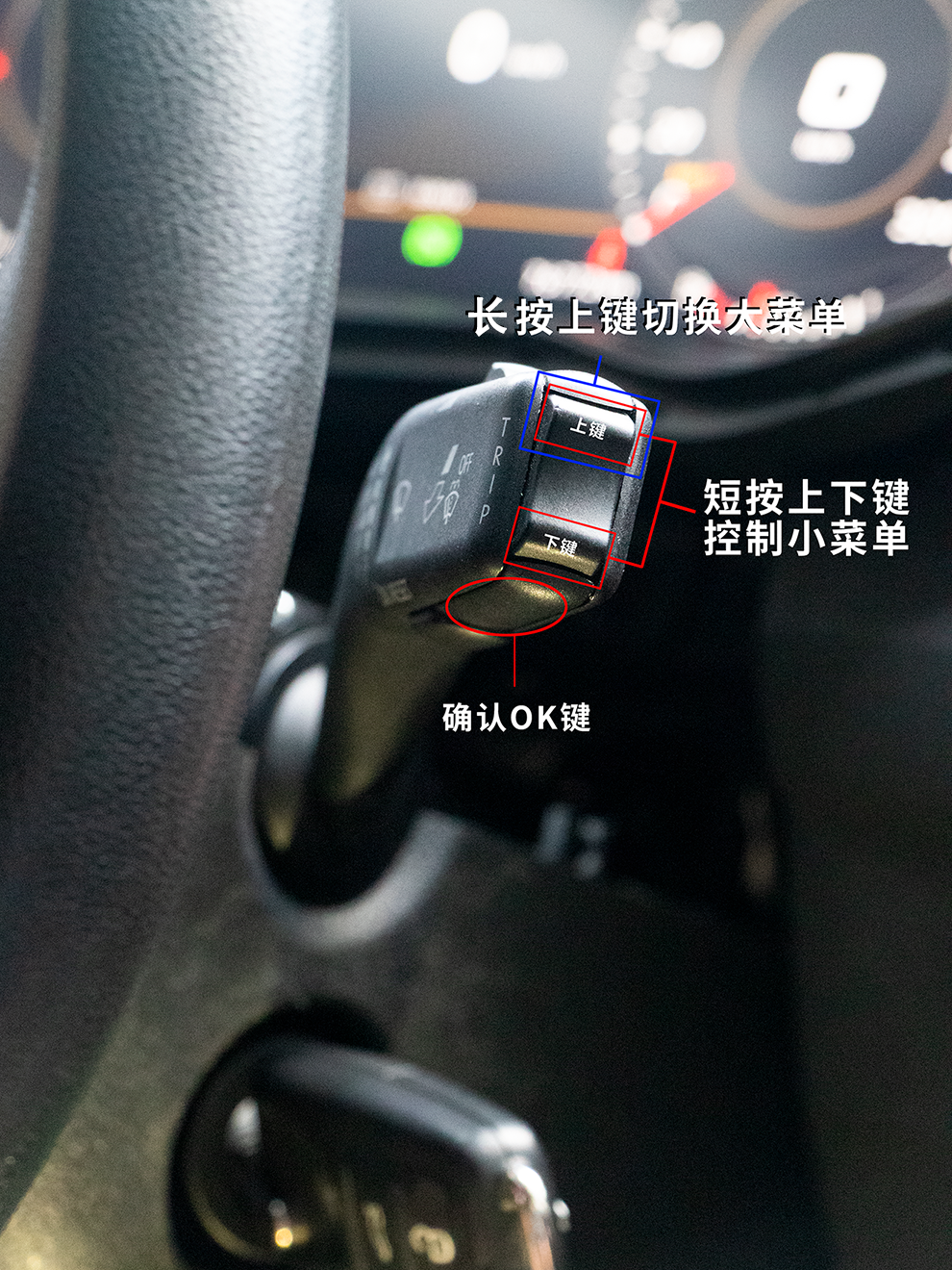
Step 2 – Steering-wheel buttons and protocol. If your steering wheel has been replaced, or some buttons already show “no function” on the factory cluster, do not expect the digital instrument cluster to repair the protocol. In this situation, some keys may still do nothing after the upgrade, or only support basic actions such as volume and track change.
Step 3 – Wiper stalk and related wiring. The digital instrument cluster can only display the wiper status that the car sends over the CAN bus; it does not change the physical stalk or add new wiper modes. If the wiper stalk or its wiring has been modified or replaced with a non-OEM solution, the wiper itself may work, but the cluster may not be able to show all wiper information correctly.
Installation Overview: What Needs to Be Done
Physically, the swap from an analog cluster to a digital instrument cluster on the Audi A4 B8 is straightforward in concept but unforgiving in details. You are dealing with the immobiliser network, security-sensitive modules and components that are clearly visible to the driver every day.
A typical retrofit process includes:
- Removing trim pieces around the steering column and original cluster
- Disconnecting the battery before unplugging any connectors
- Removing the factory cluster and installing the 12.3" LCD unit with the appropriate mounting points
- Connecting the wiring harness, adapters or additional modules required by the retrofit kit
- Performing coding and adaptation so the car recognises the new cluster correctly
Depending on local regulations and how Audi dealers in your region handle retrofits, immobiliser-related work and component adaptation may require specialist tools and knowledge. Generic "plug and play" promises should be treated with caution; a realistic plan assumes that at least basic coding and testing will be necessary.
Coding, Calibration and Dealer Visits
Any Audi A4 B8 instrument cluster upgrade naturally raises questions about odometer, component protection and dealer diagnostics. It is important to be realistic about this from the start.
- Odometer consistency. A responsible retrofit aims to keep mileage consistent with the vehicle’s actual history. Local laws on odometer handling vary, and you should only work with installers who respect those rules.
- Component adaptation. Some functions require coding and adaptation with professional-level tools. This is not the kind of work you want to do for the first time with a random phone app.
- Dealer diagnostics. After installation, basic diagnostics should still be possible with standard tools, but you should expect dealer staff to notice that the cluster is not the original unit.
If you rely heavily on official dealer servicing, it is worth discussing any planned cluster upgrade with your service provider before you proceed. An honest "yes, we can live with that" is better than discovering objections later.
Who Is This Upgrade Really For?
Not every Audi A4 owner needs a digital dash. If you drive the car occasionally, keep it mostly stock and do not care much about the interior looking current, the original cluster is still perfectly functional. This retrofit makes the most sense for owners who:
- Drive their A4 B8 daily on motorways or busy urban routes
- Care about clear, modern graphics and night-time readability
- Have already invested in a quality Android head unit or OEM-style navigation
- Plan to keep the car long enough to justify a serious interior upgrade
In other words, this is not a quick cosmetic mod. It is a change in how you interact with the car every time you drive it. If you treat the A4 as a long-term partner rather than a disposable tool, upgrading the instrument cluster starts to make sense.
Before You Buy: A Short Checklist
To avoid surprises, work through this list before you order any Audi A4 B8 digital instrument cluster retrofit kit:
- Confirm your car is indeed a B8 2009–2012 model (VIN and production year)
- Document your existing cluster with photos (front powered on, back with connectors)
- List any previous electrical modifications, retrofits or coding changes
- Decide who will handle installation and coding – yourself, a trusted workshop or a retrofit specialist
- Clarify in advance what level of map and navigation integration you expect inside the cluster
If any point feels uncertain, it is smarter to pause and ask than to "see what happens". A digital cluster upgrade is rewarding when done correctly and frustrating when rushed.
FAQ: Audi A4 B8 Digital Instrument Cluster 2009–2012
Will this 12.3" digital instrument cluster fit all Audi A4 B8 models?
It is designed for mainstream left-hand-drive Audi A4 B8 sedans and Avants from 2009 to 2012. Cars with unusual equipment, heavy electrical modifications or different market specifications may require additional checks. Always verify compatibility with photos and vehicle details before ordering.
Is the installation really "plug and play"?
Physically, the cluster bolts in place and uses matching connectors, but coding and adaptation are still required on most cars. Treat any retrofit that involves the instrument cluster as a project that needs proper tools and experience, not as a simple five-minute DIY swap.
Will my existing mileage be kept correctly?
The goal of a professional retrofit is to keep the mileage consistent with the vehicle’s history. Exact handling depends on local law and the tools used. You should only work with installers who understand and respect odometer regulations in your country.
Will dealer diagnostics still work after the upgrade?
In general, basic diagnostics should still be possible, but dealers will be able to see that the cluster is not the original part. How they react to retrofits varies by market and by workshop. If you rely heavily on the dealer for maintenance, it is better to discuss the upgrade with them before making changes.
Can this cluster show full-screen maps like newer virtual cockpits?
Some cars can display navigation guidance and map-related information inside the cluster; others are limited to basic prompts. Full moving-map views are not guaranteed on all B8 configurations. Treat navigation-in-cluster as a feature to be confirmed for your specific car, not as an automatic function.
Is this upgrade worth it if I only drive occasionally?
If you drive your Audi A4 B8 infrequently and are not concerned about interior modernisation, the stock cluster will continue to do its job. The digital instrument cluster upgrade makes the most sense for daily drivers who value clear information, night-time readability and a cockpit that feels closer to current Audi models.
If you are ready to move from the analog cluster to a 12.3" LCD cockpit, you can find detailed specifications and current availability here: Audi A4 B8 Digital Instrument Cluster 2009–2012 .


Add comment
Bạn phải đăng nhập để gửi bình luận.